Nicholas Bisciotti's Blog

Saturday, December 05, 2009

I Respectfully Disagree

As I was searching for some references for a risk management white paper that I am writing, I stumbled upon an old PowerPoint on the Web titled, "Risk Management and ROI: The IT Leadership Financial Conversation." It was created by Peter G. W. Keen of Delft University in Sepetember 2004. This PowerPoint was used to educate an IT Leadership community attending a CIO summit.

As I looked through the PowerPoint for some insight to use in my paper, I started finding statements such as:

"ROI from IT: There is none. There never will be." (Keen, 2004)
"ROMI not ROI: Return on Minimized Investment" (Keen, 2004)
"80% of IT costs are hidden below the surface - and a navigation threat" (Keen, 2004)


The more slides I viewed, the more I realized that I completely disagree with the intent of the message; essentially to encourage CIOs to view IT as a business liability which needs to be tightly controlled and driven primarily by its cost drivers.

I disagree because I think a better approach for CIOs to take is to understand the purpose of the technologies their teams are evaluating, understand the costs and benefits, and choose projects which support the objectives of the organization. Managing cost should be part of the decision making process, but it should not be the primary driver. When cost is measured, all aspects of cost should be included. And, the financial benefits of the project should also be measured and included.

The objective of Information Technology is to facilitate two very important capabilities for today's businesses:

1. Revenue generation
2. Business productivity (process efficiency)

Most leaders in the IT space generally understand the financial benefits of the IT projects they choose to pursue, but perhaps the IT industry as a whole generally does not place enough emphasis on methodologies and practices for measuring and translating these back to the financial statement. This would require more focus, analysis, calculation, and validation.

To be clear, I am not saying that all IT projects are sensible and they should be done blindly. However, what I am saying is that it is incorrect to characterize IT as a business function that shows no return on investment.

If you deploy a technology that allows people to attend meetings over the Web instead of traveling to another location, then your costs are those which are required to implement and maintain the technology while your savings are those which you do not spend to travel? Both sides of equation need to be considered, not just cost.

I also disagree with the claim that 80% of IT costs are hidden. I believe that if budgeting is done properly, most IT costs are completely visible and manageable. There are always some unforeseen costs with IT, but by learning from past experiences, it becomes possible to anticipate these variations.

In summary, I disagree with the PowerPoint. Information Technology can have a positive ROI, and costs can be manageable and predictable. I think the real problem is some organizations just don't know how to measure these things effectively.


References:
Keen, P. (2004). The IT Leadership Financial Conversation. Retrieved December 5, 2009 from www.peterkeen.com/presentations/IT%20Risk%20Management.ppt.

Friday, November 20, 2009

Windows Server 2008: Active Directory Protection From Accidental Deletion

Description:

When you create an Organizational Unit (OU) or security group in Active Directory, there is checkbox titled, "Protect container from accidental deletion." If you create the object with this check box marked, then you have to follow special steps if you would like to delete that OU in the future.

If you attempt to delete the object while it is protected, then you will receive the error, "Active Directory Domain Services. You do not have sufficient privileges to delete object, or this object is protected from accidental deletion."


Solution:

1. Open Active Directory Users and Computers.
2. Select the root domain, "company.domain.com."
3. From the menu bar, select "View" and "Advanced Features."
4. Navigate to the OU you would like to delete.
5. Right-click, properties.
6. Select the "Object" tab.
7. Uncheck the option, "Protect object from accidental deletion."
8. Now the object is no longer protected. You can proceed with deleting the object.

Thursday, November 19, 2009

SharePoint 3.0: Allowing SharePoint RSS Viewer Web Part to Read SharePoint RSS Feeds

Description:

SharePoint RSS Viewer Web Part does not display RSS feed from SharePoint list or library.

After configuring a SharePoint RSS Viewer Web Part to display an RSS feed from a SharePoint RSS list, you receive the error, "The RSS webpart does not support authenticated feeds."


Solution:

Configure anonymous access on the list which is serving the RSS feed.

1.
Enable anonymous access for the Web Application containing the list which is serving the RSS feed.
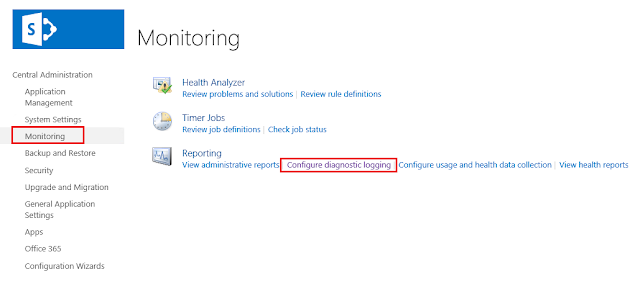
- Central Administration > Application Management > Application Security > Authentication Providers > Edit Authentication
-
Edit Authentication > Anonymous Access: Check "Enable anonymous access"
- Edit Authentication > Click "Save"

2.
Enable anonymous access for the site collection containing the list which is serving the RSS feed.
- Site Collection > Site Actions > Site Settings Site Collection Settings > Advanced Permissions
- Advanced Permissions > Settings > Anonymous Access
- Change Anonymous Access Settings > Anonymous Access: Select "Lists and Libraries"

3.
Enable anonymous access for the list which is serving the RSS feed.
- List > Settings > Permissions for this List > Settings > Anonymous Access
- Assign the "Read" or "View Only" permission level to the Anonymous User


References:

Holmes, T. (2008). Enabling Anonymous Access in SharePoint 2007. Retrieved November 19, 2009 from http://blog.tylerholmes.com/2008/01/enabling-anonymous-access-in-sharepoint.html.

Monday, October 26, 2009

Back from SharePoint Conference 2009

I have returned home from ten days in Las Vegas NV where I attended the Microsoft SharePoint Conference 2009 at Mandalay Bay. I cannot say that I am happy to be home, especially since I have to clean up after myself again. I love throwing wet towels on the floor and then going out for the day so that I can return to the hotel room at the end of the day and the towels are magically clean and put away.

There were many highlights of the conference. The cocktail reception, the keynote, the sessions, the Huey Lewis & the News concert, catching up with old friends and meeting new ones.

The bottom line is SharePoint 2010 delivers!! It is going to be an awesome, next three years working with this generation of products and technologies. Things are moving full steam ahead.

I especially enjoyed the governance planning session by my friends, Susan Hanley and Scott Jamison.

Friday's full day workshop on SharePoint Server 2010 Installation and Upgrade Training by Shane Young and Todd Klindt from SharePoint911 was fantastic and informative. It was more fun than hanging out at House of Blues Foundation Room until 3:00am...almost.

Most of all I love the fact that I won all of my gambling money back at the craps table after I checked out on Saturday morning, as I was killing some time before the cab ride to the airport. I hit three point numbers and several hard ways. Folks were happy to be winning and I received an applause for the good shooting.

Thursday, September 17, 2009

Links: CommonCraft: SharePoint in Plain English

I've seen this video posted on various blogs. I like it a lot. Its titled, "SharePoint in Plain English." It is by CommonCraft, http://www.commoncraft.com. Brilliant!


video


View Here:
http://www.commoncraft.com/custom-video-sharepoint-plain-english

Download Here:
http://download.microsoft.com/download/A/5/6/A56BB856-74F5-4A6B-887B-876BAE88116F/SharePoint%20in%20Plain%20English.zip

Sunday, August 30, 2009

Migrating Internet Explorer Favorites and RSS Feeds

With Windows 7 releasing soon, it will be time to think about migrating user profile settings to a new operating system build.

Aside from file folders, and desktop files, you may have a bit of time invested in the Internet Explorer favorites and feeds. Even if it only saves a couple minutes of searching in the end, I thought it would be worthwhile to post locations of these items on a source Vista build.

Favorites:
C: (Operating System) \Documents and Settings\UserProfileName\Favorites

RSS Feeds:
C: (Operating System) \Documents and Settings\UserProfileName\AppData\Local\Microsoft\Feeds

Friday, August 21, 2009

SharePoint 3.0: Clarifying Check Out Status on Multiple Document Upload

I found a post on TechArchive.net, "Re: disabling check out on document library upload," in which the author was observing that multiple document uploads were resulting in status of "checked out" after uploading. The author cited a post of mine, "SharePoint V3: Achieving Checked-In Status When Uploading Mulitple Documents," and explained that the post didn't solve the issue.

So, I am posting the two possible reasons why, after uploading multiple documents to a document library, the uploaded documents have the status of "checked out."


1. Require check out is configured on the library

I did a test, configuring six document libraries, and then performed a multiple document upload. Here are the results:

a.
Document library configurations resulting in "checked out" status when multiple documents are uploaded:

Require Check out + No Versioning
Require Check out + Major Versioning
Require Check out + Major and Minor Versioning

b.
Document library configurations resulting in "checked in" status when multiple documents are uploaded:

No Require Checkout + No Versioning
No Require Check out + Major Versioning
No Require Check out + Major and Minor Versioning


2. The document library is configured with a required field. When the document upload completes, the field is not populated and the status for each of the uploaded documents is set to "checked out."