Home

Tuesday, December 28, 2010

Windows Server: Enable Execution of PowerShell Scripts

This post describes the steps to enable execution of PowerShell scripts on the Windows Server operating system.

1. Click Start, All Programs, and click "Administrative Tools"

2. Right-Click Windows Powershell Modules, Select "Run as Administrator"

3. At the command prompt (PS C:\Windows\system32>), type the following:
Set-ExecutionPolicy RemoteSigned

4. The Execution Policy Change prompt will display. Respond with "Y":

Execution Policy Change
The execution policy helps protect you from scripts that you do not trust. Changing the execution policy might exposeyou to the security risks described in the about_Execution_Policies help topic.
Do you want to change the executionpolicy?
[Y] Yes [N] No [S] Suspend [?] Help (default is "Y"): Y

Monday, December 27, 2010

Windows Server 2008: MSInfo32 and Winver

System Information - To locate OS version, edition, and many details about hardware and software components.

Start > Run > Type "MSInfo32" and press Enter


About Windows - To locate OS version, edition, service pack level, and memory.

Start > Run > Type "Winver" and press Enter

Monday, December 13, 2010

Microsoft Word 2010: Hanging Indent

This post explains the steps to format a list with a hanging indent, using Microsoft Word 2010. In this example, I am starting out with a list of references which are indented to the left.


1. Highlight the text to be formatted.
2. On the Ribbon, next to the word "Paragraph" click the chevron to open the paragraph formatting window.
3. Beneath the Indentation heading, set the "Special" field to "Hanging" and set the "By" field to "0.5."
4. Click OK


5. At that point, the list should be reformatted with a hanging indent.

SharePoint 4.0: Locating or Verifying Farm Version Number

This post explains how to tell the version of a SharePoint 2010 server farm. In order to verify the complete farm, it is necessary to verify the version of DLLs as well as the Configuration Database.

A. Verify the version of DLLs.
Steps:
On each server where SharePoint 2010 is installed:
1. Open Windows Explorer.
2. Navigate to \Program Files\Common Files\Microsoft Shared\Web Server Extensions\14\ISAPI
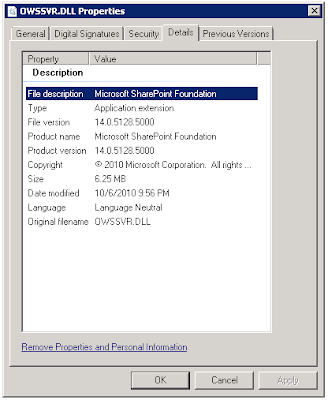
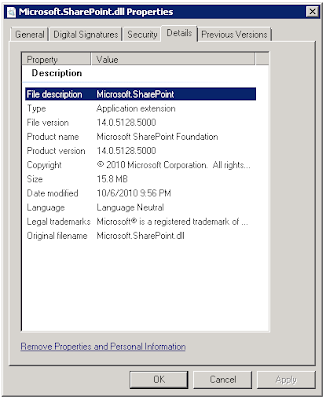
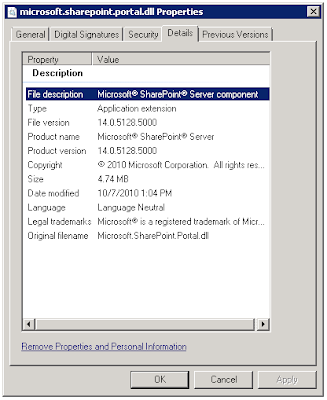
3. For each of the following DLLs, locate the file. Right-click the file > Properties > Details.
4. Note the version

OWSSVR.DLL (SharePoint Foundation)


Microsoft.SharePoint.dll (SharePoint Foundation)


Microsoft.SharePoint.Portal.dll (SharePoint Server)
B. Verify the version of the Configuration Database
Steps:
From SharePoint 2010 Central Administration:
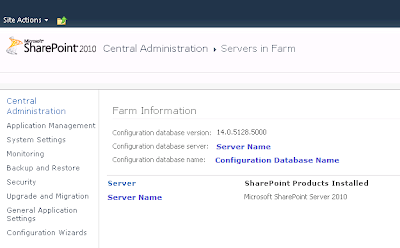
1. Navigate to SharePoint 2010 Central Administration > System Settings > Manage servers in this farm.
2. Note the "Configuration database version."

SharePoint 4.0: Records Center Behaviors? or Bugs!


I have been busy developing a proof-of-concept (POC) environment based on some design patterns involving SharePoint 2010 Records Center and Search. In this POC, Records Center is acting as a top level site collection and is storing quite a bit of content. There are numerous content types and site columns, carefully planned and configured on the site collection, to support tagging Records Center documents with lots of metadata.

In this POC environment, I have dedicated a Web application to Records Center and for discussion purposes, the URL of the site collection can be http://recordscenter.domain.com. As I write this blog post, it is December 13, 2010. My SharePoint 2010 environment is running at version 14.0.5128.5000, which reflects RTM with the October 2010 Cumulative Updates. The SharePoint Foundation and SharePoint Server DLLs, and SharePoint Database are all current with the same version. I have tested with Site Collection Publishing and Site Publishing features enabled and disabled.

During the testing process, I have discovered some unexpected behaviors related to Records Center. Microsoft Support may stamp these with the trusty "By Design" label, but since I am currently in the process of pushing these issues through the Microsoft Support channels, I cannot speak to their response at this time. I do know that these behaviors are inconvenient and troublesome. Below is a list.

A. Cannot template a sub-site beneath a Records Center site collection.
To recreate the issue, follow these steps:
1. Start from a Records Center site collection.
2. Create a sub-site using the blank site template.
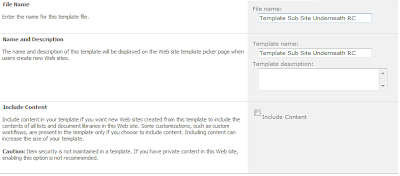
3. Attempt to save the site as a template.


Problem: Error: An unexpected error has occurred.


B. Cannot export a document library and then import it as a different name, in a Records Center site collection.
To recreate the issue, follow these steps:
1. Start from a Records Center site collection.
2. Create a sub-site using the blank site template.
3. Create a document library in the blank sub-site.
4. Using STSADM, export the document library to a .cmp file.
E.g.
C:\Program Files\Common Files\Microsoft Shared\Web Server Extensions\14\BIN>
stsadm.exe -o export -url
http://webapplication/subsite/library -filename \\server\fileshare\templatelibrary.cmp -includeusersecurity -nologfile

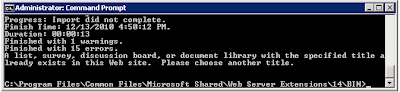
5. Using STSADM, import the document library .cmp file, as a different name.
E.g.
C:\Program Files\Common Files\Microsoft Shared\Web Server Extensions\14\BIN>
stsadm.exe -o export -url http://webapplication/subsite/library -filename file://server/fileshare/templatelibrary.cmp -includeusersecurity -nologfile
...
Finished with 15 errors.A list, survey, discussion board, or document library with the specified title already exists in this Web site. Please choose another title.

Problem: Error: The .cmp file cannot be imported because an existing document library having the same title (different than name, which affects the document library URL) already exists.
This behavior might make sense in a Records Center given the Content Organizer and its functionality which routes documents, based on content type, to appropriate document libraries using the Title of the document library. Still, templating document libraries in a Records Center is especially important, since Records Center typically have well defined site columns. It is only natural that we will want to template document libraries efficiently in a Records Center.

References
Microsoft SharePoint Team Blog (2010, December). October 2010 Cumulative Updates for SharePoint & Project Server 2010 Republished. Retrieved December 13, 2010 from http://sharepoint.microsoft.com/blog/Pages/BlogPost.aspx?pID=957.

Microsoft Support (2010, October). Description of the SharePoint Server 2010 Cumulative Update Server Hotfix Package (MOSS server-package): October 26, 2010. Retrieved December 13, 2010 from http://support.microsoft.com/default.aspx?scid=kb;EN-US;2394320.

Microsoft Support (2010, December). Hotfix Request. Retrieved December 13, 2010 from http://support.microsoft.com/hotfix/KBHotfix.aspx?kbln=en-us&kbnum=2394320.

Tuesday, December 07, 2010

SharePoint 4.0: Where to Locate Details for Errors with Correlation ID

The Correlation ID error seemed to be especially common in Beta versions of SharePoint Server 2010. However, I have managed to surface this one a few times in RTM. The screen print below illustrates what the error looks like on the Web page.

The error doesn't provide much information about the root cause. So, to uncover the details, it makes sense to investigate further by examining the log files. Here is how to do that:

1. Note the date and time of the error message.
2. Open a local console or RDP session to a SharePoint server in the farm.
3. From Windows Explorer, navigate to Program Files > Common Files > Microsoft Shared > Web Server Extensions > 14 > Logs.
4. Sort the log files by Date Modified, Descending. Then, open the file containing the event using a text editor, such as Notepad.
5. CTRL +F to locate instances of the word "Error." Then match the date/time stamp.

It isn't likely that this information will provide a direct answer, but at least you have more words to work with while researching.

Thursday, December 02, 2010

SQL Server 2008: Edit Top 200 Rows

SQL Server 2005 and earlier versions had an Open Table command available when you right-click a table. This allows you to open the table and make edits to fields. In SQL Server 2008, the Open Table command is replaced with the Edit Top Rows command. The default for this is 200, which of course, is obnoxious.

To change this setting, follow these steps from SQL Server Management Studio (SSMS):
  • Tools > Options (This opens the General Scripting Options Dialog Box)
  • SQL Server Object Explorer > Commands
  • Table and View Options: Value for Edit Top Rows command (Change this value)

After modifying the setting, you will see that the menu is updated accordingly.

Reference
Microsoft (2010). Options (SQL Server Object Explorer/Commands). Retrieved December 2, 2010 from http://msdn.microsoft.com/en-us/library/cc280381.aspx.

Monday, October 25, 2010

Focus More on Birdhouse Less on Hammer

Mauro Cardarelli recently plugged something I said, "focus more on the birdhouse and less on the hammer." If Mauro hadn't used that analogy with me a few times before, I probably would have used a different one like, "focus more on the crazy noodles and less on the fork."

The birdhouse analogy refers to the focus of conversations and presentations at SharePoint related conference sessions, meetings, and discussions.  My underlying criticism is that it seems that the community has become more focused on what the SharePoint platform can do and not focused enough on the business solutions that we are building with the platform.  I think the community stands to gain a lot if more emphasis was placed on what we are building with the platform, why, and how we measure value to the businesses receiving these solutions.

I understand that we do need to know the SharePoint product well in order to develop useful business solutions with it.  However, I think it is easy for us become consumed by the SharePoint platform; and its capabilities and limitations and lose sight of the fact that SharePoint is merely a vehicle that helps us get to a destination.  The business solutions are the true end game, not the platform and tools we use to build the solutions.  Some of the design patterns and methodologies we find to be effective may even be transferrable to other technologies. 

As workers, we in the SharePoint community are responsible for ensuring that the solutions we develop will provide the outcomes that the sponsors and stakeholders expect. I think that if we spend too much time trying to figure out the best ways to get "there," and too little time on establishing complete and clear visions of where "there" is, then we are missing the target.  As a community, I think we may miss valuable opportunities to share lessons learned and best practices for solving common business problems using the SharePoint platform. 

When we only focus only on the hammer, we miss the point.  Let's have more conversations and presentations about the birdhouse, how we designed it, why we designed it a certain way, and what we learned from the whole experience.

Use SharePoint Worfklow Like Robots on a Conveyor Belt

The idea of automating a business process with SharePoint workflow to make things more efficient and consistent sounds like a novel concept and a way leverage a technology investment. However, if you examine any major business process from the top down, what you will find is that it is made up of several tasks (some linear, some not) as well as decisions which are based on a constantly changing environment and context. These decisions are not only in support of executing the process, but often times the process itself is being evaluated real time.

Take for instance, the beginning portion of a new hire process that a company might have. This might involve a series of human interactions between candidate and recruiter. An application is submitted and the recruiter would evaluate the application, comparing it to an open requisition. The recruiter would interpret the information on the application and ask for clarification. If a match is made, then an interview might occur, and so on.

When the people involved are attempting to execute a process such as this, it is only natural that the changing conditions of the work environment will prompt questions about what tasks need to be completed, who should complete the tasks, what information should be gathered, how should that information be evaluated, what laws exist, etc.

Although, it is possible to automate certain tasks in this process, SharePoint workflow is not designed for automating the entire business process. Where SharePoint workflow really comes in is making discrete tasks more efficient. For example, the workflow technology may be used to transfer an applicant's information into a database where it can be easily compared with open requisition criteria.

The technology is not going to do a human's work, though, and it is not practical to even try to make it. No, instead, a more appropriate approach to leveraging SharePoint workflow is for efficiency gains which target small steps or tasks; ones that are completely black and white, like modifying and loading records into a custom list or database, moving documents, or sending out an e-mail when a specific event occurs.

Portal site designs which help guide the human through a series of steps is essential to a workflow solution. The portal provides the framework to guide the user, while the workflow elements provide automation for specific tasks that occur during the process.

Whatever the application, the goal is usually to provide tools that allow the human to logically string each step together, flowing as if the site is a virtual conveyor belt and the workflow elements (conditions/actions) are specific robots that do stuff at each stage. The overall solution should help guide and progress the overall process in a consistent direction so that humans can participate, contribute, and derive the needed results.

Still, in an ever changing environment, it is only natural that the conveyor belt will need to be stopped and participants will ask each other whether the process is effective and efficient enough, and what might need to happen differently. The simple fact is, every business process is a work in progress.

Friday, October 15, 2010

NESQL 2010 October 14 Virtualizing SQL Server

I attended a New England SQL Server User Group meeting last night. Brent Ozar did a presentation on Virtualizing SQL Server.

During the last few years, I have become a fan of virtualization for SharePoint environments, including the SQL Server database server role. I know many in the SharePoint community are skeptical about this, so, it was interesting to observe the opinions and responses from the local SQL Server community. I think the majority of the room was still skeptical (as expected) about virtualizing SQL Server. However, Brent did a good job of providing guidance on how to get the best performance out of a SQL environment when it is virtualized.

Beyond enlightening me about some of the finer details of how virtualization impacts I/O, Brent's presentation provided greater validation for my opinion of virtualizing SQL Server. At this point, I believe the technology is definitely mature enough to handle all roles (including database role) of most production SharePoint environments. That is; if adequate hardware is allocated and if virtualization is implemented well.

Some of the take-aways I scribbled down include the following (no warranties with these notes because I can barely read what I wrote):

CPU
- CPU-Z is a great, free utility for monitoring true CPU performance on guest systems
- In a virtual environment, more cores assigned to a SQL Server VM may actually leads to worse performance due to overhead related to instruction assignment behavior in shared environments relative to processor caching.

RAM
- In VMWare, set memory reservations, don't over commit RAM, use large pages (Microsoft, 2010).
- In SQL Server, remember to set min/max memory appropriately.

Storage
- Group DBs logically based on purpose, maintenance schedule, security, etc.
- Still separate Temp DB in virtual environments.

I believe Brent will be presenting the complete version of his presentation at the PASS Summit in November. Either way, if you are reading up on this topic, then check out his blog post on Virtualization Best Practices.


Reference

CPUID (2010). CPU-Z supports the new Intel Sandy Bridge processors. Retrieved October 15, 2010 from
http://www.cpuid.com/news/26-cpu_z_supports_the_new_intel_sandy_bridge_processors.html

Microsoft (2010). SQL Server and Large Pages Explained. Retrieved October 15, 2010 from http://blogs.msdn.com/b/psssql/archive/2009/06/05/sql-server-and-large-pages-explained.aspx.

Ozar (2010). Virtualization Best Practices. Retrieved October 15, 2010 from http://www.brentozar.com/sql/virtualization-best-practices/.

Reference: Tab Navigation

I'm always looking for ways to improve navigation. Tab navigation can be useful sometimes, depending on the situation. The resources below are helpful when exploring tab navigation options with SharePoint 3.0 and SharePoint 4.0.

Easy Tabs 5

Tab Navigation using CSS only


Reference

Humbert, C. (August, 2010). Easy Tabs Version 5.0. Retrieved October 15, 2010 from http://www.pathtosharepoint.com/sharepoint-user-toolkit/Pages/Easy-Tabs-v5.aspx.

Solomon, H. (August, 2005). Tab Navigation using CSS only - Great for SharePoint. Retrieved October 15, 2010 from http://heathersolomon.com/blog/archive/2005/08/10/1434.aspx.

SharePoint Saturday Boston #3 Webinar Series

The SharePoint Saturday Boston #3 Webinar Series schedule was recently announced. As part of this series, I will be presenting "Implementing SharePoint for Enterprise Search: Methodology and Mechanics" on Friday, December 10, 2010 at 11:45 AM.


Click Here to Register


Agenda
11:45 AM EST – 11:55 AM EST Welcome and Sign-In
11:55 AM EST – 12:00 PM EST Speaker Introduction
12:00 PM EST – 1:00 PM EST Presentation

For more information or to register for other Webinars, visit the SharePoint Saturday Web site, SharePoint Saturday Boston #3 Webinar Series: http://www.sharepointsaturday.org/boston/Pages/SPSBos3WebinarSeries.aspx

Thursday, October 14, 2010

Reference: Location Codes

I was doing some ETL work today and needed to translate location codes from one system to another. These resources were helpful in creating a reference table.

Official USPS Abbreviations

List of U.S. States by Time Zone


Reference

United States Postal Service (2010). Official USPS Abbreviations. Retrieved October 14, 2010 from http://www.usps.com/ncsc/lookups/usps_abbreviations.html.

Wikipedia (2010). List of U.S. States by Time Zone. Retrieved October 14, 2010 from http://en.wikipedia.org/wiki/List_of_U.S._states_by_time_zone.

Tuesday, October 05, 2010

SharePoint 4.0: How Search Indexing Works

The crawl process is essential to the Indexing side of SharePoint 2010 Search. Exploring the Search Service Application screens provides some insight to the configurable components that make up Search in SharePoint 2010, but you may actually have to dive deep into the system documentation and other resources to gain an understanding for the steps that occur within the subsystems, when SharePoint is instructed to crawl content.

The crawl process goes something like this:
1. Full crawl started
2. Start address moved to queue
3. Protocol determined
4.Connector selected
5. iFilter opens files
6. Content index created on crawl server
7. Index moved in batches to query server
8. Data written to Crawl and Property databases
(Microsoft, 2010)

One myth about SharePoint 2010 crawl process is that when content is crawled it never touches the file system of the Crawl Server and goes directly to Query Server...this isn't true. The way it works in environments that have crawler and query roles on separate servers is; a content index is built on the crawl server initially, but is moved in batches to the query server(s). The point when all batches have propogated to the query server, then it may appear as if there is no foot print on the Crawl server's file system...this is because all the batches have been moved up.

From a server topology perspective, Search requires three different server roles. These include Crawl Server, Query Server, and Database Server. Each of these roles plays a role in the crawl process. For scalability and availability, the architecture supports configurations that include one or many of each of the server roles. Determining the best topology is a balancing act of capacity requirements with available resources.

Reference

Microsoft (2010). Microsoft SharePoint 2010 Product Information Capabilities Search. Retrieved September 22, 2010 from
http://sharepoint.microsoft.com/en-us/product/capabilities/search/Pages/default.aspx.

Friday, October 01, 2010

Enterprise Search Summit Fall 2010


There will be an Enterprise Search Summit in Washington D.C. November 16-18, 2010. The event is taking place at the Renaissance Washington, DC Hotel.
For more information, click here.

Thursday, September 30, 2010

SPS Boston: Implementing SharePoint for Enterprise Search: Methodology and Mechanics

On Saturday, September 25, 2010 I presented a session at SharePoint Saturday Boston.

Title:
Implementing SharePoint for Enterprise Search: Methodology and Mechanics

Abstract:This session explains how following a proven approach and using certain configuration techniques can ensure the success of a SharePoint Search implementation. The prevalence of search technologies available on the World Wide Web has caused stakeholder expectations to remain high. Yet, an Enterprise Search solution is an excellent opportunity to introduce exciting capabilities and productivity gains for a business. Included in the presentation is a walk-through of project phases, a review of key design considerations, and examples of recommended configurations.

Click HERE to access slides.

In the near future, I do intend to create individual blog posts from some of the presentation slides so that I can expand on some of the topics in greater detail. If you would like to request that I write a blog post explaining a particular Search topic, please submit a request using the comments feature of this post.

Wednesday, September 08, 2010

Microsoft Project 2010: Outline Number and Fill Down

I was recently updating a Microsoft Project file and encountered a couple items worth mentioning.

First, by inserting a column called "Outline Number," Project automatically populates the Work Breakdown Structure (WBS) task ID (WBS column does the same thing). This is much better than doing it manually.


Secondly, Microsoft Project doesn't let you paste a value into a range of cells like Excel. So, instead of manually typing in durations or pasting one at a time, there is a "Fill Down" menu option. Select the cell that contains the value you want, select the range, right-click, and select "Fill Down."


This will fill in the range with the source value.

Thursday, August 05, 2010

Why Move to SharePoint 2010?

From a technology road map perspective, I think it makes sense to migrate to the SharePoint 2010 platform to be current with technology. Doing so extends the lifespan of platform support and work efforts by three years (typical product cycle). The 2010 platform provides a more stable and scalable architecture too. Furthermore, innovation in the community occurs with the most current version, so to participate in the knowledge sharing on the Web, at events, and conferences, it requires remaining current.

Beyond these reasons, business needs continue to evolve and mature. The product features of the latest version enable the delivery of better solutions, with less effort, with less customization. Aggregating information from different systems is easier now (Search, BCS). It is easier to provide end user conveniences, such as Outlook calendar integration or multi-select actions in document libraries. Branding is easier with the themes engine. There are more Search tools (e.g. navigators) available, allowing search experiences to be more like what people expect from using Web. In fact, the 2010 Search technology is rich enough to use as a development tool. Taxonomy and Folksonomy features help make organizing and navigating through content easier, while Managed Metadata Services help ensure consistency.

Different scenarios require different thought processes and approaches to 2010. For example, existing SharePoint Web sites which are flat and primarily exist to push Web content to many consumers, may benefit from a straight software upgrade. On the other hand, redesign opportunities exist for other types of SharePoint applications which are more interactive; which support business processes or facilitate workflows.

At this point, it makes sense to design and develop anything new directly in 2010, to take advantage of the technology and community benefits. Doing so also reduces duplication in efforts since there will not be a future need to upgrade the new solutions to 2010; they will already be there. That, by itself, is a legitimate reason to go 2010.

Reference

Microsoft (2010). SharePoint 2010 Product Information Overview. Retrieved August 5, 2010 from http://sharepoint.microsoft.com/en-us/product/capabilities/Pages/default.aspx.

Wednesday, August 04, 2010

Missing the Point on Spirit of Governance

Over a short period of time in the SharePoint community, the term "governance" has evolved to describe a class of software products or features. Yet, IT governance has nothing to do with what tools a SharePoint administrator has. Instead, IT governance has everything to do with the people and processes side of things; and the decision making framework that, when in play, can be used to determine that a portal should exist, who should manage it, who it should serve, how decisions will be made affecting it. Governance is really about policies, processes, roles, responsibilities, and priorities (Ross, 2004).

The scope of an effective Information Management Governance Model spans beyond a specific solution, such as SharePoint Intranet or collaboration portal, and encompasses the Information Management practices occurring throughout the organization. A SharePoint governance model should be a subset to that. Putting this in the context of documentation, an overarching Information Management Statement of Governance document should exist and define the framework at the global level, while specific statement of governance documents should be maintained for each Information Management system within the organization; SharePoint being one of those.

The IT project management framework is another significant and relevant topic to governance. The project management framework established the processes followed to initiate, plan, and execute IT projects. These processes should include such activities as the evaluation of new SharePoint projects in the context of the organization's overall information architecture. Aligning the project management decision making with Information Management, business, and IT decision making results in solutions that have backing, are sustainable, and actually provide business value.

The spirit of governance is really about defining what the processes should be, and if generous enough, explaining why to some extent. In the end, governance models maintain decision making integrity amongst people...that is not something a portal administrator can do by running a report or recovering a deleted site.

Reference

Ross, J., Weill, P. (2004). Recipe for Good Governance. Retrieved August 4, 2010 from http://www.cio.com/article/29162/Recipe_for_Good_Governance.

Friday, July 30, 2010

Event: SharePoint Saturday Boston 2010

SharePoint Saturday Boston, 2010 (#3)


When:
Saturday, September 25th, 2010


Where:
Microsoft Corporation
201 Jones Road
6th Floor
Waltham, MA 02451

Blog Archive

Followers