Friday, February 29, 2008
SharePoint V3: Records Center: Created
When you send a document from a SharePoint site to a MOSS 2007 Records Center document library, the "Created" date reflects the date and time that the document was received by the Records Center document library, not the date and time the document was originally created in its native document library.


SharePoint V3: Search: “The search request was unable to connect to the Search Service”
Description:
Error: “The search request was unable to connect to the Search Service”
Solution:
Step 1
* Central Admin > Application Management > Office SharePoint Server Shared Services > Create or Configure this farm's shared services
* Shared Services Provider (drop down) > Edit Properties
* Edit Shared Services Provider > Index Server: Verify the index server is set
Step 2
Single Server Farm
On the MOSS 2007 server:
* Start > Run > CMD > stsadm.exe -o osearch -action stop
* Start > Run > CMD > stsadm.exe -o osearch -action start -role queryindex
Multiple Server Farm
On the MOSS 2007 Front End Web/Query server:
* Start > Run > CMD > stsadm.exe -o osearch -action stop
On the MOSS 2007 Index server:
* Start > Run > CMD > stsadm.exe -o osearch -action stop
On the MOSS 2007 Index server:
* Start > Run > CMD > stsadm.exe -o osearch -action start -role index
On the MOSS 2007 Front End Web/Query server:
* Start > Run > CMD > stsadm.exe -o osearch -action start -role query
Error: “The search request was unable to connect to the Search Service”
Solution:
Step 1
* Central Admin > Application Management > Office SharePoint Server Shared Services > Create or Configure this farm's shared services
* Shared Services Provider (drop down) > Edit Properties
* Edit Shared Services Provider > Index Server: Verify the index server is set
Step 2
Single Server Farm
On the MOSS 2007 server:
* Start > Run > CMD > stsadm.exe -o osearch -action stop
* Start > Run > CMD > stsadm.exe -o osearch -action start -role queryindex
Multiple Server Farm
On the MOSS 2007 Front End Web/Query server:
* Start > Run > CMD > stsadm.exe -o osearch -action stop
On the MOSS 2007 Index server:
* Start > Run > CMD > stsadm.exe -o osearch -action stop
On the MOSS 2007 Index server:
* Start > Run > CMD > stsadm.exe -o osearch -action start -role index
On the MOSS 2007 Front End Web/Query server:
* Start > Run > CMD > stsadm.exe -o osearch -action start -role query
Tuesday, January 29, 2008
SharePoint V3: When To/When Not To Use Content Types
Content types allow you to structure documents and list items in a SharePoint portal. They give the functional ability to define and enforce uniformity throughout a portal. There is no question that content types greatly enrich SharePoint as a content management product. However, in determining when to use content types in a portal, there are several considerations.
Is there a sense of unity amongst business units or are they segmented?
Are the business units of the organization integrated in their nomenclature (or even individuals within a business unit)?
How easy is it to communicate ideas accross business units or within a buisness unit?
Resources Allowed for Design
Does the organization have the people and intellectual bandwidth, and focus to figure out how to categorize document and list types, provide name for content types, determine format of each content type?
Governance
Is there a system of checks and balances, perhaps a design committee, in place for change management to ensure that pros and cons have been properly weighed prior to making design changes?
Organizational Adoption
Will the producers and consumers of the content accept a consistent structure for their content, or will they shy away or complain about it?
Will the users understand the content if it is categorized?
Skill
Are the content producers and their supporting power users familiar with SharePoint enough, and trusted enough by peers to create content types, associate templates, and add the content types to libraries?
...these represent some of the overarching ideas that come into play when trying to determine when to use content types.
Here are some of the technical considerations:
Site Structure
Does the portal design include one site collection or many?
Do the content types span accross site collections?
Content types work well within a site collection. But, when your content types span several site collections then it becomes a little tedious keeping the content type definitions in synch with each other.
Custom List or Document Library W/Multiple Content Types + DataSheet View + Unique Columns on View = Users can apply values to metadata columns that don't actually exist for a content type, and the metadata actually gets stored (no hard damage, just not clean)
Benefits of Content Types
* Allows you to name types of content
* Makes consistent metadata structure for each type of content
* Allows you to associate a unique document template
* New button shows the name of the content type instead of generic New Document or New Item
* Allows you to define parent/child relationships, allowing you to create a logical tree structure for taxonomy design
* Allows you to easily provision a new custom list or document library, the columns are already defined in the content type, just add the content type
* IE Script Error (mentioned above)
* Orphaned Data (mentioned above)
* No easy way to synchronize accross site collections (can use PowerShell to export/import)
* No security gains, not able to secure content types, still done at item or library level
Site Columns Without Content Types
* Great middle of the road, save time by predefining columns in a site collection, but avoid some of the technical issues with content types
* Limits you to one document template per library (back to the generic new button)
* Limits you in that all items or documents in a list or library now must have the same columns as each other
Desire
Is there a knowledge management champion who can coordinate the effort of unifying a business unit or entire company?
Executive Sponsorship/Authority
Do the resources who have the desire to standardize content also have the authority within a department (or broader scope) to make descisions and execute changes (or the backing of an executive sponsor)?
Is there a sense of unity amongst business units or are they segmented?
Are the business units of the organization integrated in their nomenclature (or even individuals within a business unit)?
How easy is it to communicate ideas accross business units or within a buisness unit?
Resources Allowed for Design
Does the organization have the people and intellectual bandwidth, and focus to figure out how to categorize document and list types, provide name for content types, determine format of each content type?
Governance
Is there a system of checks and balances, perhaps a design committee, in place for change management to ensure that pros and cons have been properly weighed prior to making design changes?
Organizational Adoption
Will the producers and consumers of the content accept a consistent structure for their content, or will they shy away or complain about it?
Will the users understand the content if it is categorized?
Skill
Are the content producers and their supporting power users familiar with SharePoint enough, and trusted enough by peers to create content types, associate templates, and add the content types to libraries?
...these represent some of the overarching ideas that come into play when trying to determine when to use content types.
Here are some of the technical considerations:
Site Structure
Does the portal design include one site collection or many?
Do the content types span accross site collections?
Content types work well within a site collection. But, when your content types span several site collections then it becomes a little tedious keeping the content type definitions in synch with each other.
Portability
Since templates and site exports (.cmp) can rely on content types, which means you need to set up the content types on multiple site collections.
Custom List or Document Library W/Multiple Content Types + DataSheet View + Unique Columns on View = Users can apply values to metadata columns that don't actually exist for a content type, and the metadata actually gets stored (no hard damage, just not clean)
Benefits of Content Types
* Allows you to name types of content
* Makes consistent metadata structure for each type of content
* Allows you to associate a unique document template
* New button shows the name of the content type instead of generic New Document or New Item
* Allows you to define parent/child relationships, allowing you to create a logical tree structure for taxonomy design
* Allows you to easily provision a new custom list or document library, the columns are already defined in the content type, just add the content type
* IE Script Error (mentioned above)
* Orphaned Data (mentioned above)
* No easy way to synchronize accross site collections (can use PowerShell to export/import)
* No security gains, not able to secure content types, still done at item or library level
Site Columns Without Content Types
* Great middle of the road, save time by predefining columns in a site collection, but avoid some of the technical issues with content types
* Limits you to one document template per library (back to the generic new button)
* Limits you in that all items or documents in a list or library now must have the same columns as each other
Wednesday, January 16, 2008
SharePoint V3: Move Web Application's Virtual Directory Location
Description:
You do not like the location of a MOSS web application's virtual directory. For example, maybe it was originally configured in a default location (e.g. C:\Inetpub\WWWRoot\WSS\VirtualDirectories\). Whatever the case, you would like to move a MOSS web application's virtual directory to a new location.
Solution:
* Backup the source web application and associated site collections (e.g. SQL backup, stsadm site collection backup)
* Create a new web application
Central Admin > Application Management > Create or Extend Web Application
* In the "Create New Web Application" screen, configure the IIS Web Site path to point to the desired location (e.g. D:\VirtualDirectories\)
* Give the new web application a temporary URL (e.g. http://server:port).
* Migrate the content database of the source web application, or restore the site collections of the source web application to the new web application
* Remove the IIS host headers from the source web application, give the source web application a temporary URL (e.g. http://server:port).
* Remove the External URL and alternate access mappings of the source web application.
* Configure IIS host headers on the new web application.
* Configure External URL and alternate access mappings on new web application.
* Delete the source web application.
At this point the web application is restored and has the desired virtual directory file location.
You do not like the location of a MOSS web application's virtual directory. For example, maybe it was originally configured in a default location (e.g. C:\Inetpub\WWWRoot\WSS\VirtualDirectories\). Whatever the case, you would like to move a MOSS web application's virtual directory to a new location.
Solution:
* Backup the source web application and associated site collections (e.g. SQL backup, stsadm site collection backup)
* Create a new web application
Central Admin > Application Management > Create or Extend Web Application
* In the "Create New Web Application" screen, configure the IIS Web Site path to point to the desired location (e.g. D:\VirtualDirectories\)
* Give the new web application a temporary URL (e.g. http://server:port).
* Migrate the content database of the source web application, or restore the site collections of the source web application to the new web application
* Remove the IIS host headers from the source web application, give the source web application a temporary URL (e.g. http://server:port).
* Remove the External URL and alternate access mappings of the source web application.
* Configure IIS host headers on the new web application.
* Configure External URL and alternate access mappings on new web application.
* Delete the source web application.
At this point the web application is restored and has the desired virtual directory file location.
Friday, January 11, 2008
SharePoint V3: Error: Creating Web Application Error
Description
Central Admin > Application Management > Create a Web Application
Error: The path specified cannot be used at this time. (Exception from HRESULT: 0x80070094)

Central Admin > Application Management > Create a Web Application
Error: The path specified cannot be used at this time. (Exception from HRESULT: 0x80070094)

Solution
Start > Run > iisreset /noforce
SharePoint V3: Content Type Cons
Ok, so I have spent the last week recreating a SharePoint business application and corresponding Records Center because there still isn't a post SP1 hotfix for the MOSS2007/ContentTypes/Office 2003 compatibility issue.
One thing I did learn in this process is that if you are trying to work around this issue, then removing content types from your libraries is not the way to go. If you disable content types from your document libraries, you will still get the IE script error. You actually have to create new document libraries and leave content types disabled. This means adding site columns directly to the libraries. It also means recreating all the views.
I guess the silver lining to going no content types is at least you are able to template your libraries again. I'm beginning to shift my opinion about content types. They still sound great in a whiteboard design session, but in my recent experiences, they are more trouble than they are worth.
Content Types Cons:
* Cause document libraries to be incompatible with Office 2003
* In a sense, invalidate (or at least limit) document library templates in a multi site collection environment because templates taken are dependant on Content Type which are tied to site collection
* Allow datasheet view users to apply meta data to metadata columns that don't exist
* Are not securable (as sites, web parts, items are)
One thing I did learn in this process is that if you are trying to work around this issue, then removing content types from your libraries is not the way to go. If you disable content types from your document libraries, you will still get the IE script error. You actually have to create new document libraries and leave content types disabled. This means adding site columns directly to the libraries. It also means recreating all the views.
I guess the silver lining to going no content types is at least you are able to template your libraries again. I'm beginning to shift my opinion about content types. They still sound great in a whiteboard design session, but in my recent experiences, they are more trouble than they are worth.
Content Types Cons:
* Cause document libraries to be incompatible with Office 2003
* In a sense, invalidate (or at least limit) document library templates in a multi site collection environment because templates taken are dependant on Content Type which are tied to site collection
* Allow datasheet view users to apply meta data to metadata columns that don't exist
* Are not securable (as sites, web parts, items are)
Monday, January 07, 2008
Links: CodePlex SPSReport
CodePlex SPSReport Releases
http://www.codeplex.com/spsreport/Release/ProjectReleases.aspx?ReleaseId=5706
Quick Instructions
* Download SPSReport
* Install
* Run
* Select your version of SharePoint
* Select option 4 to capture all events
http://www.codeplex.com/spsreport/Release/ProjectReleases.aspx?ReleaseId=5706
Quick Instructions
* Download SPSReport
* Install
* Run
* Select your version of SharePoint
* Select option 4 to capture all events
Links: Microsoft Process Monitor
Microsoft TechNet Process Monitor v1.26 http://www.microsoft.com/technet/sysinternals/processesandthreads/processmonitor.mspx
Sunday, January 06, 2008
SharePoint V3: Preparing for MOSS 2007 Service Pack 1
As I am about to begin testing MOSS 2007 SP1 in some environments ahead of production deployment, I began to ask myself some questions so that I could be more prepared:
Q. What version number is WSS 3.0 SP1 and MOSS 2007 SP1?
A. 12.0.0.6219
Q. Are there any known issues with MOSS 2007 SP1?
A.
KBAlertz.com: After you install the 2007 Office System Servers SP1 or Windows SharePoint Services 3.0 SP1 on a server that has the Foxit PDF IFilter installed, .pdf document types are not indexed
http://kbalertz.com/944447/After-install-Office-System-Servers-Windows-SharePoint-Services-server-Foxit-IFilter-document-types-indexed.aspx
KBAlertz.com: Error message when you try to install 2007 Office System Servers Service Pack 1 (SP1) on a computer that also has Project Server 2007 installed
http://kbalertz.com/944446/Error-message-install-Office-System-Servers-Service-computer-Project-Server-installed.aspx
KBAlertz.com: After you install SharePoint Server 2007 Service Pack 1, the maximum disk space that is used on a query server or on an index server increases to 2.85 times the physical size of the index
http://kbalertz.com/943105/After-install-SharePoint-Server-Service-maximum-space-query-server-index-server-increases-times-physical-index.aspx
Q. What version number is WSS 3.0 SP1 and MOSS 2007 SP1?
A. 12.0.0.6219
Q. Are there any known issues with MOSS 2007 SP1?
A.
KBAlertz.com: After you install the 2007 Office System Servers SP1 or Windows SharePoint Services 3.0 SP1 on a server that has the Foxit PDF IFilter installed, .pdf document types are not indexed
http://kbalertz.com/944447/After-install-Office-System-Servers-Windows-SharePoint-Services-server-Foxit-IFilter-document-types-indexed.aspx
KBAlertz.com: Error message when you try to install 2007 Office System Servers Service Pack 1 (SP1) on a computer that also has Project Server 2007 installed
http://kbalertz.com/944446/Error-message-install-Office-System-Servers-Service-computer-Project-Server-installed.aspx
KBAlertz.com: After you install SharePoint Server 2007 Service Pack 1, the maximum disk space that is used on a query server or on an index server increases to 2.85 times the physical size of the index
http://kbalertz.com/943105/After-install-SharePoint-Server-Service-maximum-space-query-server-index-server-increases-times-physical-index.aspx
Links: SharePoint V3: Performance, Configuring Caching
Microsoft TechNet: Additional performance and capacity planning factors (Office SharePoint Server)
http://technet2.microsoft.com/Office/en-us/library/9f3cfe3f-01b5-406e-8615-04735ae422861033.mspx?mfr=true
Microsoft Office Online: Configure object cache settings
http://office.microsoft.com/en-us/sharepointserver/HA101577831033.aspx
MSDN: Object Caching
http://msdn2.microsoft.com/en-US/library/aa622758.aspx
http://technet2.microsoft.com/Office/en-us/library/9f3cfe3f-01b5-406e-8615-04735ae422861033.mspx?mfr=true
Microsoft Office Online: Configure object cache settings
http://office.microsoft.com/en-us/sharepointserver/HA101577831033.aspx
MSDN: Object Caching
http://msdn2.microsoft.com/en-US/library/aa622758.aspx
Thursday, January 03, 2008
Links: Microsoft Network Monitor
Download Microsoft Network Monitor 3.1
http://www.microsoft.com/downloads/details.aspx?FamilyID=18b1d59d-f4d8-4213-8d17-2f6dde7d7aac&displaylang=en
Microsoft Help and Support: How to use Network Monitor to capture network traffic
http://support.microsoft.com/kb/812953
Microsoft Help and Support: How to capture network traffic with Network Monitor
http://support.microsoft.com/kb/148942
http://www.microsoft.com/downloads/details.aspx?FamilyID=18b1d59d-f4d8-4213-8d17-2f6dde7d7aac&displaylang=en
Microsoft Help and Support: How to use Network Monitor to capture network traffic
http://support.microsoft.com/kb/812953
Microsoft Help and Support: How to capture network traffic with Network Monitor
http://support.microsoft.com/kb/148942
Thursday, December 27, 2007
Bryce Canyon
There is a place for those who cannot find all of their answers on the Internet. It is called Bryce Canyon and the drive from Las Vegas is almost as exhilarating as the destination.


SharePoint V3: Modify Advanced Search Box Result Types
Description:
By default, the Advanced Search Box offers a Result Type filter that allows users to select which type of documents they want returned in their search query.
By default, the options are:
* All Results
* Documents
* Word Documents
* Excel Documents
* Presentations
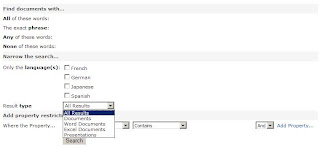
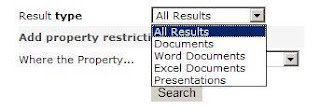
You would like users to be able to query for PDF Documents, too.
Solution:
* Site Actions > Edit Page > Advanced Search Box > Edit > Modify Shared Web Part
* Expand the Properties node > Click on Properties elipses
* Open Visual Studio > File > New File > XML File
* Copy the XML into Visual Studio
* Locate the Result Type node for Word Documents, Copy it, Modify it for PDF
By default, the Advanced Search Box offers a Result Type filter that allows users to select which type of documents they want returned in their search query.
By default, the options are:
* All Results
* Documents
* Word Documents
* Excel Documents
* Presentations


You would like users to be able to query for PDF Documents, too.
Solution:
* Site Actions > Edit Page > Advanced Search Box > Edit > Modify Shared Web Part
* Expand the Properties node > Click on Properties elipses
* Open Visual Studio > File > New File > XML File
* Copy the XML into Visual Studio
* Locate the Result Type node for Word Documents, Copy it, Modify it for PDF

* Copy the XML back into the Advanced Search Box Properties Editor, Click OK
* Publish the page

* Publish the page

Friday, December 07, 2007
Links: Public SharePoint Web Sites
Here is a link to a list of public web sites hosted on SharePoint:
http://www.wssdemo.com/Pages/websites.aspx
http://www.wssdemo.com/Pages/websites.aspx
Thursday, December 06, 2007
Links: Arx CoSign Electronic Signature Flash Demos
Arx is a digital signature solution vendor.
This link provides some demonstrations on the Arx CoSign product: http://www.arx.com/products/cosign_flash_demos.php
This link provides some demonstrations on the Arx CoSign product: http://www.arx.com/products/cosign_flash_demos.php
Monday, December 03, 2007
SharePoint V3: Error: IE Script Error When Saving Docs With Office 2003
Background/Environment:
Server: Microsoft Office SharePoint Server 2007
Client: Microsoft Office Professional 2003
Other: MOSS 2007 document library configured with content types
Description:
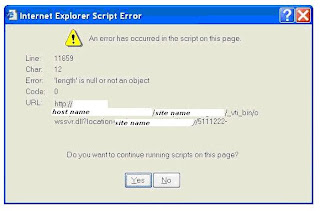
A MOSS 2007 document library is configured to use content types. A client machine with MS Office 2003 saves a document to the library and receives a script error (shown below):
" Internet Explorer Script Error, An error has occurred in the script on this page. Error: ‘length is null or not an object’. "
After continuing to save beyond the script error, changes to the content of the document are saved, however, document library metadata values are reset.
Steps to Re-Create Issue:
* From a computer which has Office 2003, browse to a SharePoint Server 2007 document library which has content types
* Open the document in Edit mode
* Make an edit to the document
* File, Save
* Script error appears
* Click yes to the error until it disappears
* Open the document, notice the changes to the document were saved
* Open the document properties, notice the metadata values have been reset
Solutions:
No "fixes" are currently available, but there are a few workarounds:
1. Upgrade to Office 2007
2. Don't use content types
3. Wait for a hotfix (possibly in the February 2008 time frame)
Reference:
MSDN Discussion
http://207.46.236.188/msdn/rss.aspx?postid=2105089&forumid=1202&siteid=1
Server: Microsoft Office SharePoint Server 2007
Client: Microsoft Office Professional 2003
Other: MOSS 2007 document library configured with content types
Description:
A MOSS 2007 document library is configured to use content types. A client machine with MS Office 2003 saves a document to the library and receives a script error (shown below):
" Internet Explorer Script Error, An error has occurred in the script on this page. Error: ‘length is null or not an object’. "
After continuing to save beyond the script error, changes to the content of the document are saved, however, document library metadata values are reset.

Steps to Re-Create Issue:
* From a computer which has Office 2003, browse to a SharePoint Server 2007 document library which has content types
* Open the document in Edit mode
* Make an edit to the document
* File, Save
* Script error appears
* Click yes to the error until it disappears
* Open the document, notice the changes to the document were saved
* Open the document properties, notice the metadata values have been reset
Solutions:
No "fixes" are currently available, but there are a few workarounds:
1. Upgrade to Office 2007
2. Don't use content types
3. Wait for a hotfix (possibly in the February 2008 time frame)
Reference:
MSDN Discussion
http://207.46.236.188/msdn/rss.aspx?postid=2105089&forumid=1202&siteid=1
Saturday, December 01, 2007
Links: Visio Stencils for Designing Sites, Processes, SharePoint
Visio Stencils for Information Architects
http://www.nickfinck.com/stencils.html
Visio stencils for designing Sharepoint sites
http://demiliani.com/blog/archive/2006/01/23/3398.aspx
Visio template and stencil for designing SharePoint sites (beta) http://blogs.msdn.com/roberdan/archive/2006/03/05/543967.aspx
http://www.nickfinck.com/stencils.html
Visio stencils for designing Sharepoint sites
http://demiliani.com/blog/archive/2006/01/23/3398.aspx
Visio template and stencil for designing SharePoint sites (beta) http://blogs.msdn.com/roberdan/archive/2006/03/05/543967.aspx
Wednesday, November 28, 2007
SharePoint V3: Adjusting Maximum Upload Size
How to adjust the maximum upload size for a web application:
Central Administration > Application Management > Web Application General Settings > Maximum Upload Size (Default is 50MB, Maximum is 2047MB)
Central Administration > Application Management > Web Application General Settings > Maximum Upload Size (Default is 50MB, Maximum is 2047MB)
Friday, November 23, 2007
SharePoint V3: How to Change the Site Access Requests Recipient Email Address
How to change the recipient of site access requests at the site collection:
Change recipient email address:
Site Actions > Site Settings > Modify All Site Settings > Advanced Permission > Settings > Access Requests
"Allow requests for access" - Select Yes/No
"Send all requests for access to the following email address" - (Provide Email Address)
How to change the recipient of site access requests at the sub-site:
1.
Break inheritance to enable the Settings menu:
Site Actions > Site Settings > Modify All Site Settings > Advanced Permission > Actions > Edit User Permissions
2.
Modify the recipient email address for access requests:
Site Actions > Site Settings > Modify All Site Settings > Advanced Permission > Settings > Access Requests
Change recipient email address:
Site Actions > Site Settings > Modify All Site Settings > Advanced Permission > Settings > Access Requests
"Allow requests for access" - Select Yes/No
"Send all requests for access to the following email address" - (Provide Email Address)
How to change the recipient of site access requests at the sub-site:
1.
Break inheritance to enable the Settings menu:
Site Actions > Site Settings > Modify All Site Settings > Advanced Permission > Actions > Edit User Permissions
2.
Modify the recipient email address for access requests:
Site Actions > Site Settings > Modify All Site Settings > Advanced Permission > Settings > Access Requests
Tuesday, November 20, 2007
SharePoint V3: How to Locate the Recycle Bin Settings for a Web Application
How to Locate the Recycle Bin Settings for a Web Application
Central Administration > Application Management > Web Application General Settings
Recycle Bin
Recycle Bin Status:
On
Off
Delete Items in the Recycle Bin:
After X Days
Never
Second Stage Recycle Bin:
Add X percent of live site quota for second stage deleted items
Off
Central Administration > Application Management > Web Application General Settings
Recycle Bin
Recycle Bin Status:
On
Off
Delete Items in the Recycle Bin:
After X Days
Never
Second Stage Recycle Bin:
Add X percent of live site quota for second stage deleted items
Off
Subscribe to:
Posts (Atom)

