Event:
SharePoint Saturday NH
Saturday, September 21, 2013
Session Title:
Search Driven Design Patterns for SharePoint 2013
Abstract:
First, we will discuss SharePoint portal design flaws, related deficiencies, and challenges that exist with SharePoint in the enterprise. We will discuss the Search platform and redefine what it means to us and how we leverage it. We will take a tour of a Search Driven portal and review the configuration of Managed Properties, Result Sources, Query Rules, Search Results Web Parts, Display Templates, Search Boxes, and Search Pages. Next, we will construct Search Driven components using creative techniques and reflect on the benefits of the overall approach that we followed, comparing and contrasting with other design patterns. Finally, we will take a step back and discuss the future of Search and how to align SharePoint Search with the overarching Enterprise Architecture strategy.
This session provides practical guidance and best practices for SharePoint 2013 and SharePoint 2010 portal design, content management design, and search configuration based on real world lessons learned. The demonstrations and technical deep dives showcase Search Driven Design Patterns in motion while providing instructions for how to build a Search Driven portal.
Slides:
Search Driven Design Patterns for SharePoint 2013.pdf
Friday, August 30, 2013
Saturday, August 17, 2013
Windows Server 2012, Windows 8, Product Key and Activate
Description
The "Change product key" link is not visible in Windows Server 2012 or Windows Server 2008 and the license is not activated.
Solution
Enter a Product Key and Activate Windows.
1) All Apps, Run, slui.exe 0x3, click OK
2) Type Product Key, click Activate
Reference
Microsoft Support (2013). "Change product key" link is not available in Windows 8 or in Windows Server 2012. Retrieved August 17, 2013 from http://support.microsoft.com/kb/2750773
TechNet (2013). Slmgr.vbs Options. Retrieved August 17, 2013 from http://technet.microsoft.com/en-us/library/ff793433.aspx
Labels:
Licensing,
Support,
Windows 8,
Windows Server 2012
Sunday, August 11, 2013
Error: SQL Server: Unable to Shrink Transaction Log, "Could not locate file for database..."
Description
You attempt to shrink a transaction log file associated with a SQL Server database, but you receive in error:
"Could not locate file 'Transaction Log Name' for database
'Database Name' in sys.database_files. The file either does not exist, or was dropped."
Solution
1) Run SP_HelpFile to get the correct name of the transaction log file.
USE Database Name
EXEC sp_helpfile
(TechNet, 2013)
This will return the following information about the database files, including the associated transation log(s): Name, FileId, FileName, FileGroup, Size, MaxSize, Growth, Usage
2) Run the Transact-SQL statement again, using the correct Transaction Log Name. You can find this in the Name column of the SP_HelpFile query results set.
USE [Database Name]
GO
ALTER DATABASE Database Name SET RECOVERY SIMPLE WITH NO_WAIT
DBCC SHRINKFILE(Transaction Log Name, 1)
ALTER DATABASE Database Name SET RECOVERY FULL WITH NO_WAIT
GO
(TechNet, 2013)
3) Verify that there are configured, scheduled, and enabled SQL Server Backup jobs in place for:
a) Full Database Backup
b) Transaction Log Backup *Important for Full Recovery Model*
Reference
TechNet (2013). Backup Under the Full Recovery Model. Retrieved August 11, 2013 from http://technet.microsoft.com/en-us/library/ms190217%28v=sql.105%29.aspx
TechNet (2013). DBCC SHRINKFILE (Transact-SQL). Retrieved August 11, 2013 from http://technet.microsoft.com/en-us/library/ms189493.aspx
TechNet (2013). Recovery Models and Transaction Log Management. Retrieved August 11, 2013 from http://technet.microsoft.com/en-us/library/ms366344%28v=sql.105%29.aspx
TechNet (2013). sp_helpfile. Retrieved August 11, 2013 from http://technet.microsoft.com/en-us/library/aa933456%28v=sql.80%29.aspx
Labels:
DBA,
SQL Server,
SQL Server 2008,
SQL Server 2008 R2,
SQL Server 2012
Monday, July 29, 2013
Installing .NET framework (Netfx3) on Windows Server 2012 using PowerShell
Description
The purpose of this post is to provide instructions for installing .NET framework (NetFx3) on Windows Server 2012 using PowerShell.
.NET Framework is a requirement for SQL Server 2012. If this has not been installed prior to a SQL Server 2012 installation, then an error message will surface during the installation process. It is recommended to run the PowerShell command for installing Netfx3 prior to beginning the SQL Server installation.
Solution
1. Make the Windows Server 2012 media (DVD) available. For this example, I mounted a DVD drive on drive letter Z.
2. Open Windows PowerShell as an Administrator.
3. Run the following PowerShell command, replacing the source details with those specific to your environment.
PS C:\Windows\system32> dism /online /enable-feature /all /featurename:NetFx3 /source:z:\sources\sxs
Reference
Microsoft TechNet (February, 2012). DISM - Deployment Image Servicing and Management Technical Reference. Retrieved July 29, 2013 from http://technet.microsoft.com/en-us/library/hh824821.aspx
Microsoft TechNet (February, 2012). Use DISM in Windows PowerShell. Retrieved July 29, 2013 from http://technet.microsoft.com/en-us/library/hh825010.aspx
Verbeeck, K. (April, 2013). Error while enabling Windows Feature: Netfx3. Retrieved July 29, 2013 from http://www.sqlservercentral.com/blogs/koen-verbeeck/2013/04/29/error-while-enabling-windows-feature-netfx3
Labels:
NetFx3,
PowerShell,
Server Build,
SQL Server 2012
Thursday, July 18, 2013
SQL Server 2012: Find SQL Server Collation
Description
How to retrieve collation information for SQL Server 2012.
Solution
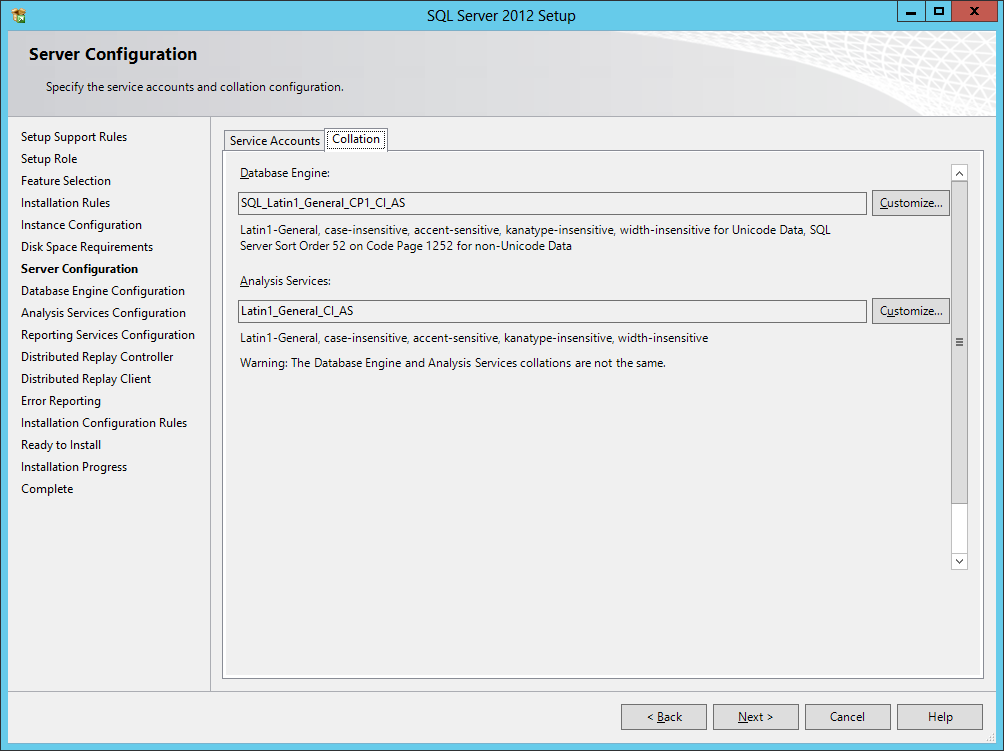
During the set up of SQL Server 2012, the default collations are as follows (as shown below):
Database Engine: SQL_Latin1_General_CP1_CI_AS
Analysis Services: Latin1_General_CI_AS
To retrieve the collation of the Database Engine for an existing SQL Server instance:
SELECT CONVERT (varchar, SERVERPROPERTY('collation'));
To retrieve the collation of databases attached to the SQL Server instance:
SELECT name, collation_name FROM sys.databases;
(MSDN, 2012)
Reference
MSDN (2012). View Collation Information. Retrieved July 18, 2013 from http://msdn.microsoft.com/en-us/library/hh230914.aspx
Wednesday, July 03, 2013
Issue: Windows Server 2012, JavaScript Blocked on Internet Explorer
Description
On a Windows Server 2012 system, JavaScript is being blocked in Internet Explorer.
Solution
1. Open Server Manager.
2. Click "Local Server"
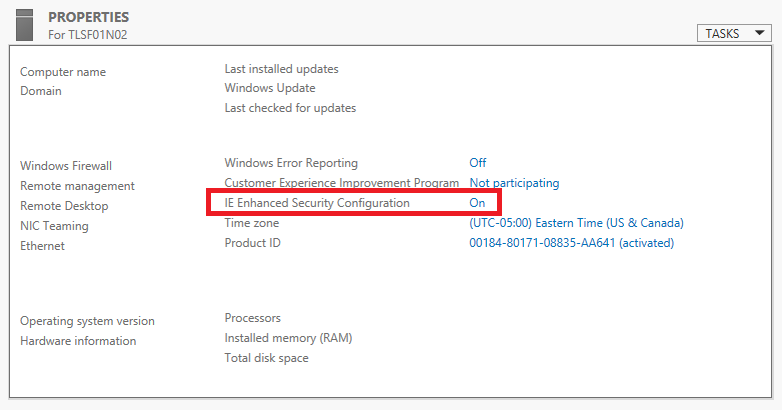
3. In the Properties section, locate "IE Enhanced Security Configuration." It is currently set to "On." Click "On" to open a dialog window.
4. Change the "Internet Explorer Enhanced Security Configuration" settings to Off as needed. Click OK and close Server Manager.
Tuesday, June 11, 2013
SPS NYC: Search Driven Design Patterns for SharePoint 2013
Event:
SharePoint Saturday NYC
Saturday, July 27, 2013
Session Title:
Search Driven Design Patterns for SharePoint 2013
Abstract:
First, we will step back and examine some SharePoint related deficiencies, common portal design flaws, and challenges that exist in the enterprise. Next, we will align ourselves with an overarching Enterprise Architecture strategy and redefine the role of SharePoint Search in the organization. From there, we will design a SharePoint 2013 portal that is optimized and ready for Search Driven design patterns. Finally, we will construct Search Driven components using creative techniques and reflect on the benefits of the overall approach that we followed.
Slides:
Search Driven Design Patterns for SharePoint 2013.pdf
SharePoint Saturday NYC
Saturday, July 27, 2013
Session Title:
Search Driven Design Patterns for SharePoint 2013
Abstract:
First, we will step back and examine some SharePoint related deficiencies, common portal design flaws, and challenges that exist in the enterprise. Next, we will align ourselves with an overarching Enterprise Architecture strategy and redefine the role of SharePoint Search in the organization. From there, we will design a SharePoint 2013 portal that is optimized and ready for Search Driven design patterns. Finally, we will construct Search Driven components using creative techniques and reflect on the benefits of the overall approach that we followed.
Slides:
Search Driven Design Patterns for SharePoint 2013.pdf
Labels:
#SPSNYC,
Events,
Search,
SharePoint 2013,
SharePoint 2013 Search
Sunday, March 10, 2013
Blindly Diagnosing a RAM Issue affecting SharePoint 2010 W3Wp.exe and SQL Server 2005 Enterprise Edition
I received limited information about an issue. Here are some ideas.
Description
A SharePoint Server 2010 Farm with a SQL Server 2005 Enterprise Edition database server has RAM issues which are affecting affecting both the Web front end (w3wp.exe) and SQL Server.
Would be Helpful to Know
Description
A SharePoint Server 2010 Farm with a SQL Server 2005 Enterprise Edition database server has RAM issues which are affecting affecting both the Web front end (w3wp.exe) and SQL Server.
Would be Helpful to Know
Is
it 32-bit or 64-bit? How much physical RAM is assigned to each server role?
What version and patch level is the OS?
What version and patch level is SQL Server? How is SharePoint being
used? How many users? Are there
custom Web parts? Custom Web pages? What are the SQL Server performance
counters reading? When does a memory spike occur? How long does it
last? When did it start? What recently changed in the
environment? Are the systems physical or virtual? What is the
server farm topology?
Possible Causes
Need
a Service Pack/Patch for OS: self-explanatory, but need the current
information to know if this is a possibility.
Antivirus: Investigate
antivirus software running on the servers.
IIS Forums reported that McAfee Enterprise V8 had a buffer overflow protection feature that
was causing problems with w3wp.exe (IIS Forums, 2008).
Incorrectly
disposed objects: Unmanaged memory can lead to memory problems
(MSDN, 2010).
Scheduled
jobs:
SQL Server maintenance plans, SQL agent jobs (e.g. backups), SharePoint
full or incremental crawl schedules can create noticeable degradation while
running.
On
the SQL Server side of things: Resource bottlenecks, TempDB bottlenecks, or
a slow running user query (less likely in this situation) (MSDN, 2010).
Query the sys.dm_os_memory_clerks and sys.dm_exec_query_memory_grants DMVs to
get an idea how SQL Server is utilizing memory.
Reference
IIS Forums(July, 2008). W3wp.exe memory usage is out of control. Retrieved March 10, 2013 from http://forums.iis.net/t/1150494.aspx
Microsoft TechNet (2005). Troubleshooting Performance Problems in SQL Server 2005. Retrieved March 10, 2013 from http://technet.microsoft.com/library/Cc96654
IIS Forums(July, 2008). W3wp.exe memory usage is out of control. Retrieved March 10, 2013 from http://forums.iis.net/t/1150494.aspx
Microsoft TechNet (2005). Troubleshooting Performance Problems in SQL Server 2005. Retrieved March 10, 2013 from http://technet.microsoft.com/library/Cc96654
MSDN (2010). Disposing Objects. Retrieved March 10, 2013 from http://msdn.microsoft.com/en-us/library/ee557362.aspx
MSDN (2010). SharePoint Dispose Checker Tool. Retrieved March 10, 2013 from http://archive.msdn.microsoft.com/SPDisposeCheck
Sunday, March 03, 2013
SPS Boston: Search Driven Design Patterns for SharePoint 2013
Event:
SharePoint Saturday Boston
Saturday, April 27, 2013
Session Title:
Search Driven Design Patterns for SharePoint 2013
Abstract:
First, we will step back and examine some SharePoint related deficiencies, common portal design flaws, and challenges that exist in the enterprise. Next, we will align ourselves with an overarching Enterprise Architecture strategy and redefine the role of SharePoint Search in the organization. From there, we will design a SharePoint 2013 portal that is optimized and ready for Search Driven design patterns. Finally, we will construct Search Driven components using creative techniques and reflect on the benefits of the overall approach that we followed.
Slides:
Search Driven Design Patterns for SharePoint 2013.pdf
SharePoint Saturday Boston
Saturday, April 27, 2013
Session Title:
Search Driven Design Patterns for SharePoint 2013
Abstract:
First, we will step back and examine some SharePoint related deficiencies, common portal design flaws, and challenges that exist in the enterprise. Next, we will align ourselves with an overarching Enterprise Architecture strategy and redefine the role of SharePoint Search in the organization. From there, we will design a SharePoint 2013 portal that is optimized and ready for Search Driven design patterns. Finally, we will construct Search Driven components using creative techniques and reflect on the benefits of the overall approach that we followed.
Slides:
Search Driven Design Patterns for SharePoint 2013.pdf
Labels:
#SPSBOS,
Events,
Search,
SharePoint 2013,
SharePoint 2013 Search
Sunday, December 30, 2012
NYESUG: Search Driven Design Patterns for SharePoint 2013
Event:
The NY Enterprise Search User Group
Wednesday, January 9, 2013
Session Title:
Search Driven Design Patterns for SharePoint 2013
Abstract:
First, we will step back and examine some SharePoint related deficiencies, common portal design flaws, and challenges that exist in the enterprise. Next, we will align ourselves with an overarching Enterprise Architecture strategy and redefine the role of SharePoint Search in the organization. From there, we will design a SharePoint 2013 portal that is optimized and ready for Search Driven design patterns. Finally, we will construct Search Driven components using creative techniques and reflect on the benefits of the overall approach that we followed.
Slides:
Search Driven Design Patterns for SharePoint 2013.pdf
The NY Enterprise Search User Group
Wednesday, January 9, 2013
Session Title:
Search Driven Design Patterns for SharePoint 2013
Abstract:
First, we will step back and examine some SharePoint related deficiencies, common portal design flaws, and challenges that exist in the enterprise. Next, we will align ourselves with an overarching Enterprise Architecture strategy and redefine the role of SharePoint Search in the organization. From there, we will design a SharePoint 2013 portal that is optimized and ready for Search Driven design patterns. Finally, we will construct Search Driven components using creative techniques and reflect on the benefits of the overall approach that we followed.
Slides:
Search Driven Design Patterns for SharePoint 2013.pdf
Labels:
Events,
NYESUG,
Search,
SharePoint 2013,
SharePoint 2013 Search
Tuesday, December 04, 2012
Error: SharePoint 2013: Adding ContentDB with No Free Space
Description
When attempting to add a Content Database to a SharePoint Web Application, an error occurs:
"Sorry, something went wrong..."
The error message is self explanatory. It states that "There is not enough disk space on disk".
Solution
Make free space and then recreate Content Database. It is time to investigate the reasons why free disk space was drawn down to zero. This situation should not be allowed to occur on the SQL Server data file partition. Therefore, an activity plan following the error message should be aim towards preventing this situation from occurring in the future.
Some initial questions to ask might include:
- Was the initial storage allocation sufficient?
- Is the server storage partitioned properly?
- What is consuming space?
- Are backups configured for the SQL data file partition?
- Are database backup cleanup jobs scheduled?
- Is there any logging on the partition?
- What is the logging retention?
Labels:
Central Administration,
SharePoint 2013,
Support
Thursday, November 29, 2012
Error: SharePoint 2013: Central Administration - Service Unavailable: HTTP Error 503
Description
When attempting to open the SharePoint 2013 Central Administration Web site, the site does not come up, and there is an error:
"Service Unavailable. HTTP Error 503. The Service is unavailable."
Cause
The SQL Server services are stopped because the domain Service Account used to run the SQL Server services is locked out. This is visible from All Programs, Microsoft SQL Server 2012, Configuration Tools, SQL Server Configuration Manager.
Solution
In Active Directory Users and Computers, perform the following:
- Unlock the Service Account
- Ensure that the Service Account is not set to require user to change password at next login
- Ensure that the password never expires
- Verify Group Policies on the Organizational Unit to ensure that the account password is not being expired as a result of an effective policy. If so, change the policy inheritance on the OU.
- If possible, reboot the SQL Server or manually start all of the services that were affected by the account lockout.
Labels:
Central Administration,
SharePoint 2013,
Support
Tuesday, November 27, 2012
SharePoint 2013: How to Configure Subscription Settings Service Application using PowerShell
Last Updated March 28, 2014
Description
This post describes how to configure the SharePoint Server 2013 Subscription Settings Service Application using PowerShell.
Solution
1) Document the Naming Convention
Document a naming convention for each of the Subscription Settings Service Application components.
Example:
Application Pool Service Account: Domain\SvcAccount (this should already be created)
Application Pool: SvcApp_SPServiceApplicationPool_03 (this should already be created)
Service Application: SvcApp_SPSubscriptionSettingsServiceApplication_01
Service Application Database: SvcApp_SPSubscriptionSettingsServiceApplication_01_DB_01
Service Application Proxy: The Proxy is named automatically by SharePoint
2) Open the SharePoint 2013 Management Shell as Administrator.
3) Verify the Name of the Application Pool.
PS C:\ Get-SPServiceApplicationPool | Select Name
4) Set the Service Application Pool in a variable.
$SvcAppPool03 = Get-SPServiceApplicationPool "SvcApp_SPServiceApplicationPool_03"
5) Create the Service Application and assign it to the Application Pool.
$SvcApp = New-SPSubscriptionSettingsServiceApplication -ApplicationPool $SvcAppPool03 -Name "SvcApp_SPSubscriptionSettingsServiceApplication_01" -DatabaseName "SvcApp_SPSubscriptionSettingsServiceApplication_01_DB_01" -DatabaseServer "MSSQL Client Alias"
6) Verify the Service Application.
PS C:\ Get-SPServiceApplication | Select Name
5) Create the Service Application Proxy and assign it to the Service Application.
$SvcAppProxy = New-SPSubscriptionSettingsServiceApplicationProxy -ServiceApplication $SvcApp
It does not appear that the name of the Proxy can be set using the cmdlet. SharePoint will name the Proxy automatically.
7) Verify Service Application Proxy.
PS C:\ Get-SPServiceApplicationProxy | Select Name
8) Start the Service Instance.
Get-SPServiceInstance | where{$_.TypeName -eq "Microsoft SharePoint Foundation Subscription Settings Service"} | Start-SPServiceInstance
References
Microsoft TechNet (2012). New-SPSubscriptionSettingsServiceApplication. Retrieved November 27, 2012 from http://technet.microsoft.com/en-us/library/ff607823.aspx.
Microsoft TechNet (2012). Service application cmdlets in SharePoint 2013. Retrieved November 27, 2012 from http://technet.microsoft.com/en-us/library/ee906561.aspx.
Microsoft TechNet (2012). SharePoint 2013 - Service Applications. Retrieved November 27, 2012 from http://social.technet.microsoft.com/wiki/contents/articles/12512.sharepoint-2013-service-applications.aspx.
Description
This post describes how to configure the SharePoint Server 2013 Subscription Settings Service Application using PowerShell.
Solution
1) Document the Naming Convention
Document a naming convention for each of the Subscription Settings Service Application components.
Example:
Application Pool Service Account: Domain\SvcAccount (this should already be created)
Application Pool: SvcApp_SPServiceApplicationPool_03 (this should already be created)
Service Application: SvcApp_SPSubscriptionSettingsServiceApplication_01
Service Application Database: SvcApp_SPSubscriptionSettingsServiceApplication_01_DB_01
Service Application Proxy: The Proxy is named automatically by SharePoint
2) Open the SharePoint 2013 Management Shell as Administrator.
3) Verify the Name of the Application Pool.
PS C:\ Get-SPServiceApplicationPool | Select Name
4) Set the Service Application Pool in a variable.
$SvcAppPool03 = Get-SPServiceApplicationPool "SvcApp_SPServiceApplicationPool_03"
5) Create the Service Application and assign it to the Application Pool.
$SvcApp = New-SPSubscriptionSettingsServiceApplication -ApplicationPool $SvcAppPool03 -Name "SvcApp_SPSubscriptionSettingsServiceApplication_01" -DatabaseName "SvcApp_SPSubscriptionSettingsServiceApplication_01_DB_01" -DatabaseServer "MSSQL Client Alias"
6) Verify the Service Application.
PS C:\ Get-SPServiceApplication | Select Name
5) Create the Service Application Proxy and assign it to the Service Application.
$SvcAppProxy = New-SPSubscriptionSettingsServiceApplicationProxy -ServiceApplication $SvcApp
It does not appear that the name of the Proxy can be set using the cmdlet. SharePoint will name the Proxy automatically.
7) Verify Service Application Proxy.
PS C:\ Get-SPServiceApplicationProxy | Select Name
8) Start the Service Instance.
Get-SPServiceInstance | where{$_.TypeName -eq "Microsoft SharePoint Foundation Subscription Settings Service"} | Start-SPServiceInstance
References
Microsoft TechNet (2012). New-SPSubscriptionSettingsServiceApplication. Retrieved November 27, 2012 from http://technet.microsoft.com/en-us/library/ff607823.aspx.
Microsoft TechNet (2012). Service application cmdlets in SharePoint 2013. Retrieved November 27, 2012 from http://technet.microsoft.com/en-us/library/ee906561.aspx.
Microsoft TechNet (2012). SharePoint 2013 - Service Applications. Retrieved November 27, 2012 from http://social.technet.microsoft.com/wiki/contents/articles/12512.sharepoint-2013-service-applications.aspx.
SharePoint 2013: How to Configure State Service Application using PowerShell
Last Updated March 28, 2014
Description
This post describes how to configure the SharePoint Server 2013 State Service Application using PowerShell.
Solution
1) Document the Naming Convention.
Document a naming convention for each of the State Service Application components.
6) Verify State Service Application.
Get-SPStateServiceApplication | Select Name
7) Verify State Service Database.
Get-SPStateServiceDatabase | Select Name
9) Verify State Service Application Proxy.
Get-SPStateServiceApplicationProxy | Select Name
References
Microsoft TechNet (2012). New-SPStateServiceApplication. Retrieved November 27, 2012 from http://technet.microsoft.com/en-us/library/ff608084.aspx.
Microsoft TechNet (2012). Service application cmdlets in SharePoint 2013. Retrieved November 27, 2012 from http://technet.microsoft.com/en-us/library/ee906561.aspx.
Microsoft TechNet (2012). SharePoint 2013 - Service Applications. Retrieved November 27, 2012 from http://social.technet.microsoft.com/wiki/contents/articles/12512.sharepoint-2013-service-applications.aspx.
Microsoft TechNet (2012). State service and session state cmdlets in SharePoint 2013. Retrieved November 27, 2012 from http://technet.microsoft.com/en-us/library/ee890113.aspx.
Description
This post describes how to configure the SharePoint Server 2013 State Service Application using PowerShell.
Solution
1) Document the Naming Convention.
Document a naming convention for each of the State Service Application components.
Example:
Application Pool Service Account: Domain\SvcAccount (this should already be created)
Application Pool: SvcApp_SPServiceApplicationPool_02 (this should already be created)
Service Application: SvcApp_SPStateServiceApplication_01
Application Pool Service Account: Domain\SvcAccount (this should already be created)
Application Pool: SvcApp_SPServiceApplicationPool_02 (this should already be created)
Service Application: SvcApp_SPStateServiceApplication_01
Service Application Database: SvcApp_SPStateServiceApplication_01_DB_01
Service Application Proxy: SvcApp_SPStateServiceApplication_01_Proxy_01
2) Open the SharePoint 2013 Management Shell as Administrator.
3) Verify the Name of the Application Pool.
Get-SPServiceApplicationPool | Select Name
4) Set the Service Application Pool in a variable.
$SvcAppPool02 = Get-SPServiceApplicationPool "SvcApp_SPServiceApplicationPool_02"
5) Create the Service Application and assign it to the Application Pool.
3) Verify the Name of the Application Pool.
Get-SPServiceApplicationPool | Select Name
4) Set the Service Application Pool in a variable.
$SvcAppPool02 = Get-SPServiceApplicationPool "SvcApp_SPServiceApplicationPool_02"
5) Create the Service Application and assign it to the Application Pool.
New-SPStateServiceDatabase -Name SvcApp_SPStateServiceApplication_01_DB_01 |
New-SPStateServiceApplication -Name SvcApp_SPStateServiceApplication_01 |
New-SPStateServiceApplicationProxy -Name SvcApp_SPStateServiceApplication_01_Proxy_01 | -DefaultProxyGroup
Get-SPStateServiceApplication | Select Name
7) Verify State Service Database.
Get-SPStateServiceDatabase | Select Name
9) Verify State Service Application Proxy.
Get-SPStateServiceApplicationProxy | Select Name
References
Microsoft TechNet (2012). New-SPStateServiceApplication. Retrieved November 27, 2012 from http://technet.microsoft.com/en-us/library/ff608084.aspx.
Microsoft TechNet (2012). Service application cmdlets in SharePoint 2013. Retrieved November 27, 2012 from http://technet.microsoft.com/en-us/library/ee906561.aspx.
Microsoft TechNet (2012). SharePoint 2013 - Service Applications. Retrieved November 27, 2012 from http://social.technet.microsoft.com/wiki/contents/articles/12512.sharepoint-2013-service-applications.aspx.
Microsoft TechNet (2012). State service and session state cmdlets in SharePoint 2013. Retrieved November 27, 2012 from http://technet.microsoft.com/en-us/library/ee890113.aspx.
Sunday, September 30, 2012
Issue: SharePoint 2013 Configuration Wizard Failure
Description
SharePoint Products Configuration Wizard: Configuration Failed
Error referencing Step 3: "Failed to Create the Configuration Database"
Environment Observed
SharePoint 2013 Preview
Windows Server 2008 R2 SP1
SQL Server 2008 R2 SP1
Solution
I searched the Web for blog posts referencing this error, there were quite a few. I verified the service accounts settings and the SQL Server configurations (Kalil, 2012). I ran the psconfig command below from PowerShell, from the BIN directory. After this cmdlet completed, I ran the Configuration Wizard again and the Wizard was successful.
psconfig.exe -cmd configdb create SkipRegisterAsDistributedCacheHost user %domain\service account% password %password% passphrase %password%
(Spiffy, 2012)References
Khalil, G. (July, 2012). Installing SharePoint 2013 Preview on Windows 2012 Server with SQL 2012-Part 2. Retrieved September 30, 2012 from http://sharepointgeorge.com/2012/installing-sharepoint-2013-preview-windows-2012-server-sql-2012part-2.
MSDN (2012). Max degree of parallelism Option. Retrieved September 30, 2012 from http://msdn.microsoft.com/en-us/library/ms181007(v=sql.105).aspx.
Spiffy (August, 2012). 3 Steps to Setup your SharePoint 2013 Preview. Retrieved September 30, 2012 from http://spiffy.sg/developers/3-steps-to-setup-your-sharepoint-2013-preview.
Monday, August 20, 2012
SharePoint 2010 UPA Idle
DESCRIPTION
I ran into an issue with the User Profile Application (UPA) recently. I had recently added a custom user property to the UPA and needed to do a full synchronization to pull in the values from Active Directory. I manually initiated a full sync, however, the Profile Synchronization Settings remained "Idle."
SOLUTION
First thing I did was RDP to the SharePoint application server and to figure out the LOGONSERVER. From the command line I typed:
echo %logonserver%
Doing this revealed that that the LOGONSERVER was a domain controller DC01. I investigated to find that this server was running Windows Server 2003. I continued to research the domain and found that the entire domain was running at 2003 level and there were a mix of 2003 and 2008 domain controllers. The domain level wasn't the issue, but the specific server might be the issue.
Next, I manually changed the LOGONSERVER of the SharePoint application server to a Windows Server 2008 domain controller named, DC03. I did this from the command line using the following command:
set logonserver=\\DC03
With the LOGONSERVER updated, I attempted to run another full UPA sync. It was successful this time.
Finally, I wanted to hard code this LOGONSERVER setting to ensure that I didn't have to monitor this. To do this, I made the following change on the SharePoint application server: Start, Control Panel, System, System Properties. Advanced Tab, Environment Variables, System Variables. I added a System Variable called "LOGONSERVER" and I set it to DC03.
Sunday, August 19, 2012
Why Certain SharePoint Solutions Aren't The End Game
Generally speaking, as an organization
matures, business processes often need to become more defined and standardized to
facilitate repeatability and scalability. Business processes may also
become more centralized out of necessity. For example, if you have a lemonade stand on ten streets in town and each one is independently managed, the independent stands end up wasting a lot of time designing their own signs, figuring out how to process sales, and making trips to the grocery store. If the lemonade stands centralize and standardize then perhaps there is only one group in charge of designing signs, and another group for stocking inventory, and another group for collecting the cash. Each functional group can then serve the rest of the lemonade stands and the whole operation becomes much more efficient.

I believe that SharePoint has experienced a lot of success by helping companies get one step closer to the centralized and standardized model. A sweet spot has been opportunities with ten independent lemonade stands. I thing collaboration sites bridge a huge gap at this stage when companies don't have mature processes in place, haven't figured out how to do things efficiently, and transactional systems are nowhere to be found. Only after intentional progress and many waves of iteration will a company achieve great efficiency in such processes. SharePoint helps in that progression...but I don't think that it is necessarily the end game in all cases.
One advantage to using SharePoint is it is quick and easy to get a solution up and running and the solution is probably a lot better than an email and document attachment process that was occurring before. We can make successes in these situations and they are great steps forward. If you read the Budgeting Portal Case Study you will see how SharePoint was used for Budgeting and Planning. However, there comes a point where we need our process data to be completely integrated with other process data. It needs to be relational. It needs to be consistent. And the ways we consume and produce the data electronically needs to be consistent and intuitive for us to achieve the level of efficiency that we are seeking. Sometimes, our processes get to be too grown up for SharePoint, quite frankly.
The Budgeting Portal that I have been demonstrating at SharePoint Saturday events is only in SharePoint, temporarily. Eventually, this is being moved to Hyperion Budgeting and Planning. You see, a process that started off in email evolved to a document library in SharePoint. Then it evolved again within SharePoint to include list data. It continued to progress and get more sophisticated with custom databases, TSQL views and stored procedures, SSIS packages, SSRS reports, dashboards, and Data View Web Parts. Then the practical limit within SharePoint was reached. The data in the Budgeting Portal needed to be tied more closely to other financial data that could only be maintained in a financial system. It became inevitable that this solution would need to become part of the overall financial system in order to facilitate the next wave of progression and efficiency.
Whether it is a lemonade stand or a budgeting and forecasting process, I believe that in many cases, we need to view SharePoint as a tool to help define a process, give it a place to become organized, mature it, and then transfer it to its permanent home. I don't approach every project this way, but I am seeing this approach become more applicable and more common especially as transactional systems are becoming more flexible. I believe that the core capabilities of ECM, collaboration, and social computing will eventually become very practical within CRM and ERP systems, which already provide business processes tuned for best practices and rigidity. In the future, I believe that more and more SharePoint projects will be initiated, not with the purpose of being the end all, but rather with the purpose of promoting adoption of rigid processes in CRM and ERP. SharePoint can help bridge the gap by being the interim solution where process discovery, definition, and initial improvements are made.
I believe that SharePoint has experienced a lot of success by helping companies get one step closer to the centralized and standardized model. A sweet spot has been opportunities with ten independent lemonade stands. I thing collaboration sites bridge a huge gap at this stage when companies don't have mature processes in place, haven't figured out how to do things efficiently, and transactional systems are nowhere to be found. Only after intentional progress and many waves of iteration will a company achieve great efficiency in such processes. SharePoint helps in that progression...but I don't think that it is necessarily the end game in all cases.
One advantage to using SharePoint is it is quick and easy to get a solution up and running and the solution is probably a lot better than an email and document attachment process that was occurring before. We can make successes in these situations and they are great steps forward. If you read the Budgeting Portal Case Study you will see how SharePoint was used for Budgeting and Planning. However, there comes a point where we need our process data to be completely integrated with other process data. It needs to be relational. It needs to be consistent. And the ways we consume and produce the data electronically needs to be consistent and intuitive for us to achieve the level of efficiency that we are seeking. Sometimes, our processes get to be too grown up for SharePoint, quite frankly.
The Budgeting Portal that I have been demonstrating at SharePoint Saturday events is only in SharePoint, temporarily. Eventually, this is being moved to Hyperion Budgeting and Planning. You see, a process that started off in email evolved to a document library in SharePoint. Then it evolved again within SharePoint to include list data. It continued to progress and get more sophisticated with custom databases, TSQL views and stored procedures, SSIS packages, SSRS reports, dashboards, and Data View Web Parts. Then the practical limit within SharePoint was reached. The data in the Budgeting Portal needed to be tied more closely to other financial data that could only be maintained in a financial system. It became inevitable that this solution would need to become part of the overall financial system in order to facilitate the next wave of progression and efficiency.
Whether it is a lemonade stand or a budgeting and forecasting process, I believe that in many cases, we need to view SharePoint as a tool to help define a process, give it a place to become organized, mature it, and then transfer it to its permanent home. I don't approach every project this way, but I am seeing this approach become more applicable and more common especially as transactional systems are becoming more flexible. I believe that the core capabilities of ECM, collaboration, and social computing will eventually become very practical within CRM and ERP systems, which already provide business processes tuned for best practices and rigidity. In the future, I believe that more and more SharePoint projects will be initiated, not with the purpose of being the end all, but rather with the purpose of promoting adoption of rigid processes in CRM and ERP. SharePoint can help bridge the gap by being the interim solution where process discovery, definition, and initial improvements are made.
SPS NYC: Case Study of a SharePoint 2010 Budgeting/Forecasting Portal
Event:
SharePoint Saturday New York City
Saturday, July 28, 2012
Session Title:
Case Study of a SharePoint 2010 Budgeting/Forecasting Portal
Abstract:
A professional services company required a company-wide budgeting solution in time to do year end budgeting, forecasting, and strategic planning. The organization’s commercial off the shelf (COTS) finance system couldn’t fulfill the requirements. Despite many resource and time constraints, a solution was developed and rolled out within 6 weeks using SharePoint Server 2010, a custom SQL Server database, SQL Server Integration Services (SSIS), SQL Server Reporting Services (SSRS), SharePoint Designer, and Data View Web Parts. This session includes a demonstration of the solution as well as a walkthrough of the project approach and lessons learned.
Slides:
Case Study of a SharePoint 2010 Budgeting/Forecasting Portal.pdf
Monday, April 09, 2012
SPS Baltimore: Case Study of a SharePoint 2010 Budgeting/Forecasting Portal

SharePoint Saturday Baltimore
Saturday, May 12, 2012
Session Title:
Case Study of a SharePoint 2010 Budgeting/Forecasting Portal
Abstract:
A professional services company required a company-wide budgeting solution in time to do year end budgeting, forecasting, and strategic planning. The organization’s commercial off the shelf (COTS) finance system couldn’t fulfill the requirements. Despite many resource and time constraints, a solution was developed and rolled out within 6 weeks using SharePoint Server 2010, a custom SQL Server database, SQL Server Integration Services (SSIS), SQL Server Reporting Services (SSRS), SharePoint Designer, and Data View Web Parts. This session includes a demonstration of the solution as well as a walkthrough of the project approach and lessons learned.
Slides:
Case Study of a SharePoint 2010 Budgeting/Forecasting Portal.pdf
Thursday, March 29, 2012
SPS Boston: Case Study of a SharePoint 2010 Budgeting/Forecasting Portal
SharePoint Saturday Boston
Saturday, April 28th, 2012
Session Title:
Case Study of a SharePoint 2010 Budgeting/Forecasting Portal
Abstract:
A professional services company required a company-wide budgeting solution in time to do year end budgeting, forecasting, and strategic planning. The organization’s commercial off the shelf (COTS) finance system couldn’t fulfill the requirements. Despite many resource and time constraints, a solution was developed and rolled out within 6 weeks using SharePoint Server 2010, a custom SQL Server database, SQL Server Integration Services (SSIS), SQL Server Reporting Services (SSRS), SharePoint Designer, and Data View Web Parts. This session includes a demonstration of the solution as well as a walkthrough of the project approach and lessons learned.
Slides:
Case Study of a SharePoint 2010 Budgeting/Forecasting Portal.pdf
Subscribe to:
Posts (Atom)
Events / Conferences / User Groups
- AIIM Conference
- Boston Area SharePoint User Group
- Boston Azure User Group
- Collaborate
- DevConnections
- DevIntersection
- Enterprise Search Summit
- Microsoft Build
- Microsoft SharePoint Conference
- Microsoft TechEd
- New England ASP.NET Professionals User Group
- New England Oracle Applications User Group
- Oracle Applications User Group (OAUG)
- Oracle OpenWorld
- PeopleSoft Government Contractor Special Interest Group
- PeopleSoft Southern New England Users Group
- Quest International Users Group
- SharePoint Saturday
- SPTechCon
- SQL PASS
- SQL Saturday
- Startup Weekend