View Here:
http://www.commoncraft.com/custom-video-sharepoint-plain-english
Download Here:
http://download.microsoft.com/download/A/5/6/A56BB856-74F5-4A6B-887B-876BAE88116F/SharePoint%20in%20Plain%20English.zip
View Here:
http://www.commoncraft.com/custom-video-sharepoint-plain-english
Download Here:
http://download.microsoft.com/download/A/5/6/A56BB856-74F5-4A6B-887B-876BAE88116F/SharePoint%20in%20Plain%20English.zip
With Windows 7 releasing soon, it will be time to think about migrating user profile settings to a new operating system build.
Aside from file folders, and desktop files, you may have a bit of time invested in the Internet Explorer favorites and feeds. Even if it only saves a couple minutes of searching in the end, I thought it would be worthwhile to post locations of these items on a source Vista build.
Favorites:
C: (Operating System) \Documents and Settings\UserProfileName\Favorites
RSS Feeds:
C: (Operating System) \Documents and Settings\UserProfileName\AppData\Local\Microsoft\Feeds
I found a post on TechArchive.net, "Re: disabling check out on document library upload," in which the author was observing that multiple document uploads were resulting in status of "checked out" after uploading. The author cited a post of mine, "SharePoint V3: Achieving Checked-In Status When Uploading Mulitple Documents," and explained that the post didn't solve the issue.
So, I am posting the two possible reasons why, after uploading multiple documents to a document library, the uploaded documents have the status of "checked out."
1. Require check out is configured on the library
I did a test, configuring six document libraries, and then performed a multiple document upload. Here are the results:
a.
Document library configurations resulting in "checked out" status when multiple documents are uploaded:
Require Check out + No Versioning
Require Check out + Major Versioning
Require Check out + Major and Minor Versioning
b.
Document library configurations resulting in "checked in" status when multiple documents are uploaded:
No Require Checkout + No Versioning
No Require Check out + Major Versioning
No Require Check out + Major and Minor Versioning
2. The document library is configured with a required field. When the document upload completes, the field is not populated and the status for each of the uploaded documents is set to "checked out."
This subject comes up rather frequently during discussions and as a proponent of SQL Server in general and especially its Business Intelligence features such as Reporting Services for extending the capabilities of SharePoint solutions, I feel compelled to chime in.
I completely understand Microsoft's position. How could a software company possibly support custom, schema changes or functional modifications to their application? They cannot. Nor can Microsoft really ensure their software will function (optimally) with any type of foreign database object running on the live databses, even a view.
However, accepting Microsoft's position doesn't change two things:
1. SharePoint information is business intelligence information and often times needs to extract, transform, load, and display in other places than its native content database.
2. Where there's a will there's a way.
Exploring some scenarios...
If you need to add custom functionality to your SharePoint environment, then you might build your own custom database with triggers, functions, sprocs and all, and then use a programmatic methods to move the data you need out of the SharePoint content databases and into your custom database. Then, use Web Parts to deliver the data and functionality from the custom database throughout the SharePoint Web sites. This does not overstep any of the guidelines listed in the article.
Secondly, T-SQL queries are some times necessary for reports when using the Object Model as an XML data source reaches limitations. If you need to integrate SharePoint data with other systems or for reports you can:
1. Create a database snapshot of the SharePoint content datbase (if you have SQL 2005 / 2008 Enterprise Edition)
2. Use programmatic methods to move the data from the SharePoint content database into an intermediary database for abstraction purposes.
3. Move data into an existing data mart or data warehouse during regular intervals.
Any of these three approaches allows you to leverage Views. The benefits of compiling T-SQL queries as Views is that you can secure them, you can use them as data sources in SQL Reporting Services reports, and you can store them on the database where they are accessible, reusable, they get backed up with database backups, you can optimize query performance with Indexes, and querying Views performs better because you are not storing queries nor are you filtering or transforming data in the Web tier.
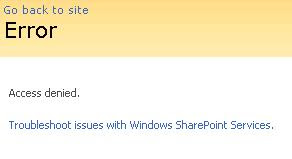 Solution:
* Start > Programs > Administrative Tools > IIS Manager
* Expand the Application Pools node, locate the application pool associated with the site collection that is experiencing an issue
* Right-Click the Application Pool and select "Properties"
* Select the "Identity" tab
* Note the user account
* Start > Programs > Microsoft Office Server > SharePoint 3.0 Central Administration
* Site Actions > Site Settings > Advanced Permissions
* Click "Groups"
* Click "Farm Administrators"
* New > Add Users
* Add Users: Type the name of the Application Pool Identity account
* Give Permission: Add users to a SharePoint group: Farm Administrators
* Add the Application Pool account to the Farm Administrators group
* Send E-Mail: Uncheck (you most likely do not want to send an email)
* Click OK
* Try again to activate the "Office SharePoint Server Publishing Infrastructure" Site Collection Feature
Reference:
SharePoint - Access Denied When Enabling The Publishing Infrastructure Site Collection Feature http://www.sharepointblogs.com/george/archive/2009/03/24/sharepoint-access-denied-when-enabling-the-publishing-infrastructure-site-collection-feature.aspx
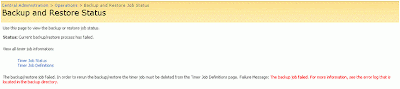
Error: Object Shared Search Index failed in event OnBackupComplete. For more information, see the error log located in the backup directory. WebException: The current operation timed-out after 3600 seconds.
Central Administration > Operations (Tab) > Backup and Restore (Heading) > Backup and restore job status
Error: The Backup/Restore job has the status of "Failed"
Central Administration > Operations (Tab) > Global Configuration (Heading) > Timer job status
Solution:
This issue may be caused by a timeout. To resolve this issue, there are a few steps. First, any time a SharePoint Backup/Restore job fails, you must delete the failed timer job definition, otherwise subsequent backup attempts will also fail.
Second, take an inventory of scheduled jobs that are running on the farm, including incremental crawl schedules, SharePoint backup scheduled tasks, and Enterprise Backup jobs (e.g. Symantec BackupExec, Networker, etc..). Measure how much time incremental crawls are taking to run. Also, measure how much time the backup is taking to run. Determine what time the backup job needs to start. Keep in mind that if an enterprise backup solution is backing up the SharePoint backup files, then the SharePoint backup should COMPLETE before the tape backup job begins.
If necessary, adjust the scheduled jobs so that the crawls are not interferring with the backup job.
Steps:
1. Delete the Backup/Restore timer job definition.
Central Administration > Operations (Tab) > Global Configuration (Heading) > Timer job definition