This article covers the most common causes that would occur in a real environment. I want to add that I received this error in a virtual pc environment when I accidentally allocated 128MB to the vpc instead of the 1024 I intended. At 128MB the SharePoint server choked and sql didn't start properly and it resulted in this message. After recreating the vmc using 1024MB memory, then I was able to open the site with no problems.
Tuesday, January 30, 2007
Microsoft Office SharePoint Server 2007: Cannot connect to the configuration database
You receive a "Cannot connect to the configuration database" error message when you connect to your Windows SharePoint Services Web site. For troubleshooting this issue, refer to Microsoft KB Article 823287 .


Friday, January 26, 2007
MOSS 2007: The backup/restore failed because there is already another job scheduled.
If you run a backup/restore job from SharePoint V3 Central Admin and the job fails, then it may leave a job timer in the Jobs Definition page. You need to delete this timer before you can run the backup/restore utility successfully. If you don't delete the timer job then you may receive this error:
"The backup/restore failed because there is already another job scheduled. Delete the timer job from the Timer Jobs Definition page, and then restart the backup/restore job. "
 In Central Admin > Operations > Global Configuration, click on Timer job definitions.
 Click the timer job with the title of "backup/restore."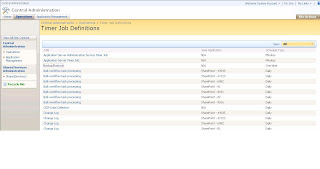
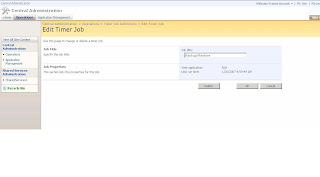
Now you should be able to run the backup/restore from Central Admin.
In Central Admin > Operations > Global Configuration, click on Timer job definitions.Click the timer job with the title of "backup/restore."Delete the timer job.
Now you should be able to run the backup/restore from Central Admin.
Wednesday, January 24, 2007
Microsoft Office SharePoint Designer (Contributor Mode)
Ever find your SharePoint Designer in Contributor Mode?
Here is how to turn it off: Site > Contributor Settings > Disable Contributor Settings
Here is how to turn it off: Site > Contributor Settings > Disable Contributor Settings
Wednesday, January 10, 2007
File Naming Convention
I got in the habit of naming files a certain way so that I could archive them and not have to worry about categorizing them into the correct folders. If I need to find something I can sort and scroll or use desktop search to find it.
First thing about the naming convention, I don't put any spaces in the name. Second, I prefix the file name with the date e.g. YYYYMMDDFileName. If the day or month is a single digit number then I put a 0 in front of it so that the prefix is always the same length e.g. 20070110. Since files travel from system to system, this naming convention ensures that the created date won't be lost. It allows the files to be sorted by date. Thirdly, it provides a versioning mechanism because when you save the file again tomorrow the date is different.
If the document is a certain type such as note, template, invoice, quote, etc., then I put the type right after the date. E.g. 20070110InvoiceVendorName. This way when I sort I can find all of the same type on the same day.
Finally, I put the most unique part of the name at the end. E.g. 20070110InvoiceMicrosoft.
The name might look funny, but it works. And, when storing the files in a SharePoint environment you can always display the friendly title of the document on the document library view instead of the actual file name.
First thing about the naming convention, I don't put any spaces in the name. Second, I prefix the file name with the date e.g. YYYYMMDDFileName. If the day or month is a single digit number then I put a 0 in front of it so that the prefix is always the same length e.g. 20070110. Since files travel from system to system, this naming convention ensures that the created date won't be lost. It allows the files to be sorted by date. Thirdly, it provides a versioning mechanism because when you save the file again tomorrow the date is different.
If the document is a certain type such as note, template, invoice, quote, etc., then I put the type right after the date. E.g. 20070110InvoiceVendorName. This way when I sort I can find all of the same type on the same day.
Finally, I put the most unique part of the name at the end. E.g. 20070110InvoiceMicrosoft.
The name might look funny, but it works. And, when storing the files in a SharePoint environment you can always display the friendly title of the document on the document library view instead of the actual file name.
Tuesday, January 09, 2007
Software Solution Project Planning
I like to use the following six project phases when creating an software solution project plan. I always start with these phases at the top level, then indent detailed tasks and subtasks beneath each respective phase.
Discovery
Assessment
Design
Construction
Validation
Rollout
These project phases can be applied to projects small and large. It works for new projects or add-ons to existing projects. One pattern that occurs is that the series of phases will cylce. For example, perhaps you implemented a line of business web application. Over the course of time, the requirements change and enhancements are requested. You are naturally led back into the discovery phase where you begin the cycle again. You define what enhancements are needed, you design a solution, you build it, test it, and roll it out.
SharePoint V3 brings makes project charting more realistic for small projects. Previously, creating a project plan could take as long as a small project. However, with the project-lite features and a little bit of templating on your part to reuse previous efforts, its quick to set up the plan and execute. Doing this can help you and anybody else who has an interest in what you are doing.
Discovery
Assessment
Design
Construction
Validation
Rollout
These project phases can be applied to projects small and large. It works for new projects or add-ons to existing projects. One pattern that occurs is that the series of phases will cylce. For example, perhaps you implemented a line of business web application. Over the course of time, the requirements change and enhancements are requested. You are naturally led back into the discovery phase where you begin the cycle again. You define what enhancements are needed, you design a solution, you build it, test it, and roll it out.
SharePoint V3 brings makes project charting more realistic for small projects. Previously, creating a project plan could take as long as a small project. However, with the project-lite features and a little bit of templating on your part to reuse previous efforts, its quick to set up the plan and execute. Doing this can help you and anybody else who has an interest in what you are doing.
Friday, January 05, 2007
SharePoint V2: Daylight Savings Time
Tom/Scooter, thanks for sending me this link on preparing SharePoint for daylight savings time changes.
Monday, January 01, 2007
SharePoint V3: Workaround for creating a unique id for list items and documents
SharePoint V3 does not provide a good way to uniquely id list items and/or documents. However, the SharePoint Designer workflow capabilities can be used to configure a workaround.
One way to ensure a unique id is to create the id number based on current date and time, down to the precision of a second. This method won't provide a sequential id number for items in a list or document library, but in many real life scenarios as long as the id number is unique, it will suffice.
SharePoint offers a calculation field type for lists and document libraries. This is great for performing the calculation of the id number. However, you do not want to store the id number in this type of field because it is dynamic and the value it generates will change based upon the system. What I mean is, if you generate a unique id off of the created field, then some how the created date is changed, the value of your calculation will be compromised. This happens if you move item from one web part to another. So, instead, it is best to store the id number in a text field where it is safe.
SharePoint V2 didn't allow you to copy a value from a calc field to a text field, but, V3 offers workflow and it allows you to do this.
In this example, I will demonstrate how to generate a unique id for custom list items. The result is a unique id (although not sequential) that is stored in a single line text field.
1. Create a site in the portal to contain the demo custom list
2. Create a custom list with the following fields
=MID(YEAR([Created]),1,4)&IF(LEN(MONTH([Created]))=1,"0"&MID(MONTH([Created]),1,1),IF(LEN(MONTH([Created]))>1,MID(MONTH([Created]),1,2)))&IF(LEN(DAY([Created]))=1,"0"&MID(DAY([Created]),1,1),IF(LEN(DAY([Created]))>1,MID(DAY([Created]),1,2)))&IF(LEN(HOUR([Created]))=1,"0"&MID(HOUR([Created]),1,1),IF(LEN(HOUR([Created]))>1,MID(HOUR([Created]),1,2)))&IF(LEN(MINUTE([Created]))=1,"0"&MID(MINUTE([Created]),1,1),IF(LEN(MINUTE([Created]))>1,MID(MINUTE([Created]),1,2)))&IF(LEN(SECOND([Created]))=1,"0"&MID(SECOND([Created]),1,1),IF(LEN(SECOND([Created]))>1,MID(SECOND([Created]),1,2)))
4. Create a view for the list displaying all of the fields
5. Using Sharepoint Designer, open the site
6. File, New, Workflow
7.
Name the workflow as "ItemID Workflow"
Set the workflow to start automatically when item is created or manually
Click Next
8.
In Step 1 of workflow:
Set the condition as If Created equals ListName: Created
Set the action as Update item in ListName
Field = ItemIDText
Value = ListName: ItemIDCalc
Click Finish
9.
Add a new item to the list. Populate the Title and Notes field. Click ok. You will see that the item is created and that the ItemIDCalc field and ItemIDText Field automatically populate with a unique item id.
One way to ensure a unique id is to create the id number based on current date and time, down to the precision of a second. This method won't provide a sequential id number for items in a list or document library, but in many real life scenarios as long as the id number is unique, it will suffice.
SharePoint offers a calculation field type for lists and document libraries. This is great for performing the calculation of the id number. However, you do not want to store the id number in this type of field because it is dynamic and the value it generates will change based upon the system. What I mean is, if you generate a unique id off of the created field, then some how the created date is changed, the value of your calculation will be compromised. This happens if you move item from one web part to another. So, instead, it is best to store the id number in a text field where it is safe.
SharePoint V2 didn't allow you to copy a value from a calc field to a text field, but, V3 offers workflow and it allows you to do this.
In this example, I will demonstrate how to generate a unique id for custom list items. The result is a unique id (although not sequential) that is stored in a single line text field.
1. Create a site in the portal to contain the demo custom list
2. Create a custom list with the following fields
- Title (single line text)
- Notes (mulitple line text)
- ItemIDText (single line text)
- ItemIDCalc (calculated, single line of text)
=MID(YEAR([Created]),1,4)&IF(LEN(MONTH([Created]))=1,"0"&MID(MONTH([Created]),1,1),IF(LEN(MONTH([Created]))>1,MID(MONTH([Created]),1,2)))&IF(LEN(DAY([Created]))=1,"0"&MID(DAY([Created]),1,1),IF(LEN(DAY([Created]))>1,MID(DAY([Created]),1,2)))&IF(LEN(HOUR([Created]))=1,"0"&MID(HOUR([Created]),1,1),IF(LEN(HOUR([Created]))>1,MID(HOUR([Created]),1,2)))&IF(LEN(MINUTE([Created]))=1,"0"&MID(MINUTE([Created]),1,1),IF(LEN(MINUTE([Created]))>1,MID(MINUTE([Created]),1,2)))&IF(LEN(SECOND([Created]))=1,"0"&MID(SECOND([Created]),1,1),IF(LEN(SECOND([Created]))>1,MID(SECOND([Created]),1,2)))
4. Create a view for the list displaying all of the fields
5. Using Sharepoint Designer, open the site
6. File, New, Workflow
7.
Name the workflow as "ItemID Workflow"
Set the workflow to start automatically when item is created or manually
Click Next
8.
In Step 1 of workflow:
Set the condition as If Created equals ListName: Created
Set the action as Update item in ListName
Field = ItemIDText
Value = ListName: ItemIDCalc
Click Finish
9.
Add a new item to the list. Populate the Title and Notes field. Click ok. You will see that the item is created and that the ItemIDCalc field and ItemIDText Field automatically populate with a unique item id.
Thursday, November 30, 2006
Monday, November 27, 2006
Microsoft Office Sharepoint Server 2007 (Beta)Setup ErrorsSetup is unable to proceed due to the following error(s):This product requires Windows Workf
When installing MOSS 2007 Beta2 on an SPS2003 environment during an upgrade attempt, I received the following error:
------------
Microsoft Office Sharepoint Server 2007 (Beta)Setup ErrorsSetup is unable to proceed due to the following error(s):This product requires Windows Workflow Foundation Beta 2 (Build 3.0.3807.7 or later).Please refer to this readme file for instructions to obtain these pre-requisites. Correct the issue(s) listed above and re-run setup.
-------------
My action steps were as follows:
1. Remove .NET 3.0 framework using the Pre-released Microsoft .NET Framework 3.0 Uninstall Tool
http://www.microsoft.com/downloads/details.aspx?familyid=AAE7FC63-D405-4E13-909F-E85AA9E66146&displaylang=en
2. Install Windows Workflow Foundation Runtime Components Beta 2_2(EN) for x86.exe
After I completed these steps I was able to install MOSS 2007 Beta 2.
Saturday, November 25, 2006
The Value of Having a Separate "Admin" Portal
Sharepoint portal deployments can be complicated to manage. They can include several customizations that make restores, upgrades, and day to day maintenance more difficult to perform.
Think about all of the data that is necessary to maintain in order to effectively manage Sharepoint.
Contact information
Invoices, subscription information
License compliance reports
Hardware (make, model, sn, RAID, tech support information)
IP addresses
Port numbers
SSL certficates
Users, passwords
Portal area security hierarchies
Group memberships
Service identities
IIS host headers
IIS app pool identities
Area/site templates
Unghosted pages
Branding, modifications to OWS.css, Menu.css, SPS.css, ..OWSPERS.css, OWSmac.css, OWSnocr.css, Paystub.css
Custom image files
Custom animation files (swf files)
Third party add-ons
Custom web parts (dwp files, assembly files, aspx files)
Custom javascript e.g. custom_owj.js
Data view, custom data sources to line of business databases
Custom security, site groups, ad groups, audiences, web part
Connected web parts
Dependency information
Datasources pointing to Sharepoint content db
Linked servers
Instruction documents
Backup and restore procedure
Support procedures
Log files
Code templates
Branding templates
Answers
Notes
One solution I have found to be very helpful is to deploy a separate Sharepoint portal with the sole purpose of maintaining administrative information. I like to keep it vanilla so that I can quickly restore it independently from the main portal(s). I find that it is really easy to lock down the portal when you are only going to allow administrators to access it.
Think about all of the data that is necessary to maintain in order to effectively manage Sharepoint.
Contact information
Invoices, subscription information
License compliance reports
Hardware (make, model, sn, RAID, tech support information)
IP addresses
Port numbers
SSL certficates
Users, passwords
Portal area security hierarchies
Group memberships
Service identities
IIS host headers
IIS app pool identities
Area/site templates
Unghosted pages
Branding, modifications to OWS.css, Menu.css, SPS.css, ..OWSPERS.css, OWSmac.css, OWSnocr.css, Paystub.css
Custom image files
Custom animation files (swf files)
Third party add-ons
Custom web parts (dwp files, assembly files, aspx files)
Custom javascript e.g. custom_owj.js
Data view, custom data sources to line of business databases
Custom security, site groups, ad groups, audiences, web part
Connected web parts
Dependency information
Datasources pointing to Sharepoint content db
Linked servers
Instruction documents
Backup and restore procedure
Support procedures
Log files
Code templates
Branding templates
Answers
Notes
One solution I have found to be very helpful is to deploy a separate Sharepoint portal with the sole purpose of maintaining administrative information. I like to keep it vanilla so that I can quickly restore it independently from the main portal(s). I find that it is really easy to lock down the portal when you are only going to allow administrators to access it.
Wednesday, November 22, 2006
Tuesday, November 21, 2006
SQL Server 2005 install error 70233
While I was installing the SQL Server 2005 Prerequisites I came accross this error:
"Errors occurred during the installation: Beta Components Detected. Error 70233 installing .NET Framework 2.0."
After running the utility provided by the link below, the installation was able to successfully continue http://go.microsoft.com/fwlink/?LinkID=47598
Tuesday, November 14, 2006
Upgrading to Sharepoint V3: The "Other" Option
Microsoft offers four options for upgrading SharePoint V2 to SharePoint V3. These approaches describe how to take your V2 Portal or Site Collections and upgrade the underlying software to V3.
In-Place Upgrade
Gradual Upgrade
Gradual upgrade for Shared Services
Content Database Migration
To view detailed comparison of these options, visit Microsoft TechNet's Determine upgrade approach [Office SharePoint Server].
http://technet2.microsoft.com/Office/en-us/library/f11e6c4f-dc2a-4d17-a2c8-9455792b4b9b1033.mspx
I want to also introduce another option. In fact I like to refer to it as the "other upgrade option." The way I describe this is that you install a fresh V3 portal and you recreate manually, then migrate data and content. This allows you an opportunity to first re-think the design of each part of the new portal, instead of automatically inheriting the limited configurations that you have in V2.
In some cases, I think that running an upgrade can be a mistake. As you know, performing a software upgrade to V3 doesn't automatically result in a robust V3 environment that suddenly fulfills all of your needs and desires...it just puts your same old portal on new software that happens to be capable of doing more. You still have to due necessary diligence to figure out how you are going to leverage the new functionality to meet business needs. This is a manual process. There are no short cuts. And, in some cases, by upgrading content from V3 to V7 you are actually creating more work for yourself.
Implementing new portal technology is kind of like traveling from point A to point B. Point A represents the portal concept and design that you arrive at after you analyze the business requirements, draw scribbles on the whiteboard, and have some meaningful discussions about the portal you are going to build.
A (idea) -----> B (reality)
Point B is reality. It is the end product; an actual, tangible Sharepoint 2007 environment configured the best possible way to resemble your concept.
And, the V2 portal is simply an outdated Point B.
Consider too, that the business requirements that drove the V2 portal probably have become more complex. V2 users may be wanting more sophisticated functionality by now. If time and budgets allow, don't automatically assume the limitations of a V2 portal when the subject of Sharepoint V3 comes up. Implementing V3 may be a great opportunity to re-engineer the portal solution and selecting the "other" upgrade option of redefining and creating your V3 portal from your ideas instead of from your V2 portal may result in a better solution.
In-Place Upgrade
Gradual Upgrade
Gradual upgrade for Shared Services
Content Database Migration
To view detailed comparison of these options, visit Microsoft TechNet's Determine upgrade approach [Office SharePoint Server].
http://technet2.microsoft.com/Office/en-us/library/f11e6c4f-dc2a-4d17-a2c8-9455792b4b9b1033.mspx
I want to also introduce another option. In fact I like to refer to it as the "other upgrade option." The way I describe this is that you install a fresh V3 portal and you recreate manually, then migrate data and content. This allows you an opportunity to first re-think the design of each part of the new portal, instead of automatically inheriting the limited configurations that you have in V2.
In some cases, I think that running an upgrade can be a mistake. As you know, performing a software upgrade to V3 doesn't automatically result in a robust V3 environment that suddenly fulfills all of your needs and desires...it just puts your same old portal on new software that happens to be capable of doing more. You still have to due necessary diligence to figure out how you are going to leverage the new functionality to meet business needs. This is a manual process. There are no short cuts. And, in some cases, by upgrading content from V3 to V7 you are actually creating more work for yourself.
Implementing new portal technology is kind of like traveling from point A to point B. Point A represents the portal concept and design that you arrive at after you analyze the business requirements, draw scribbles on the whiteboard, and have some meaningful discussions about the portal you are going to build.
A (idea) -----> B (reality)
Point B is reality. It is the end product; an actual, tangible Sharepoint 2007 environment configured the best possible way to resemble your concept.
And, the V2 portal is simply an outdated Point B.
Consider too, that the business requirements that drove the V2 portal probably have become more complex. V2 users may be wanting more sophisticated functionality by now. If time and budgets allow, don't automatically assume the limitations of a V2 portal when the subject of Sharepoint V3 comes up. Implementing V3 may be a great opportunity to re-engineer the portal solution and selecting the "other" upgrade option of redefining and creating your V3 portal from your ideas instead of from your V2 portal may result in a better solution.
Tuesday, October 24, 2006
Links: SharePoint
All Versions
Microsoft Office SharePoint Server 2007 products comparison download
Penny Coventry: Sharepoint Version Table
Heather Solomon: CSS Quick Reference
Heather Solomon: CSS Reference Chart for Sharepoint 2003
Version 3
Microsoft TechNet: Office SharePoint Server 2007
Microsoft TechNet: Upgrading to Office SharePoint Server 2007
Microsoft TechNet: Determine upgrade approach (Office SharePoint Server)
Microsoft Office Online: Microsoft Office SharePoint Server 2007 Frequently Asked Questions
Jason Medero: WSS V3/MOSS 2007 Upgrade and Migration from V2: Part 1 of 2
Jason Medero: WSS V3/MOSS 2007 Upgrade and Migration from V2: Part 2 of 2
Joel Oleson: Troubleshooting & Logs during a WSS/MOSS Upgrade
Shane Young: Upgrading from SPS 2003 to MOSS 2007 Beta2 TR using the gradual approach
Jonathon Frost: Preparing for a SharePoint Server 2007 Upgrade
James Henry: SPS 2003 to MOSS 2007 Upgrade Issues
William Baer: Understanding PRESCAN.EXE in MOSS 2007
Bill English: Moving SPS 2003 Databases to new SQL Servers
MSDN: Best Practices for Ensuring Application Reusability and Upgrade in Windows SharePoint Services
Joel Oleson: Best of... Upgrade and Deployment Guides for WSS v3 and Microsoft Office SharePoint Server 2007
Version 2
MSDN: Branding a SharePoint Portal Server 2003 Site: Part 1, Understanding the Use of a Corporate Brand
MSDN: Branding a SharePoint Portal Server 2003 Site: Part 2, How to Apply Your Own Corporate Brand
Dr. Dobbs: Sharepoint Web Part Development
Version 1
Microsoft: How to Create a Personal Dashboard in SharePoint Portal Server
Microsoft: Programs That Cannot Coexist with SharePoint Portal Server
Microsoft: Accessing a Workspace Using HTTPS Does Not Work, Dashboard Error -2147221499
Microsoft: Setup FAQ and Troubleshooting Guide
Microsoft: IIS Lockdown Tool Affects SharePoint Portal Server
Microsoft: Errors When Antivirus Software Scans Web Storage System
Microsoft: Indexing Web Sites on the Internet
Microsoft: Portal Displays Incorrectly When You Use FQDN
Microsoft: Required Properties Not Enforced During Bulk Check-in
Microsoft: SharePoint Portal Server and Storage Area Networks
Microsoft Office SharePoint Server 2007 products comparison download
Penny Coventry: Sharepoint Version Table
Heather Solomon: CSS Quick Reference
Heather Solomon: CSS Reference Chart for Sharepoint 2003
Version 3
Microsoft TechNet: Office SharePoint Server 2007
Microsoft TechNet: Upgrading to Office SharePoint Server 2007
Microsoft TechNet: Determine upgrade approach (Office SharePoint Server)
Microsoft Office Online: Microsoft Office SharePoint Server 2007 Frequently Asked Questions
Jason Medero: WSS V3/MOSS 2007 Upgrade and Migration from V2: Part 1 of 2
Jason Medero: WSS V3/MOSS 2007 Upgrade and Migration from V2: Part 2 of 2
Joel Oleson: Troubleshooting & Logs during a WSS/MOSS Upgrade
Shane Young: Upgrading from SPS 2003 to MOSS 2007 Beta2 TR using the gradual approach
Jonathon Frost: Preparing for a SharePoint Server 2007 Upgrade
James Henry: SPS 2003 to MOSS 2007 Upgrade Issues
William Baer: Understanding PRESCAN.EXE in MOSS 2007
Bill English: Moving SPS 2003 Databases to new SQL Servers
MSDN: Best Practices for Ensuring Application Reusability and Upgrade in Windows SharePoint Services
Joel Oleson: Best of... Upgrade and Deployment Guides for WSS v3 and Microsoft Office SharePoint Server 2007
Version 2
MSDN: Branding a SharePoint Portal Server 2003 Site: Part 1, Understanding the Use of a Corporate Brand
MSDN: Branding a SharePoint Portal Server 2003 Site: Part 2, How to Apply Your Own Corporate Brand
Dr. Dobbs: Sharepoint Web Part Development
Version 1
Microsoft: How to Create a Personal Dashboard in SharePoint Portal Server
Microsoft: Programs That Cannot Coexist with SharePoint Portal Server
Microsoft: Accessing a Workspace Using HTTPS Does Not Work, Dashboard Error -2147221499
Microsoft: Setup FAQ and Troubleshooting Guide
Microsoft: IIS Lockdown Tool Affects SharePoint Portal Server
Microsoft: Errors When Antivirus Software Scans Web Storage System
Microsoft: Indexing Web Sites on the Internet
Microsoft: Portal Displays Incorrectly When You Use FQDN
Microsoft: Required Properties Not Enforced During Bulk Check-in
Microsoft: SharePoint Portal Server and Storage Area Networks
Monday, October 23, 2006
Links: SQL Server 2005
Microsoft SQL Server 2005 Books Online
Microsoft SQL Server 2005 RS Tutorials
Microsoft SQL Server 2005 Hardware and Software Requirements for Installing
Microsoft SQL Server 2005 Maximum Capacity Specifications
Microsoft SQL Server 2005 Maximum Number of Processors Supported
Microsoft SQL Server 2005 Memory Supported
Microsoft SQL Server 2005 RS Tutorials
Microsoft SQL Server 2005 Hardware and Software Requirements for Installing
Microsoft SQL Server 2005 Maximum Capacity Specifications
Microsoft SQL Server 2005 Maximum Number of Processors Supported
Microsoft SQL Server 2005 Memory Supported
Sunday, October 22, 2006
Monday, October 02, 2006
Using the Web Service Interface of Windows SharePoint Services (2003)
Web services available in Windows SharePoint Services:
Administration
Administrative methods for managing a deployment of Microsoft Windows SharePoint Services, such as for creating or deleting site collections.
http://server_name:5966/_vti_adm/Admin.asmx
Alerts
Methods for working with alerts for list items in a SharePoint site.
http://server_name/_vti_bin/Alerts.asmx
Data Retrieval Service
Methods for retrieving schemas and data.
http://server_name/_vti_bin/DspSts.asmx
Document Workspace
Methods for managing Document Workspace sites and the data they contain.
http://server_name/_vti_bin/DWS.asmx
Forms
Methods for returning forms used in the user interface when working with the contents of a list.
http://server_name/_vti_bin/Forms.asmx
Imaging
Methods that enable you to create and manage picture libraries.
http://server_name/_vti_bin/Imaging.asmx
Lists
Methods for working with lists and list data.
http://server_name/_vti_bin/Lists.asmx
Meetings
Methods that enable you to create and manage Meeting Workspace sites.
http://server_name/_vti_bin/Meetings.asmx
Permissions
Methods for working with Windows SharePoint Services security.
http://server_name/_vti_bin/Permissions.asmx
Site Data
Methods used by search services to extract and crawl data from SharePoint sites.
http://server_name/_vti_bin/SiteData.asmx
Sites
Methods for returning information about the collection of site templates on the virtual server.
http://server_name/_vti_bin/Sites.asmx
Users and Groups
Methods for working with users, site groups, and cross-site groups.
http://server_name/_vti_bin/UserGroup.asmx
Versions
Methods for working with file versions.
http://server_name/_vti_bin/versions.asmx
Views
Methods for working with views of lists.
http://server_name/_vti_bin/Views.asmx
Web Part Pages
Methods to send information to and retrieve information from XML Web services.
http://server_name/_vti_bin/WebPartPages.asmx
Webs
Methods for working with sites and subsites.
http://server_name/_vti_bin/Webs.asmx
Administration
Administrative methods for managing a deployment of Microsoft Windows SharePoint Services, such as for creating or deleting site collections.
http://server_name:5966/_vti_adm/Admin.asmx
Alerts
Methods for working with alerts for list items in a SharePoint site.
http://server_name/_vti_bin/Alerts.asmx
Data Retrieval Service
Methods for retrieving schemas and data.
http://server_name/_vti_bin/DspSts.asmx
Document Workspace
Methods for managing Document Workspace sites and the data they contain.
http://server_name/_vti_bin/DWS.asmx
Forms
Methods for returning forms used in the user interface when working with the contents of a list.
http://server_name/_vti_bin/Forms.asmx
Imaging
Methods that enable you to create and manage picture libraries.
http://server_name/_vti_bin/Imaging.asmx
Lists
Methods for working with lists and list data.
http://server_name/_vti_bin/Lists.asmx
Meetings
Methods that enable you to create and manage Meeting Workspace sites.
http://server_name/_vti_bin/Meetings.asmx
Permissions
Methods for working with Windows SharePoint Services security.
http://server_name/_vti_bin/Permissions.asmx
Site Data
Methods used by search services to extract and crawl data from SharePoint sites.
http://server_name/_vti_bin/SiteData.asmx
Sites
Methods for returning information about the collection of site templates on the virtual server.
http://server_name/_vti_bin/Sites.asmx
Users and Groups
Methods for working with users, site groups, and cross-site groups.
http://server_name/_vti_bin/UserGroup.asmx
Versions
Methods for working with file versions.
http://server_name/_vti_bin/versions.asmx
Views
Methods for working with views of lists.
http://server_name/_vti_bin/Views.asmx
Web Part Pages
Methods to send information to and retrieve information from XML Web services.
http://server_name/_vti_bin/WebPartPages.asmx
Webs
Methods for working with sites and subsites.
http://server_name/_vti_bin/Webs.asmx
SharePoint Products and Technologies (2003): GetUserProfileByName(String) Method
SharePoint Products and Technologies (2003) SDK Documentation
Methods
Method: GetUserProfileByName(String) Method.
The GetUserProfileByName method of the UserProfile service gets user profile property information by account name.
Parameters
Parameter: AccountName
The account name that specifies the user profile property.
Return ValueMicrosoft.SharePoint.Portal.UserProfiles.PropertyData that contains the user profile property information.
Exceptions
Exception Type: UserNotFoundException Class.
Condition: User is not found.
Requirements
Platforms: Microsoft Windows Server 2003.
Security: Code Access Security.
Methods
Method: GetUserProfileByName(String) Method.
The GetUserProfileByName method of the UserProfile service gets user profile property information by account name.
Parameters
Parameter: AccountName
The account name that specifies the user profile property.
Return ValueMicrosoft.SharePoint.Portal.UserProfiles.PropertyData that contains the user profile property information.
Exceptions
Exception Type: UserNotFoundException Class.
Condition: User is not found.
Requirements
Platforms: Microsoft Windows Server 2003.
Security: Code Access Security.
Subscribe to:
Posts (Atom)

