Here is a quick overview when comparing Windows Server 2008 R2 Datacenter vs. Enterprise. Based on the licensing model for Windows Server 2008 R2, it may be more cost effective for many virtual infrastructure environments to license Datacenter Edition rather than Enterprise Edition. Furthermore, the hot pluggable hardware features of Datacenter Edition may be a key discriminator.
Role: No difference
Core Installation Features: No difference
Features: No difference
Technical Specifications: See Below
Datacenter
· hot add processors
· hot replace memory
· hot replace processors
· Virtual image use rights = Unlimted
· X64 sockets = 64
Enterprise
· No - hot add processors
· No - hot replace memory
· No - hot replace processors
· Virtual image use rights = Host plus 4VM
· X64 sockets = 8
Reference
Windows Server 2008 R2: Overview of Editions
http://www.microsoft.com/windowsserver2008/en/us/r2-editions-overview.aspx
Friday, April 23, 2010


Friday, April 09, 2010
Inconsistency in Information Management System Governance, Projects is Kryponite
I continue to revisit the thought that a SharePoint governance model (policies, procedures, standards, resources, etc.) can be undermined if an organization does not employ proper and consistent governance for all of its information management activities and systems.
Consistency is important because it level sets the way that people approach information management projects, including SharePoint projects. If some projects were to take a fly by the seat of your pants approach, disregarding governance concepts, it is bad because the resulting deliverables will be inconsistent from what the guiding principles that the governance model is supporting. What is worse is the sloppy result is the one that is achieved first, since it takes less time to do things when you circumvent processes.
Meanwhile, you might have some projects following the rules and progressing a bit slowly while the wild wild west ones are moving fast and crossing the finish line earlier. By the time the "good" project finishes, the wild wild west has already become the de facto standard. A precedent is set and now all of those "unnecessary" rules are perceived as pockets of resistance and momentum builds in avoiding the rules rather than following them. This is a vicious cycle and requires quite a lot of effort to reverse the damage. It is much easier if the executive sponsors can support the governance concepts, then promote and mandate accordingly.
The benefits of the formal approach to projects and adherence to information management governance is obvious to anybody who has experienced a complete project life cycle and then stuck around long enough to observe the after effects. This topic is very much philosophical; do you want to manage projects short-sighted to get the project completed or do you want to manage projects for the greater good, long term to support the guiding principles of the governance model?
I will draw an analogy. You live in the mountains and have a wood stove. You can spend cheap money buying an axe, then hurry to chop wood with it to meet an immediate need of filling the stove once. Or, you can invest more money on a chainsaw and then be able to provide wood for the stove, more efficiently, every time you need it moving forward. It is called return on investment. Sustainable efficiency and the ability to produce higher quality deliverables (which are easier to maintain) is the result of following a slow and steady approach to information management projects; taking the time to remain aligned with the principles of the governance plan.
Consistency is important because it level sets the way that people approach information management projects, including SharePoint projects. If some projects were to take a fly by the seat of your pants approach, disregarding governance concepts, it is bad because the resulting deliverables will be inconsistent from what the guiding principles that the governance model is supporting. What is worse is the sloppy result is the one that is achieved first, since it takes less time to do things when you circumvent processes.
Meanwhile, you might have some projects following the rules and progressing a bit slowly while the wild wild west ones are moving fast and crossing the finish line earlier. By the time the "good" project finishes, the wild wild west has already become the de facto standard. A precedent is set and now all of those "unnecessary" rules are perceived as pockets of resistance and momentum builds in avoiding the rules rather than following them. This is a vicious cycle and requires quite a lot of effort to reverse the damage. It is much easier if the executive sponsors can support the governance concepts, then promote and mandate accordingly.
The benefits of the formal approach to projects and adherence to information management governance is obvious to anybody who has experienced a complete project life cycle and then stuck around long enough to observe the after effects. This topic is very much philosophical; do you want to manage projects short-sighted to get the project completed or do you want to manage projects for the greater good, long term to support the guiding principles of the governance model?
I will draw an analogy. You live in the mountains and have a wood stove. You can spend cheap money buying an axe, then hurry to chop wood with it to meet an immediate need of filling the stove once. Or, you can invest more money on a chainsaw and then be able to provide wood for the stove, more efficiently, every time you need it moving forward. It is called return on investment. Sustainable efficiency and the ability to produce higher quality deliverables (which are easier to maintain) is the result of following a slow and steady approach to information management projects; taking the time to remain aligned with the principles of the governance plan.
Monday, March 22, 2010
Documenting Your SharePoint Server Search Design Specifications
During a SharePoint Server Search implementation, it is especially important to document the technical design specifications of Search, prior to configuring. By creating a Search Design Specifications document and continiously managing changes in it, the document acts as a good reference for future projects, knowledge transfer, upgrades, migrations, and disaster recovery scenarios.
When I document search specifications, I do it in a Word document and capture detailed information in a similar format to how the actual configuration screens appear. Here are some samples:
Crawl Rules


When I document search specifications, I do it in a Word document and capture detailed information in a similar format to how the actual configuration screens appear. Here are some samples:
Content Sources

Crawl Rules
Crawl Schedules
Metadata Property Mappings
Scopes

SharePoint 3.0: How to Create an Anonymous Discussion Area in an Existing Web Application
Description:
You want to create a discussion board area that is anonymous, so that people can post messages without requiring to authentication and without tracking their identities in discussion posts.
Solution:
Here are steps to create an anonymous, stand alone dicussion area:
Step 1. Enable Anonymous Access on Existing Web Application
Central Administration > Application Management > Application Security > Authentication Providers
Click "Default"Anonymous Access > Check "Enable anonymous access" > Click "OK"
Note the description of the setting you are enabling: "You can enable anonymous access for sites on this server or disallow anonymous access for all sites. Enabling anonymous access allows site administrators to turn anonymous access on. Disabling anonymous access blocks anonymous users in the web.config file for this zone."
Tom Daddario adds "Make sure your intended Web Application is selected before modifying any configuration settings."
Step 2. Create a site collection
Central Administration > Application Management > Create Site CollectionProvide Title, URL, Template, and Site Collection Adminstrators, click "OK"
Step 3. Enable Anonymous Access on Site Collection
Site Actions > Site Settings > Advanced PermissionsPermissions for Site > Settings > Anonymous AccessAnonymous Access > Select "Entire Web site" > Click "OK"
Step 4. Create Discussion Board
Click "View All Site Content"Click "Create"Communications > Click "Discussion Board"Provide Name > click "OK
Step 5. Modify Anonymous Permissions on Discussion Boards
Discussion Board > Setting > Click "Discussion Board Settings"Click "Permissions for this Discussion Board"Actions > Click "Edit Permissions" (click "OK" to message)Settings > Click "Anonymous Access"Anonymous Access > Anonymous users can: > Select "Add Items, Edit Items, and View Items" > Click "OK"
Friday, February 26, 2010
Links: PowerPivot videos on Microsoft Technet...
PowerPivot videos on Microsoft Technet...
PowerPivot Part 1 - Loading Data
http://edge.technet.com/Media/PowerPivot-part-1-Loading-Data/
PowerPivot Part 2 - Preparing data
http://edge.technet.com/Media/PowerPivot-part-2-Preparing-data/
PowerPivot Part 3 - Analysis
http://edge.technet.com/Media/PowerPivot-part-3-Analysis/
PowerPivot Part 4 - Sharing in SharePoint 2010
http://edge.technet.com/Media/PowerPivot-part-4-Sharing-in-SharePoint-2010/
PowerPivot Part 5 - Management
http://edge.technet.com/Media/PowerPivot-part-5-Management/
Wednesday, February 24, 2010
Use Case Points for Project Estimating
Use Case Points is a project estimating technique that helps you to determine complexity level of use cases, human participants, non-functional requirements, and software environments (Cohn, 2005).
Due to the rapid development nature of SharePoint, I think Use Case Points may be an efficient estimating tool for large SharePoint projects which are being formally managed. Such projects typically have an upfront investment in business analysis and likely have documented outputs including use cases. Use cases can be written like a sequential script of steps and exceptions to explain various ways that the system will be used. I think use cases themselves provide a great deal of value on a portal or search project because they provide greater visibility and detail about the requirements of the solution.
So, taking an artifact (use cases) that might already exist for a SharePoint project, you can simply use this information and apply the Use Case Points technique to gain other insights about time and cost estimates for the project.
Reference
Clemmons, R. (2006). Project Estimation With Use Case Points. Retrieved February 24, 2010 from http://www.stsc.hill.af.mil/crosstalk/2006/02/0602Clemmons.pdf
Cohn, M. (2005). Estimating With Use Case Points. Retrieved February 24, 2010 from http://www.methodsandtools.com/archive/archive.php?id=25.
Koirala, S. (2004). How to Prepare Quotation Using Use Case Points. Retrieved February 24, 2010 from http://www.codeproject.com/KB/architecture/usecasepoints.aspx.
Due to the rapid development nature of SharePoint, I think Use Case Points may be an efficient estimating tool for large SharePoint projects which are being formally managed. Such projects typically have an upfront investment in business analysis and likely have documented outputs including use cases. Use cases can be written like a sequential script of steps and exceptions to explain various ways that the system will be used. I think use cases themselves provide a great deal of value on a portal or search project because they provide greater visibility and detail about the requirements of the solution.
So, taking an artifact (use cases) that might already exist for a SharePoint project, you can simply use this information and apply the Use Case Points technique to gain other insights about time and cost estimates for the project.
Reference
Clemmons, R. (2006). Project Estimation With Use Case Points. Retrieved February 24, 2010 from http://www.stsc.hill.af.mil/crosstalk/2006/02/0602Clemmons.pdf
Cohn, M. (2005). Estimating With Use Case Points. Retrieved February 24, 2010 from http://www.methodsandtools.com/archive/archive.php?id=25.
Koirala, S. (2004). How to Prepare Quotation Using Use Case Points. Retrieved February 24, 2010 from http://www.codeproject.com/KB/architecture/usecasepoints.aspx.
Thursday, February 18, 2010
Ten Reasons Why I Love VMWare for SQL Server
 Sometimes it seems as if there is a "do not virtualize SQL Server" echo in the SharePoint community, at conferences, and events. For many practical reasons, I reject this sentiment and believe that SQL should be one of the first roles to virtualize.
Here's ten quick reasons:
1. Storage - SAN storage, local drives or ISCSI drives. Storage can grow as requirements change.
2. Performance - Yes, SQL Server requires a lot of resources, but if you use resource governor in SQL Server 2008 and later you can control a lot of the spikes. In a virtualized environment, the pool of shared resources provides good spillover coverage for member servers.
3. HA - VMotion. Enough said. Sure, you can still leverage SQL native HA features such as clustering, replication, log shipping...but hardware failures occurring at a local site can be covered seamlessly with VMotion and require far less configuration at the DBMS level.
4. VMWare Snapshots - Right-click and snapshot before making configuration changes. Big sigh of relief for QA processes.
5. VMware Templates - Build an operating system, template it, re-use it over and over again.
6. SAN Snapshots - Many of the current storage arrays, such as Dell EquaLogic, ship with snapshot capabilities.
7. Centralized Management - Yeah, I like being able to access the whole farm from one console and monitor what is going on, quickly remote into systems.
8. Disaster Recovery - Advanced features to help facilitate remote site recovery. Several more layers of data and configuration protection than physical environments.
9. Physical to Virtual - Drivers aren't an issue, capture and protect important systems that happen to be running on legacy hardware.
10. Little Conveniences - How about an ISO drive where you can store and back up all of your ISO images for operating systems, software applications, etc.
Wednesday, February 17, 2010
Program Evaluation and Review Technique (PERT)
Having worked in many different types and sizes of companies, I have always found there to be a great variance in how long it takes to accomplish certain tasks. For example, one organization might have lots of hardware at it's disposal, while another might need to order hardware. Or, another good one is the task of setting up DNS records. I've been in places where I can simply log into Active Directory myself and create what I need without hesitation, while other places can take upwards to a week to get a DNS record pointing to an IP address.
Whatever the case, the majority of the time it is the company's processes and resources that define how long something takes.
This week, I've been using the Program Evaluation and Review Technique (PERT) to estimate the duration of an extranet portal project. Fortunately, I have a very good sense for the company's processes so I can factor these things in fairly accurately. Still, I really like to include PERT calcualtions in my project plan because it allows me to factor in optimism and pessimism and come up with an accurate duration.
With PERT you calculate a weighted average by doing this:
Optimistic Time + (4 * Most Likely Time) + Pessimistic Time / 6 (Schwalbe, 2009)
So, if I wanted to estimate the time it takes to spin up some virtual machines and configure a SharePoint 2010 Farm completely from scratch, I might do something like this:
3 workdays + (4 * 5 workdays) + 10 wordays / 6
Result = 7.5 workdays
Reference
Schwalbe, K. (2009). Information Technology Project Management (6th Edition). Boston: Course Technology.
Whatever the case, the majority of the time it is the company's processes and resources that define how long something takes.
This week, I've been using the Program Evaluation and Review Technique (PERT) to estimate the duration of an extranet portal project. Fortunately, I have a very good sense for the company's processes so I can factor these things in fairly accurately. Still, I really like to include PERT calcualtions in my project plan because it allows me to factor in optimism and pessimism and come up with an accurate duration.
With PERT you calculate a weighted average by doing this:
Optimistic Time + (4 * Most Likely Time) + Pessimistic Time / 6 (Schwalbe, 2009)
So, if I wanted to estimate the time it takes to spin up some virtual machines and configure a SharePoint 2010 Farm completely from scratch, I might do something like this:
3 workdays + (4 * 5 workdays) + 10 wordays / 6
Result = 7.5 workdays
Reference
Schwalbe, K. (2009). Information Technology Project Management (6th Edition). Boston: Course Technology.
Issue: Windows Server 2008, JavaScript Blocked on Internet Explorer
Description:
On a Windows Server 2008 system, JavaScript is being blocked in Internet Explorer.
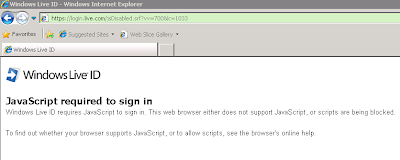 Solution:
1. Open Server Manager
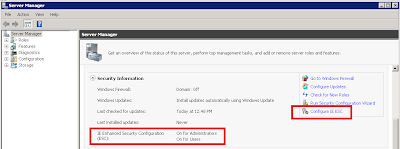
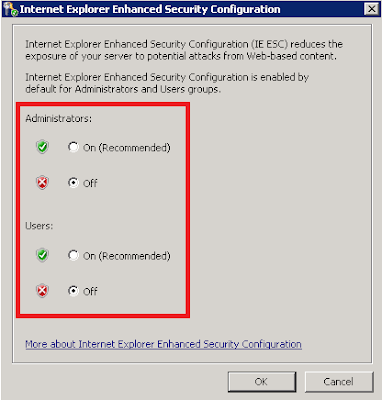
2. Turn Off the Internet Explorer Enhanced Security Configuration for Administrators and Users.
On a Windows Server 2008 system, JavaScript is being blocked in Internet Explorer.
 Solution:
1. Open Server Manager
- Start > Control Panel
- Programs > Turn Windows features on or off
- Server Manager
- Put the cursor on the root node called, "Server Manager"

2. Turn Off the Internet Explorer Enhanced Security Configuration for Administrators and Users.

Wednesday, February 10, 2010
FAST and Windows: A Blessing for Innovation
In a recent post on the Microsoft Enterprise Search Blog, Bjørn Olstad (CTO of FAST) published a post titled, Innovation on Linux and UNIX, which explains the longer term technology strategy for FAST with respect to supported operating systems. The post describes an increased focus of innovation for the product, for Windows operating system installations, while gradually deprecating support for Linux and Unix installations.
I can sort of understand the negative reactions to this announcement and the notion that customers may turn to other search platforms to maintain their Linux/Unix operating standards. However, I believe that this is a truly good decision by Microsoft, which will result in a higher quality product.
The reality is; in order to push innovation of the search platform forward beyond its current boundaries of functionality and performance, it is an inherihent requirement that the low level levels of the architecture be tightly bonded with the operating system. By not making this long term decision, a forced common denomintor is then imposed on the platform at higher levels of the architecture, ultimately inhibiting the product. Multiple OS support for installations actually sets the platform back. We've seen this as recent as 5.3 when we are required to install FAST ESP as a 32 bit application along with Java runtime 32 bit. This is a 64 bit world now, get with the program.
My sense is that the product roadmap will offer great improvements in the document processor and query processor pipelines, linguistics, user experience, etc. These improvements are required to allow search to become the leading functional component for indexing, transforming, and presenting not only content but navigation, functional components, and structures on Web sites. The relationship that search platforms will have with tomorrow's Web applciations, is comparable to the relationship that relational databases have with yesterday's Web sites. This innovation simply cannot afford to be spread thin.
I can sort of understand the negative reactions to this announcement and the notion that customers may turn to other search platforms to maintain their Linux/Unix operating standards. However, I believe that this is a truly good decision by Microsoft, which will result in a higher quality product.
The reality is; in order to push innovation of the search platform forward beyond its current boundaries of functionality and performance, it is an inherihent requirement that the low level levels of the architecture be tightly bonded with the operating system. By not making this long term decision, a forced common denomintor is then imposed on the platform at higher levels of the architecture, ultimately inhibiting the product. Multiple OS support for installations actually sets the platform back. We've seen this as recent as 5.3 when we are required to install FAST ESP as a 32 bit application along with Java runtime 32 bit. This is a 64 bit world now, get with the program.
My sense is that the product roadmap will offer great improvements in the document processor and query processor pipelines, linguistics, user experience, etc. These improvements are required to allow search to become the leading functional component for indexing, transforming, and presenting not only content but navigation, functional components, and structures on Web sites. The relationship that search platforms will have with tomorrow's Web applciations, is comparable to the relationship that relational databases have with yesterday's Web sites. This innovation simply cannot afford to be spread thin.
Tuesday, February 09, 2010
Links: Windows PowerShell compiled Help for SharePoint Server 2010
I am relieved that Microsoft has published PowerShell help files for SharePoint. The help files will certainly come in handy. These are available for download:
Windows PowerShell compiled Help for SharePoint Server 2010
http://www.microsoft.com/downloads/details.aspx?FamilyID=045f7af5-b226-4a05-8ace-4e17cfdef856&displaylang=en
This site contains separate help file (.chm) downloads for:
· Access Services
· ECM
· Excel Services
· InfoPath
· PerformancePoint
· Search
· Secure Store
· SharePoint Foundation Search
· SharePoint Products
· State Service
· User Profile
· Visio Services
· Web Analytics
· Word Services
Monday, February 01, 2010
Strange Computer Virus
This might be the first time I am posting a computer cleanup instruction on this blog, but I feel compelled since several people around me have been complaining about a common set of symptoms hitting their computers recently. I thought I could share some steps that a colleague took to successfully clean an infected system.
DISCLAIMER:
The purpose of this post is for informational purposes only and to share some steps performed on an infected system to fix a computer virus, related to symptoms described in the Problem section of this post. I don't know the name of the virus at this time. And, please don't go and modify the registry unless you know what you are doing.
Description:
System virus, automatically redirects internet explorer to a site that requests purchase of an anti-virus product. Task manager becomes blocked and inaccessible.
Solution:
Part I
* Boot the infected system and at the BIOS Press [F8] (Prior to Windows Displaying)
* Select “Safe Mode”
* Log in with the local administrator account
* Start, Run, Type MSCONFIG, and click OK
* Open Windows Explorer, and invoke the file property view and select “show hide files..”
* Look for a strange file type without much detail pointing directly to a user profile, sub to the application directory. Eg. “Document and Settings” > “User Profile”…..”
* Deselect the file and write the file name down. This will prevent it from launching during start up.
* Reboot into Safe Mode again.
* Log in as the local Administrator account.
* Browse to: “Document and Settings” > “User Profile”….. abs search for file name written down in the previous step.
Part II
* On a separate computer, download ATF-Cleaner
http://www.atribune.org/index.php?option=com_content&task=view&id=25&Itemid=25
* Copy ATF-Cleaner.exe to a USB drive so that you can move it onto the infected system
* Copy ATF-Cleaner.exe to the desktop of the infected system
* Double-click and run ATF-Cleaner.exe
* Click “Select and Delete All”
* Now review search results and delete directory where file is contained.
* Open Regedit – and Export a copy of the registry
* Select Edit > Find and Search for file.
* Delete file reference key
* Reboot
* Login in Windows in normal mode and test
DISCLAIMER:
The purpose of this post is for informational purposes only and to share some steps performed on an infected system to fix a computer virus, related to symptoms described in the Problem section of this post. I don't know the name of the virus at this time. And, please don't go and modify the registry unless you know what you are doing.
Description:
System virus, automatically redirects internet explorer to a site that requests purchase of an anti-virus product. Task manager becomes blocked and inaccessible.
Solution:
Part I
* Boot the infected system and at the BIOS Press [F8] (Prior to Windows Displaying)
* Select “Safe Mode”
* Log in with the local administrator account
* Start, Run, Type MSCONFIG, and click OK
* Open Windows Explorer, and invoke the file property view and select “show hide files..”
* Look for a strange file type without much detail pointing directly to a user profile, sub to the application directory. Eg. “Document and Settings” > “User Profile”…..”
* Deselect the file and write the file name down. This will prevent it from launching during start up.
* Reboot into Safe Mode again.
* Log in as the local Administrator account.
* Browse to: “Document and Settings” > “User Profile”….. abs search for file name written down in the previous step.
Part II
* On a separate computer, download ATF-Cleaner
http://www.atribune.org/index.php?option=com_content&task=view&id=25&Itemid=25
* Copy ATF-Cleaner.exe to a USB drive so that you can move it onto the infected system
* Copy ATF-Cleaner.exe to the desktop of the infected system
* Double-click and run ATF-Cleaner.exe
* Click “Select and Delete All”
* Now review search results and delete directory where file is contained.
* Open Regedit – and Export a copy of the registry
* Select Edit > Find and Search for file.
* Delete file reference key
* Reboot
* Login in Windows in normal mode and test
Thursday, January 07, 2010
Governance Concepts, Strategy, and Authority
One of the initial challenges with establishing governance model is organizing the concepts appropriately. In order for governance to be effective, the concepts need to be grouped according to the appropriate scope, authority, and audience.
Information Management is a concept that may apply across an entire enterprise; same with corporate polices and procedures. However, the SharePoint platform may only be responsible for organizing a sub-set of an organization's information and therefore the scope of this is smaller. Additionally, SharePoint is technical in nature and so the emphasis on Information Technology audience is greater. For these reasons, it makes little sense to try to encapsulate all of the governance topics for an organization's information management needs, within a SharePoint governance plan. Instead, topics should be divided and organized appropriately.
For example, if you were on a whiteboard brainstorming and creating idea clouds for the purpose of outlining your governance topics, you might start to group topics like this:
Thinking about these concepts right is a prerequisite to creating governance documents and perhaps even beginning to model any new, collaborative solutions. Authority needs to be defined and delegated up front. Without a central managing body having necessary authority, the decision making process will be a constant road block.
Consider this classic scenario; a hypothetical Information Technology department owns and manages technology systems for an organization. They don't happen to possess authority to own or commence initiatives around analysis, design, and integration of information architecture policies and processes. This department decides to deploy SharePoint as a technology offering. A likely, potential result of this is that the deployment becomes a commodity service. The odds that this platform will do much to improve information management practices throughout the organization, are thin. The initiative was not started by the body which governs information architecture practices for the company.
Now consider a variation. Consider that this hypothetical business unit now has the authority to work with other business units collectively, and facilitate a company wide initiative to analyze, interpret, and parse the information management requirements of the company, the teams, and the individuals. They also have authority to facilitate the creation and management of information management policies and procedures. Finally, they retain the authority to own and manage technology systems. This scenario has a much greater potential to produce a full bodied SharePoint deployment, adding lots of value throughout the business by integrating information management capabilities. In this scenario, the technology can actually be used to mandate how documents are organized, where they are stored, and how they are tagged.
Having said this, a commodity service may be the right next step for an organization, who is to say. But evolution of processes tell us that one day, silos of information will want to be joined. Progression is a natural thing and it should be embraced. SharePoint as a commodity service is not the end game, it is a starting point. Strategy is recognizing progression paths and figuring out how to make it happen. There will be people fighting the progression and arguing the direction is wrong, that they have different ideas. There will be resistance. Strategy demands authority. Governance provides it. The right combination of these pieces can act as one hell of a steam roller.
Information Management is a concept that may apply across an entire enterprise; same with corporate polices and procedures. However, the SharePoint platform may only be responsible for organizing a sub-set of an organization's information and therefore the scope of this is smaller. Additionally, SharePoint is technical in nature and so the emphasis on Information Technology audience is greater. For these reasons, it makes little sense to try to encapsulate all of the governance topics for an organization's information management needs, within a SharePoint governance plan. Instead, topics should be divided and organized appropriately.
For example, if you were on a whiteboard brainstorming and creating idea clouds for the purpose of outlining your governance topics, you might start to group topics like this:
Information Management Statement of Governance
- Overview
- Roles and responsibilties
- Decision making processes
- Explanation of information architecture
- How taxonomies are developed and integrated
- References to file naming conventions
- References to policies and procedures
SharePoint Governance
- Overview
- Roles and responsibilities
- Operating processes
- Explanation of the applied use of SharePoint with respect to Information Management
- References to SLA
- References to policies and procedures
Policies and Procedures
- Information Security policies
- System Use policies
- Support policies
- Request processes
- Project processes
Thinking about these concepts right is a prerequisite to creating governance documents and perhaps even beginning to model any new, collaborative solutions. Authority needs to be defined and delegated up front. Without a central managing body having necessary authority, the decision making process will be a constant road block.
Consider this classic scenario; a hypothetical Information Technology department owns and manages technology systems for an organization. They don't happen to possess authority to own or commence initiatives around analysis, design, and integration of information architecture policies and processes. This department decides to deploy SharePoint as a technology offering. A likely, potential result of this is that the deployment becomes a commodity service. The odds that this platform will do much to improve information management practices throughout the organization, are thin. The initiative was not started by the body which governs information architecture practices for the company.
Now consider a variation. Consider that this hypothetical business unit now has the authority to work with other business units collectively, and facilitate a company wide initiative to analyze, interpret, and parse the information management requirements of the company, the teams, and the individuals. They also have authority to facilitate the creation and management of information management policies and procedures. Finally, they retain the authority to own and manage technology systems. This scenario has a much greater potential to produce a full bodied SharePoint deployment, adding lots of value throughout the business by integrating information management capabilities. In this scenario, the technology can actually be used to mandate how documents are organized, where they are stored, and how they are tagged.
Having said this, a commodity service may be the right next step for an organization, who is to say. But evolution of processes tell us that one day, silos of information will want to be joined. Progression is a natural thing and it should be embraced. SharePoint as a commodity service is not the end game, it is a starting point. Strategy is recognizing progression paths and figuring out how to make it happen. There will be people fighting the progression and arguing the direction is wrong, that they have different ideas. There will be resistance. Strategy demands authority. Governance provides it. The right combination of these pieces can act as one hell of a steam roller.
Outline for Disaster Recovery Plan Document
The purpose of this post is to share a disaster recovery plan outline. This is an outline that I have been evolving for several years. And, although this outline was intended for SharePoint environments, it can be used for any system or application.
The reason I like this outline is because I know it works. Unlike many other plans on the Web, I think this outline provides more complete coverage of the business and technical aspects of disaster recovery. Many of the plans I have seen are merely explanations of the SharePoint product features and limitations, or advertisements for third party products. Detailing what SharePoint's strengths and weaknesses are with regards to backup and restore will not do you an ounce of good in the event you need to perform a recovery of some sort. Additionally, no matter what tools you have for backing up and restoring, you still need a good plan to address the process. Different tools only change the content of the backup and recovery procedure section of the plan, they don't change the structure of the document or eliminate the need for any of the sections of the document.
The audience for this document can include the tactical team members who execute the plan, but also the business stakeholders, sponsors, and business process owners who are affected by the availability and recovery policies and procedures. Everybody should be involved with contributing to and reviewing the plan. This review process is very healthy because it resets expectations and keeps everybody on the same page.
SharePoint Disaster Recovery Plan Outline
I. Overview
a. Explanation of the document
b. Explanation of when to use the plan
II. Business Profile
a. Application or system owners, points of contact
b. Application or system summary
c. Related business processes
d. Usage information
e. Availability requirements (link to SLA)
f. Recovery requirements (link to SLA)
III. Technical Profile
a. Hardware inventory
b. Software inventory
c. Related systems
d. Vendor contact information (contact, support agreement information, etc.)
IV. Failure Scenarios
Matrix listing all failure scenarios with description of each scenario
V. Backup Procedures
Instructions for each method of back up used to support every possible recovery scenario
VI. Recovery Procedures
Instructions for recovering from each failure scenario
VII. Verification Procedures
a. Functional testing
b. Security testing
c. Performance testing
d. Checklists
VII. Appendix
a. Glossary
b. Links to policies, procedures
VIII. References
The reason I like this outline is because I know it works. Unlike many other plans on the Web, I think this outline provides more complete coverage of the business and technical aspects of disaster recovery. Many of the plans I have seen are merely explanations of the SharePoint product features and limitations, or advertisements for third party products. Detailing what SharePoint's strengths and weaknesses are with regards to backup and restore will not do you an ounce of good in the event you need to perform a recovery of some sort. Additionally, no matter what tools you have for backing up and restoring, you still need a good plan to address the process. Different tools only change the content of the backup and recovery procedure section of the plan, they don't change the structure of the document or eliminate the need for any of the sections of the document.
The audience for this document can include the tactical team members who execute the plan, but also the business stakeholders, sponsors, and business process owners who are affected by the availability and recovery policies and procedures. Everybody should be involved with contributing to and reviewing the plan. This review process is very healthy because it resets expectations and keeps everybody on the same page.
SharePoint Disaster Recovery Plan Outline
I. Overview
a. Explanation of the document
b. Explanation of when to use the plan
II. Business Profile
a. Application or system owners, points of contact
b. Application or system summary
c. Related business processes
d. Usage information
e. Availability requirements (link to SLA)
f. Recovery requirements (link to SLA)
III. Technical Profile
a. Hardware inventory
b. Software inventory
c. Related systems
d. Vendor contact information (contact, support agreement information, etc.)
IV. Failure Scenarios
Matrix listing all failure scenarios with description of each scenario
V. Backup Procedures
Instructions for each method of back up used to support every possible recovery scenario
VI. Recovery Procedures
Instructions for recovering from each failure scenario
VII. Verification Procedures
a. Functional testing
b. Security testing
c. Performance testing
d. Checklists
VII. Appendix
a. Glossary
b. Links to policies, procedures
VIII. References
Interesting Change Affecting Microsoft Office 2003 and 2007
According to KB978951, versions of Microsoft Office 2003 and 2007 sold after January 2010 will no longer include some of the custom XML tagging capabilities. Full details are available in the article, "Description of the January 2010 update for Office Word."
Monday, December 28, 2009
Governance: Capability Driven, Not Platform Driven
Although I have no survey or poll results to support this; I believe that the SharePoint community as a whole is putting more weight on the topic of governance as time moves forward. I am basing this on the number of blog posts, conference presentations, third party products, and research available on the Web. Microsoft even has made a SharePoint governance plan template (SharePoint Products and Technologies Governance Plan) available for download.
I have mixed emotions about some of the messaging in the community. I think the topic of governance has become so SharePoint-centered that the original intent of governance becomes lost. Taking a few steps back, I thought I might weigh-in on the subject.
When push comes to shove, SharePoint is simply a platform, a means to an end. It is a tool to facilitate a capability. If that capability happens to be information management, then SharePoint is providing the technical functionality required to make managing information better.
My take on governance planning is that an organization should first address the capability (e.g. information management) as a whole, and then develop a plan for it. Once that overarching effort is in motion, it should branch off into defining the policies, processes, and measures specifically addressing SharePoint.
The flaw I see in creating a governance plan starting with SharePoint platform is that too many questions and risks about the overall initiative of providing that information management capability exist. This flaw may be a symptom or an indicator of larger ailments in the organization such as a lack of clarity or a lack of sponsorship (or a lack of clarity within its sponsorship). The way I see it, if an executive management team is willing to embrace the idea of using the SharePoint platform, then it ought to be willing to accept and embrace the larger initiatives at hand; which is where governance should originate.
In conclusion, I think that in order to maintain long term credibility with the subject of governance planning, we in the SharePoint community should share more ideas about how to integrate SharePoint governance into existing corporate governance as well as how to properly originate governance where it does not already exist. And, in order to do this I think it requires stepping out of the world of SharePoint and taking a wholistic view of the organization and understanding the fundamental policies and processes at play, as well as understanding what is the underlying intent and purpose for which SharePoint is being deployed.
I have mixed emotions about some of the messaging in the community. I think the topic of governance has become so SharePoint-centered that the original intent of governance becomes lost. Taking a few steps back, I thought I might weigh-in on the subject.
When push comes to shove, SharePoint is simply a platform, a means to an end. It is a tool to facilitate a capability. If that capability happens to be information management, then SharePoint is providing the technical functionality required to make managing information better.
My take on governance planning is that an organization should first address the capability (e.g. information management) as a whole, and then develop a plan for it. Once that overarching effort is in motion, it should branch off into defining the policies, processes, and measures specifically addressing SharePoint.
The flaw I see in creating a governance plan starting with SharePoint platform is that too many questions and risks about the overall initiative of providing that information management capability exist. This flaw may be a symptom or an indicator of larger ailments in the organization such as a lack of clarity or a lack of sponsorship (or a lack of clarity within its sponsorship). The way I see it, if an executive management team is willing to embrace the idea of using the SharePoint platform, then it ought to be willing to accept and embrace the larger initiatives at hand; which is where governance should originate.
In conclusion, I think that in order to maintain long term credibility with the subject of governance planning, we in the SharePoint community should share more ideas about how to integrate SharePoint governance into existing corporate governance as well as how to properly originate governance where it does not already exist. And, in order to do this I think it requires stepping out of the world of SharePoint and taking a wholistic view of the organization and understanding the fundamental policies and processes at play, as well as understanding what is the underlying intent and purpose for which SharePoint is being deployed.
Friday, December 18, 2009
My Favorite Windows 7 Feature
For me, the most valuable enhancements to usability affect the basic things that I do the most often. This includes browsing folders and opening files. And, although, I do like to keep twelve or more windows open at one time, I do not like clutter.
For this reason, my favorite Windows 7 feature is the ability to right click on an open application and then click a shortcut to open another instance of that application.
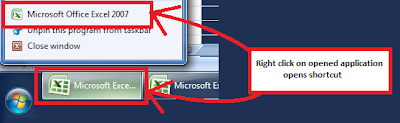
For this reason, my favorite Windows 7 feature is the ability to right click on an open application and then click a shortcut to open another instance of that application.

2009 SQL Server Magazine Best SharePoint Product
I thought it might be interesting to note the SQL Server Magazine, 2009 Best SharePoint Product awards. Here they are:
2009 SQL Server Magazine Best SharePoint Product
Editor's Best
Gold: ControlPoint for SharePoint, Axceler, www.axceler.com
Silver: Professional Archive Manager, Metalogix, www.metalogix.net
Bronze: NearPoint for SharePoint, Mimosa Systems, www.mimosasystems.com
Community Choice
Gold: Site Administrator for SharePoint, Quest Software, http://www.quest.com/
Silver: Colligo Contributor Pro, Colligo Networks, http://www.colligo.com/
Bronze: CorasWorks Workplace Sutie 10, CorasWorks, http://www.corasworks.com/
References:
2009 SQL Server Magazine (2008, December). 2009 SQL Server Magazine Editor's Best and Community Choice Awards. SQL Server Magazine, pp. 12-19.
2009 SQL Server Magazine Best SharePoint Product
Editor's Best
Gold: ControlPoint for SharePoint, Axceler, www.axceler.com
Silver: Professional Archive Manager, Metalogix, www.metalogix.net
Bronze: NearPoint for SharePoint, Mimosa Systems, www.mimosasystems.com
Community Choice
Gold: Site Administrator for SharePoint, Quest Software, http://www.quest.com/
Silver: Colligo Contributor Pro, Colligo Networks, http://www.colligo.com/
Bronze: CorasWorks Workplace Sutie 10, CorasWorks, http://www.corasworks.com/
References:
2009 SQL Server Magazine (2008, December). 2009 SQL Server Magazine Editor's Best and Community Choice Awards. SQL Server Magazine, pp. 12-19.
Thursday, December 17, 2009
Error: SQL Server Maintenance Plan, Database Backup Job
Description:
When executing a SQL Server maintenance plan, having a database backup job, an error occurs. The issue is that the SQL Server Agent service account does not have access to the backup folder. This happens more frequently on backup folders which exist on a separate server, such as a backup server.
1. First, navigate to SQL Server Management Studio > Maintenance Plans > Right click on maintenance plan > View History.
You might see something like this in the history:
"Action: Execute maintenance plan (full backup of all SQL databases). ErrorMessage: Execution failed: See the maintenance plan and SQL Server Agent job history for details. Additional Information: Job 'Backup SQL' failed. (SqlManagerUI)"
2. Next, navigate to the history log for the SQL Server Agent job:
SQL Server Management Studio > SQL Server Agent > Jobs > Right click on job > View History > Highlight the error > Click Export > Export a log file > Open the log file in a text editor
...and you might see entries like this:
"Reason for failure: " failed with the following error: "Cannot open backup device 'backup device name'. "
"Error information: Operating system error 5(Access is denied.)."
Solution:
The solution to this is to configure the appropriate access for the SQL Server Agent service account on the folder security access control list and the folder sharing access control list.
However, the catch here is that you may need to add the service account directly to the access control list, as opposed to an AD group in which the user account belongs. In fact, I tested this by doing the steps below.
1. Deleted the maintenance plan and created it again.
2. Added the backup folder location, and clicked Next.
This brought up an error:
"Maintenance Plan Wizard: The Database Engine service could not resolve the specified folder location. Either the location does not exist, or the current login account does not have access to it. Verify that the folder exists, and that the login account has permissions on it."
3. Added the SQL Server Agent service account directly to the backup folder's access control lists for folder security and folder sharing. After doing this, the creation of the maintenance plan was successful.
When executing a SQL Server maintenance plan, having a database backup job, an error occurs. The issue is that the SQL Server Agent service account does not have access to the backup folder. This happens more frequently on backup folders which exist on a separate server, such as a backup server.
1. First, navigate to SQL Server Management Studio > Maintenance Plans > Right click on maintenance plan > View History.
You might see something like this in the history:
"Action: Execute maintenance plan (full backup of all SQL databases). ErrorMessage: Execution failed: See the maintenance plan and SQL Server Agent job history for details. Additional Information: Job 'Backup SQL' failed. (SqlManagerUI)"
2. Next, navigate to the history log for the SQL Server Agent job:
SQL Server Management Studio > SQL Server Agent > Jobs > Right click on job > View History > Highlight the error > Click Export > Export a log file > Open the log file in a text editor
...and you might see entries like this:
"Reason for failure: " failed with the following error: "Cannot open backup device 'backup device name'. "
"Error information: Operating system error 5(Access is denied.)."
Solution:
The solution to this is to configure the appropriate access for the SQL Server Agent service account on the folder security access control list and the folder sharing access control list.
However, the catch here is that you may need to add the service account directly to the access control list, as opposed to an AD group in which the user account belongs. In fact, I tested this by doing the steps below.
1. Deleted the maintenance plan and created it again.
2. Added the backup folder location, and clicked Next.
This brought up an error:
"Maintenance Plan Wizard: The Database Engine service could not resolve the specified folder location. Either the location does not exist, or the current login account does not have access to it. Verify that the folder exists, and that the login account has permissions on it."
3. Added the SQL Server Agent service account directly to the backup folder's access control lists for folder security and folder sharing. After doing this, the creation of the maintenance plan was successful.
Saturday, December 05, 2009
I Respectfully Disagree
As I was searching for some references for a risk management white paper that I am writing, I stumbled upon an old PowerPoint on the Web titled, "Risk Management and ROI: The IT Leadership Financial Conversation." It was created by Peter G. W. Keen of Delft University in Sepetember 2004. This PowerPoint was used to educate an IT Leadership community attending a CIO summit.
As I looked through the PowerPoint for some insight to use in my paper, I started finding statements such as:
"ROI from IT: There is none. There never will be." (Keen, 2004)
"ROMI not ROI: Return on Minimized Investment" (Keen, 2004)
"80% of IT costs are hidden below the surface - and a navigation threat" (Keen, 2004)
The more slides I viewed, the more I realized that I completely disagree with the intent of the message; essentially to encourage CIOs to view IT as a business liability which needs to be tightly controlled and driven primarily by its cost drivers.
I disagree because I think a better approach for CIOs to take is to understand the purpose of the technologies their teams are evaluating, understand the costs and benefits, and choose projects which support the objectives of the organization. Managing cost should be part of the decision making process, but it should not be the primary driver. When cost is measured, all aspects of cost should be included. And, the financial benefits of the project should also be measured and included.
The objective of Information Technology is to facilitate two very important capabilities for today's businesses:
1. Revenue generation
2. Business productivity (process efficiency)
Most leaders in the IT space generally understand the financial benefits of the IT projects they choose to pursue, but perhaps the IT industry as a whole generally does not place enough emphasis on methodologies and practices for measuring and translating these back to the financial statement. This would require more focus, analysis, calculation, and validation.
To be clear, I am not saying that all IT projects are sensible and they should be done blindly. However, what I am saying is that it is incorrect to characterize IT as a business function that shows no return on investment.
If you deploy a technology that allows people to attend meetings over the Web instead of traveling to another location, then your costs are those which are required to implement and maintain the technology while your savings are those which you do not spend to travel? Both sides of equation need to be considered, not just cost.
I also disagree with the claim that 80% of IT costs are hidden. I believe that if budgeting is done properly, most IT costs are completely visible and manageable. There are always some unforeseen costs with IT, but by learning from past experiences, it becomes possible to anticipate these variations.
In summary, I disagree with the PowerPoint. Information Technology can have a positive ROI, and costs can be manageable and predictable. I think the real problem is some organizations just don't know how to measure these things effectively.
References:
Keen, P. (2004). The IT Leadership Financial Conversation. Retrieved December 5, 2009 from www.peterkeen.com/presentations/IT%20Risk%20Management.ppt.
As I looked through the PowerPoint for some insight to use in my paper, I started finding statements such as:
"ROI from IT: There is none. There never will be." (Keen, 2004)
"ROMI not ROI: Return on Minimized Investment" (Keen, 2004)
"80% of IT costs are hidden below the surface - and a navigation threat" (Keen, 2004)
The more slides I viewed, the more I realized that I completely disagree with the intent of the message; essentially to encourage CIOs to view IT as a business liability which needs to be tightly controlled and driven primarily by its cost drivers.
I disagree because I think a better approach for CIOs to take is to understand the purpose of the technologies their teams are evaluating, understand the costs and benefits, and choose projects which support the objectives of the organization. Managing cost should be part of the decision making process, but it should not be the primary driver. When cost is measured, all aspects of cost should be included. And, the financial benefits of the project should also be measured and included.
The objective of Information Technology is to facilitate two very important capabilities for today's businesses:
1. Revenue generation
2. Business productivity (process efficiency)
Most leaders in the IT space generally understand the financial benefits of the IT projects they choose to pursue, but perhaps the IT industry as a whole generally does not place enough emphasis on methodologies and practices for measuring and translating these back to the financial statement. This would require more focus, analysis, calculation, and validation.
To be clear, I am not saying that all IT projects are sensible and they should be done blindly. However, what I am saying is that it is incorrect to characterize IT as a business function that shows no return on investment.
If you deploy a technology that allows people to attend meetings over the Web instead of traveling to another location, then your costs are those which are required to implement and maintain the technology while your savings are those which you do not spend to travel? Both sides of equation need to be considered, not just cost.
I also disagree with the claim that 80% of IT costs are hidden. I believe that if budgeting is done properly, most IT costs are completely visible and manageable. There are always some unforeseen costs with IT, but by learning from past experiences, it becomes possible to anticipate these variations.
In summary, I disagree with the PowerPoint. Information Technology can have a positive ROI, and costs can be manageable and predictable. I think the real problem is some organizations just don't know how to measure these things effectively.
References:
Keen, P. (2004). The IT Leadership Financial Conversation. Retrieved December 5, 2009 from www.peterkeen.com/presentations/IT%20Risk%20Management.ppt.
Subscribe to:
Posts (Atom)

