Tuesday, June 07, 2011
SPS New York: SharePoint 2010 Search Driven Design Patterns: Better Portal Designs with Fewer Compromises
Event:
SharePoint Saturday New York
Saturday, July 30th, 2011
Session Title:
SharePoint 2010 Search Driven Design Patterns: Better Portal Designs with Fewer Compromises
Abstract:
When designing a SharePoint 2010 Intranet, collaboration portal, or business process solution we are faced with many decisions and challenges. While our objectives for user experience, information architecture, security model, and administrative model are driven primarily by business requirements, technology limitations tend to force certain decisions on us. This session explores search driven portal design patterns and explains how we can leverage the SharePoint Server 2010 Search feature area in creative ways, leading to better portal designs with fewer compromises.
Slides:
20110730 0100PM SharePoint Saturday Search Driven Design Patterns - Bisciotti.pdf
Monday, June 06, 2011
SharePoint Designer 2010: How to Show Toolbox
In SharePoint Designer 2010, the Toolbox provides a way to work with SharePoint Controls, Data View Controls, Server Controls, and Page Fields. However, in order to use the Toolbox, you must first make it visible.
1. Click "Insert"
2. Click "SharePoint to expand the "Add SharePoint Controls" menu
3. Click "Show Toolbox"
Thursday, May 26, 2011
SharePoint 4.0: Content Type Hub Synchronization Steps (Publish/Subscribe)
2) The Managed Metadata Service Application is configured properly
3) The Managed Metadata Service Connection is configured properly and the setting for "This service application is the default storage location for Keywords" is checked off.
4) The Subscriber site collection has the following Site Collection Features enabled:

Solution
- Content Type Hub Publisher site collection > Site Actions > Site Settings > Galleries > Site Content Types
- Click on Content Type
- Click on "Manage publishing for this content type"
- Click OK
- Repeat this step for all content types that requiring publishing
- Central Administration > Monitoring > Timer Jobs > Review Timer Job Definitions
- Set the View to "All"
- Click on the Timer Job, "Content Type Hub" Timer Job
- Click "Run Now"
- Set the View to "Web Application"
- Select the Web Application that contains the subscriber site collection
- Click on the Timer Job, "Content Type Subscriber"
- Click "Run Now"
- Content Type Hub Subscriber site collection > Site Actions > Site Settings > Galleries > Site Content Types
- Verify that the subscriber has received the published content type from the Content Type Hub
Reference
Microsoft TechNet (May, 2010). Content type and workflow planning (SharePoint Server 2010). Retrieved May 26, 2011 from http://technet.microsoft.com/en-us/library/cc262735.aspx.
Share-n-dipity (October, 2009). Publish and Subscribe to Content Types in SharePoint 2010. Retrieved May 26, 2011 from http://blogs.technet.com/b/speschka/archive/2009/10/30/publish-and-subscribe-to-content-types-in-sharepoint-2010.aspx
Tuesday, May 17, 2011
Links: SharePoint 4.0: March 2011 Cumulative Hotfix
SharePoint Foundation 2010
KB2475880: Description of the SharePoint Foundation 2010 cumulative update package (SharePoint Foundation server-package): March 3, 2011
http://support.microsoft.com/kb/2475880
SharePoint Server 2010
KB2475878:
Description of the SharePoint Server 2010 Cumulative Update Server Hotfix Package (MOSS server-package): March 3, 2011
http://support.microsoft.com/kb/2475878
Downloads
SharePoint Foundation 2010
Download for Microsoft SharePoint Foundation 2010
http://support.microsoft.com/hotfix/KBHotfix.aspx?kbln=en-us&kbnum=2475880
SharePoint Server 2010
Download for Microsoft SharePoint Server 2010
http://support.microsoft.com/hotfix/KBHotfix.aspx?kbln=en-us&kbnum=2475878
Error: Microsoft SQL Server Shared Feature Directory (INSTALLSHAREDDIR, INSTALLSHAREDWOWDIR)
During an installation of Microsoft SQL Server 2008 R2 x64 Standard Edition on a Windows Server 2008 R2 Service Pack 1 x64 Standard Edition operating system, I encountered issues on the Feature Selection screen.
Issue #1 - While the installation is 64bit, the Shared Feature Directory is hard coded as x86 - this is wrong.
Issue #2 - Error: "The INSTALLSHAREDWOWDIR command line value is not valid. Please ensure the specified path is valid and different than the INSTALLSHAREDDIR path."
Solution
3. Delete the key.
Notes
"INSTALLSHAREDDIR" is the 64-bit shared component files directory with a path of "Program Files\Microsoft SQL Server" (Microsoft Support, 2011)
"INSTALLSHAREDWOWDIR" is the 32-bit shared component files with a path of "Program Files(x86)\Microsoft SQL Server" (Microsoft Support, 2011)
When specifying the the directories, there are known issues with putting a "\" at the end of the path. For this reason, omit the symbol.
Examples:
Good - Program Files\Microsoft SQL Server
Bad - Program Files\Microsoft SQL Server\
Reference
Microsoft Support (2011). You receive an error message if you change the "Shared component directory" path on the Feature Selection screen when you install SQL Server 2008 on a computer that is running an Itanium-based version of Windows. Retrieved May 17, 2011 from http://support.microsoft.com/kb/955458.
MSDN (2011). How to: Install SQL Server 2008 from the Command Prompt. Retrieved May 17, 2011 from http://msdn.microsoft.com/en-us/library/ms144259(SQL.100).aspx.
MSDN (2011). Feature Selection. Retrieved May 17, 2011 from http://msdn.microsoft.com/en-us/library/ms143786.aspx.
MSDN (2011). File Locations for Default and Named Instances of SQL Server. Retrieved May 17, 2011 from http://msdn.microsoft.com/en-us/library/ms143547(v=SQL.105).aspx.
Monday, March 21, 2011
SPS Boston: SharePoint 2010 Search Driven Design Patterns: Better Portal Designs with Fewer Compromises
SharePoint Saturday Boston
Saturday, April 9th, 2011
Session Title:
SharePoint 2010 Search Driven Design Patterns: Better Portal Designs with Fewer Compromises
Abstract:
When designing a SharePoint 2010 Intranet, collaboration portal, or business process solution we are faced with many decisions and challenges. While our objectives for user experience, information architecture, security model, and administrative model are driven primarily by business requirements, technology limitations tend to force certain decisions on us. This session explores search driven portal design patterns and explains how we can leverage the SharePoint Server 2010 Search feature area in creative ways, leading to better portal designs with fewer compromises.
Slides:
20110730 0100PM SharePoint Saturday Search Driven Design Patterns - Bisciotti.pdf
Tuesday, March 01, 2011
Naming Convention for SharePoint Databases
Here it is:
FarmAbbreviation_DatabaseCategory_Component_InstanceNumber_DatabaseType_InstanceNumber
Farm Abbreviation: A consistent abbreviation used to prefix all objects in a farm including IIS Application Pool, IIS Web Site, IIS Web Site directory, and databases.
Database Category: WebApp for Web Application and SvcApp for Service Application.
Component: Name of the Web Application or name of the Service Application.
Instance Number: Two digit, incremental number of component instance.
Database Type: For Web Applications, this is ContentDB. Some service applications use multiple databases so Database Type describes which one it is.
Instance Number: Two digit, incremental number of Database Type.
Examples:
The first content database for a Web Application named "Intranet", in a Farm abbreviated as "SPF01" would read as follows:
SPF01_WebApp_Intranet_01_ContentDB_01
An additional content database added to the "Intranet" Web Application would be incremented by 1, as follows:
SPF01_WebApp_Intranet_01_ContentDB_02
The Reporting database of a Web Analytics Service Application would read like this:
SPF01_SvcApp_WebAnalytics_01_ReportingDB_01
SharePoint 4.0: PowerShell Get-SPDatabase | Select Name


Thursday, February 03, 2011
Links: Windows Server Catalog
Tuesday, February 01, 2011
SharePoint Saturday Hartford Speaker Social on Friday January 28
Sunday, January 23, 2011
SPS Hartford: SharePoint 2010 Search Driven Design Patterns: Better Portal Designs with Fewer Compromises
SharePoint Saturday Hartford
Saturday, January 29, 2011
Session Title:
SharePoint 2010 Search Driven Design Patterns: Better Portal Designs with Fewer Compromises
Abstract:
When designing a SharePoint 2010 portal for collaboration or business process facilitation we are faced with many challenges. While our intentions for user experience, Information Architecture, and security model are driven primarily by business requirements, technology limitations tend to force us into certain decisions. This session explains how search driven design patterns can result in better portal designs with fewer compromises.
Slides:
20110730 0100PM SharePoint Saturday Search Driven Design Patterns - Bisciotti
Thursday, January 20, 2011
Error: SharePoint Server 2010 Installation, SharePoint Configuration Failed
After configuring the operating systems and SQL Server instance in a multi-tiered server farm, I installed the SharePoint Server 2010 prerequisites and server binaries on the first Web front end. Next, I opened PowerShell and began creating a new farm from the command line. After only the first step, I received the error shown below.
Windows PowerShell
Copyright (C) 2009 Microsoft Corporation. All rights reserved.
PS C:\Windows\system32> New-SPConfigurationDatabase -DatabaseName "FarmName_Configuration_Database_01" -DatabaseServer "FarmDBSQLAlias" -A
dministrationContentDatabaseName "FarmName_Content_Database_01" -Passphrase (ConvertTo-SecureString "FarmPassPhrase" -AsPlaintext -Force) -FarmCredentials (Get-Credential)
...
New-SPConfigurationDatabase : CREATE FILE encountered operating system error 3(The system cannot find the path specifie
d.) while attempting to open or create the physical file 'I:\Program Files\Microsoft SQL Server\MSSQL10_50.MSSQLSERVER\
MSSQL\Data\FarmName_Configuration_Database_01_log.LDF'.
CREATE DATABASE failed. Some file names listed could not be created. Check related errors.
At line:1 char:28
...
So, I navigated to the log directory: C:\Program Files\Common Files\Microsoft Shared\Web Server Extensions\14\LOGS and opened up the current PSCDiagnostics log file.
CTRL + F "error" brought me to this error:
...
01/20/2011 17:46:26 10 ERR Exception: System.Data.SqlClient.SqlException: CREATE FILE encountered operating system error 3(The system cannot find the path specified.) while attempting to open or create the physical file 'I:\Program Files\Microsoft SQL Server\MSSQL10_50.MSSQLSERVER\MSSQL\Data\FarmName_Configuration_Database_01_log.LDF'.
CREATE DATABASE failed. Some file names listed could not be created. Check related errors.
...
Solution:
After viewing the log file message, I immediately knew what the cause of the error was. The SQL Server default path for LDF was not accessible because it hadn't been created yet. During the SQL Server 2008 R2 installation, I specified a particular default drive letter for MDF and LDF. After the installation, I changed the default path location for LDF's to a different drive letter, however, the new folder path (I:\Program Files\Microsoft SQL Server\MSSQL10_50.MSSQLSERVER\MSSQL\Data) didn't exist yet!
The fix was simply to go to the I: drive letter and create the necessary folder paths that I had set as the default LDF location for the SQL instance.
Note: When you install SQL Server 2008 R2 and you encounter the screen that asks for the default locations, be sure to set the MDF first and then the LDF second. The reason is that if you do the MDF path second, the installation wizard will reset your LDF location back to the MDF setting. It's just one of those things!
Links: Microsoft SQL Server 2008 R2 Feature Pack
http://www.microsoft.com/downloads/en/details.aspx?FamilyID=CEB4346F-657F-4D28-83F5-AAE0C5C83D52
- Microsoft® SQL Server Report Builder 3.0 for Microsoft® SQL Server 2008 R2
- Microsoft® SQL Server® PowerPivot for Microsoft® Excel
- Microsoft® SQL Server® 2008 R2 Reporting Services Add-in for Microsoft® SharePoint® Technologies 2010
- Microsoft® SQL Server® 2008 Reporting Services Add-in for Microsoft® SharePoint® Technologies 2007
- Microsoft® SQL Server® 2008 R2 Policies
- Microsoft® Sync Framework 2.0 Software Development Kit (SDK)
- Microsoft® SQL Server® Compact 3.5 SP2 For Windows Mobile
- Microsoft® SQL Server ®Compact 3.5 SP2 Server Tools
- Microsoft® SQL Server® Compact 3.5 SP2 Books On-line
- Microsoft® SQL Server® JDBC Driver 3.0
- Microsoft® Connector 1.1 for SAP BW for SQL Server® 2008 R2
- Microsoft® System CLR Types for SQL Server® 2008 R2
- Microsoft® SQL Server® 2008 R2 Remote Blob Store
- Microsoft® SQL Server® 2008 R2 Books On-line
- Microsoft® SQL Server® 2008 R2 Upgrade Advisor
- Microsoft® SQL Server® 2008 R2 Native Client
- Microsoft® Core XML Services (MSXML) 6.0 SP 1
- Microsoft® OLEDB Provider for DB2
- Microsoft® SQL Server® 2008 R2 Command Line Utilities
- Microsoft® SQL Server® Service Broker External Activator for SQL Server® 2008 R2
- Microsoft® Windows PowerShell Extensions for SQL Server® 2008 R2
- Microsoft® SQL Server® 2008 R2 Shared Management Objects
- Microsoft® SQL Server® 2008 R2 ADOMD.NET
- Microsoft® Analysis Services OLE DB Provider for Microsoft® SQL Server® 2008 R2
- Microsoft® SQL Server® 2008 R2 Analysis Management Objects
- Microsoft® SQL Server® 2008 Data Mining Add-ins for Microsoft® Office 2007
- Microsoft® Datamining Viewer Controls For Microsoft® SQL Server® 2008
- Microsoft® SQL Server® Migration Assistant
- Microsoft® SQL Server® 2008 R2 Best Practices Analyzer
Microsoft (2011). Microsoft SQL Server 2008 R2 Feature Pack. Retrieved January 20, 2011 from http://www.microsoft.com/downloads/en/details.aspx?FamilyID=CEB4346F-657F-4D28-83F5-AAE0C5C83D52.
Wednesday, January 19, 2011
Error: SharePoint Server 2010 Setup Errors, Prerequisites Needed
After running SharePoint Server 2010 setup.exe, Setup Errors occur.

Setup is unable to proceed due to the following error(s):
This product requires the Windows Identity Foundation.
This product requires Microsoft Sync Framework Runtime v1.0 (x64).
This product requires Microsoft SQL Server 2008 Native Client. Install SQL Server 2008 Native Client and re-run setup.
Windows Server Features or Role Services required by this product are not enabled. For a complete list, refer to the link below.
This product requires Microsoft Filter Pack 2.0.
This product requires Internet Information Services (IIS) 7.0 or higher, with ASP.NET v2.0 set to 'Allow' in the list of IIS Web Server Extensions.
This product requires the IIS 6 Management Compatibility component to install.
This product requires Hotfix for Microsoft Windows (KB976462) or above.
For the list of pre-requisites needed to install the product please refer to:
http://go.microsoft.com/fwlink/?LinkId=106209
Solution:
1. Windows Identity Foundation
http://www.microsoft.com/downloads/details.aspx?FamilyID=eb9c345f-e830-40b8-a5fe-ae7a864c4d76&displaylang=en
2. Microsoft Sync Framework Runtime v1.0 (x64)
http://www.microsoft.com/downloads/en/details.aspx?FamilyId=C88BA2D1-CEF3-4149-B301-9B056E7FB1E6&displaylang=en
3. Microsoft SQL Server 2008 Native Client
Installing SQL Server Native Client
http://msdn.microsoft.com/en-us/library/ms131321.aspx
4. Windows Server Features or Role Services
Start > All Programs > Administrative Tools > Server Manager
Add Roles and Features:
i. Application Server
ii. File Services
iii. Web Server (IIS)
5. Microsoft Office 2010 Filter Packs
http://www.microsoft.com/downloads/en/details.aspx?FamilyID=5CD4DCD7-D3E6-4970-875E-ABA93459FBEE&displaylang=en
6. Internet Information Services (IIS) 7.0 or higher, with ASP.NET v2.0 set to 'Allow' in the list of IIS Web Server Extensions.
i. Start > All Programs > Administrative Tools > IIS Manager
ii. ISAPI and CGI Restrictions
iii. Confirm that ASP.NET V2.0 is set to "Allow"
7. Hotfix for Microsoft Windows (KB976462) or above.
A hotfix for the.NET Framework 3.5 Service Pack 1 is available for Windows 7 and for Windows Server 2008 R2 as a prerequisite for Microsoft Office SharePoint Server 2010
http://support.microsoft.com/kb/976462
Reference
Microsoft TechNet (July, 2010). Hardware and software requirements (SharePoint Server 2010). Retrieved January 20, 2011 from http://technet.microsoft.com/en-us/library/cc262485.aspx.
Windows Server: How to Configure SQL Server Client Alias Using CLICONFG
Considerations for SQL Server Client Alias configurations should be made prior to installing SharePoint Server. When deciding whether or not to implement SQL Server Client Aliases, you might think about these items:
- Just because you can doesn’t mean you should - what need is driving this configuration?
- Apply the “so what” test - what are the risks of doing versus not doing?
- Thirdly, it probably makes sense to have server naming conventions in place before you go and abstract things by adding one more layer of names - will aliases confuse anybody?
2. On the General tab, enable “TCP/IP” protocol.


5. Review the Network Library information on the Network Libraries tab. Click Apply and OK.

6. At this point the Alias has been created and the SharePoint installation may proceed.
Sunday, January 09, 2011
SharePoint 4.0: Search Core Results Web Part Internal Error
Search results page error caused by Core Results Web Part after modifying the Fetched Properties.
Error:
"Internal server error exception:
Troubleshoot issues with Microsoft SharePoint Foundation
Correlation ID: aba98106-d203-48bf-bdc9-bf2f8dd15bcd"
Solution:In addition to the Column Name tags, the Fetched Properties must be properly opened and closed with Columns and /Columns tags, respectively. One possible cause for this error is that thet Fetched Properties XML is missing the opening and closing tags.
Monday, January 03, 2011
Windows Server: ADO.NET Data Services Update for .NET Framework 3.5 SP1
This update is required in order to install SharePoint Server 2010 on Windows Server 2008 R2.
"The ADO.NET Data Services framework consists of patterns and libraries that enable the creation and consumption of REST-based data services for the web. This update to the Microsoft .NET Framework 3.5 SP1 provides additional features which extend the functionality provided in version 1.0 of the ADO.NET Data Services framework."
(Microsoft, 2010)
Reference
Microsoft (2010). ADO.NET Data Services Update for .NET Framework 3.5 SP1 for Windows 7 and Windows Server 2008 R2. Retrieved January 3, 2011 from http://www.microsoft.com/downloads/details.aspx?FamilyID=79D7F6F8-D6E9-4B8C-8640-17F89452148E&displaylang=fi&displaylang=en.
Microsoft (2010). A hotfix for the.NET Framework 3.5 Service Pack 1 is available for Windows 7 and for Windows Server 2008 R2 as a prerequisite for Microsoft Office SharePoint Server 2010. Retrieved January 3, 2011 from http://support.microsoft.com/kb/976462.
Tuesday, December 28, 2010
Windows Server: Enable Execution of PowerShell Scripts
1. Click Start, All Programs, and click "Administrative Tools"
2. Right-Click Windows Powershell Modules, Select "Run as Administrator"
3. At the command prompt (PS C:\Windows\system32>), type the following:
Set-ExecutionPolicy RemoteSigned
4. The Execution Policy Change prompt will display. Respond with "Y":
Execution Policy Change
The execution policy helps protect you from scripts that you do not trust. Changing the execution policy might exposeyou to the security risks described in the about_Execution_Policies help topic.
Do you want to change the executionpolicy?
[Y] Yes [N] No [S] Suspend [?] Help (default is "Y"): Y

Monday, December 27, 2010
Windows Server 2008: MSInfo32 and Winver
Start > Run > Type "MSInfo32" and press Enter

About Windows - To locate OS version, edition, service pack level, and memory.
Start > Run > Type "Winver" and press Enter

Monday, December 13, 2010
Microsoft Word 2010: Hanging Indent

1. Highlight the text to be formatted.
2. On the Ribbon, next to the word "Paragraph" click the chevron to open the paragraph formatting window.
3. Beneath the Indentation heading, set the "Special" field to "Hanging" and set the "By" field to "0.5."
4. Click OK
5. At that point, the list should be reformatted with a hanging indent.
SharePoint 4.0: Locating or Verifying Farm Version Number
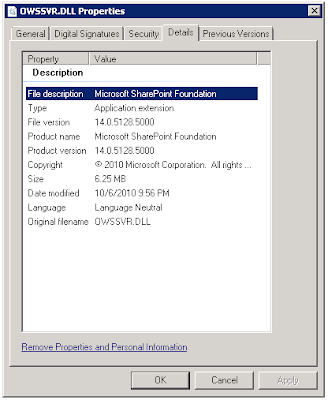
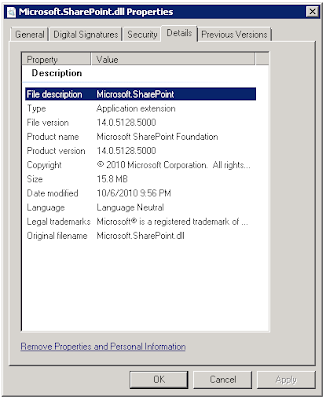
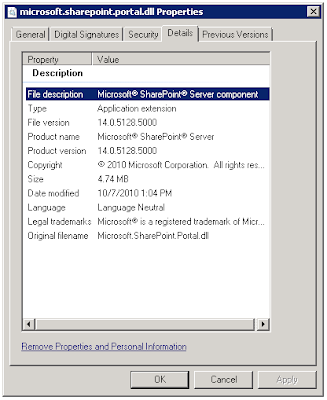
A. Verify the version of DLLs.
Steps:
On each server where SharePoint 2010 is installed:
1. Open Windows Explorer.
2. Navigate to \Program Files\Common Files\Microsoft Shared\Web Server Extensions\14\ISAPI
3. For each of the following DLLs, locate the file. Right-click the file > Properties > Details.
4. Note the version
OWSSVR.DLL (SharePoint Foundation)

Microsoft.SharePoint.dll (SharePoint Foundation)


SharePoint 4.0: Records Center Behaviors? or Bugs!
I have been busy developing a proof-of-concept (POC) environment based on some design patterns involving SharePoint 2010 Records Center and Search. In this POC, Records Center is acting as a top level site collection and is storing quite a bit of content. There are numerous content types and site columns, carefully planned and configured on the site collection, to support tagging Records Center documents with lots of metadata.
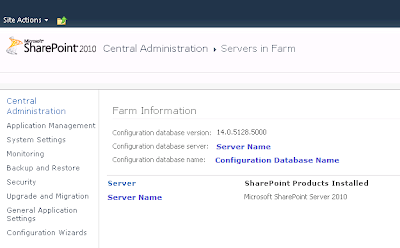
In this POC environment, I have dedicated a Web application to Records Center and for discussion purposes, the URL of the site collection can be http://recordscenter.domain.com. As I write this blog post, it is December 13, 2010. My SharePoint 2010 environment is running at version 14.0.5128.5000, which reflects RTM with the October 2010 Cumulative Updates. The SharePoint Foundation and SharePoint Server DLLs, and SharePoint Database are all current with the same version. I have tested with Site Collection Publishing and Site Publishing features enabled and disabled.
During the testing process, I have discovered some unexpected behaviors related to Records Center. Microsoft Support may stamp these with the trusty "By Design" label, but since I am currently in the process of pushing these issues through the Microsoft Support channels, I cannot speak to their response at this time. I do know that these behaviors are inconvenient and troublesome. Below is a list.
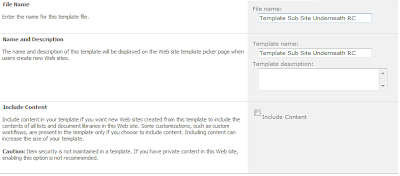
A. Cannot template a sub-site beneath a Records Center site collection.
To recreate the issue, follow these steps:
1. Start from a Records Center site collection.
2. Create a sub-site using the blank site template.
3. Attempt to save the site as a template.

Problem: Error: An unexpected error has occurred.
B. Cannot export a document library and then import it as a different name, in a Records Center site collection.
To recreate the issue, follow these steps:
1. Start from a Records Center site collection.
2. Create a sub-site using the blank site template.
3. Create a document library in the blank sub-site.
4. Using STSADM, export the document library to a .cmp file.
E.g.
C:\Program Files\Common Files\Microsoft Shared\Web Server Extensions\14\BIN>
stsadm.exe -o export -url http://webapplication/subsite/library -filename \\server\fileshare\templatelibrary.cmp -includeusersecurity -nologfile
5. Using STSADM, import the document library .cmp file, as a different name.
E.g.
C:\Program Files\Common Files\Microsoft Shared\Web Server Extensions\14\BIN>
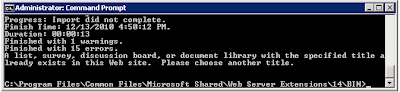
stsadm.exe -o export -url http://webapplication/subsite/library -filename file://server/fileshare/templatelibrary.cmp -includeusersecurity -nologfile...
Finished with 15 errors.A list, survey, discussion board, or document library with the specified title already exists in this Web site. Please choose another title.

Problem: Error: The .cmp file cannot be imported because an existing document library having the same title (different than name, which affects the document library URL) already exists.
This behavior might make sense in a Records Center given the Content Organizer and its functionality which routes documents, based on content type, to appropriate document libraries using the Title of the document library. Still, templating document libraries in a Records Center is especially important, since Records Center typically have well defined site columns. It is only natural that we will want to template document libraries efficiently in a Records Center.
References
Microsoft SharePoint Team Blog (2010, December). October 2010 Cumulative Updates for SharePoint & Project Server 2010 Republished. Retrieved December 13, 2010 from http://sharepoint.microsoft.com/blog/Pages/BlogPost.aspx?pID=957.
Microsoft Support (2010, October). Description of the SharePoint Server 2010 Cumulative Update Server Hotfix Package (MOSS server-package): October 26, 2010. Retrieved December 13, 2010 from http://support.microsoft.com/default.aspx?scid=kb;EN-US;2394320.
Microsoft Support (2010, December). Hotfix Request. Retrieved December 13, 2010 from http://support.microsoft.com/hotfix/KBHotfix.aspx?kbln=en-us&kbnum=2394320.
Tuesday, December 07, 2010
SharePoint 4.0: Where to Locate Details for Errors with Correlation ID
The error doesn't provide much information about the root cause. So, to uncover the details, it makes sense to investigate further by examining the log files. Here is how to do that:1. Note the date and time of the error message.
2. Open a local console or RDP session to a SharePoint server in the farm.
3. From Windows Explorer, navigate to Program Files > Common Files > Microsoft Shared > Web Server Extensions > 14 > Logs.
4. Sort the log files by Date Modified, Descending. Then, open the file containing the event using a text editor, such as Notepad.
5. CTRL +F to locate instances of the word "Error." Then match the date/time stamp.
Thursday, December 02, 2010
SQL Server 2008: Edit Top 200 Rows
To change this setting, follow these steps from SQL Server Management Studio (SSMS):- Tools > Options (This opens the General Scripting Options Dialog Box)
- SQL Server Object Explorer > Commands
- Table and View Options: Value for Edit Top Rows command (Change this value)

After modifying the setting, you will see that the menu is updated accordingly.
Monday, October 25, 2010
Focus More on Birdhouse Less on Hammer
The birdhouse analogy refers to the focus of conversations and presentations at SharePoint related conference sessions, meetings, and discussions. My underlying criticism is that it seems that the community has become more focused on what the SharePoint platform can do and not focused enough on the business solutions that we are building with the platform. I think the community stands to gain a lot if more emphasis was placed on what we are building with the platform, why, and how we measure value to the businesses receiving these solutions.
I understand that we do need to know the SharePoint product well in order to develop useful business solutions with it. However, I think it is easy for us become consumed by the SharePoint platform; and its capabilities and limitations and lose sight of the fact that SharePoint is merely a vehicle that helps us get to a destination. The business solutions are the true end game, not the platform and tools we use to build the solutions. Some of the design patterns and methodologies we find to be effective may even be transferrable to other technologies.
As workers, we in the SharePoint community are responsible for ensuring that the solutions we develop will provide the outcomes that the sponsors and stakeholders expect. I think that if we spend too much time trying to figure out the best ways to get "there," and too little time on establishing complete and clear visions of where "there" is, then we are missing the target. As a community, I think we may miss valuable opportunities to share lessons learned and best practices for solving common business problems using the SharePoint platform.
When we only focus only on the hammer, we miss the point. Let's have more conversations and presentations about the birdhouse, how we designed it, why we designed it a certain way, and what we learned from the whole experience.
Use SharePoint Worfklow Like Robots on a Conveyor Belt
Take for instance, the beginning portion of a new hire process that a company might have. This might involve a series of human interactions between candidate and recruiter. An application is submitted and the recruiter would evaluate the application, comparing it to an open requisition. The recruiter would interpret the information on the application and ask for clarification. If a match is made, then an interview might occur, and so on.
When the people involved are attempting to execute a process such as this, it is only natural that the changing conditions of the work environment will prompt questions about what tasks need to be completed, who should complete the tasks, what information should be gathered, how should that information be evaluated, what laws exist, etc.
Although, it is possible to automate certain tasks in this process, SharePoint workflow is not designed for automating the entire business process. Where SharePoint workflow really comes in is making discrete tasks more efficient. For example, the workflow technology may be used to transfer an applicant's information into a database where it can be easily compared with open requisition criteria.
The technology is not going to do a human's work, though, and it is not practical to even try to make it. No, instead, a more appropriate approach to leveraging SharePoint workflow is for efficiency gains which target small steps or tasks; ones that are completely black and white, like modifying and loading records into a custom list or database, moving documents, or sending out an e-mail when a specific event occurs.
Portal site designs which help guide the human through a series of steps is essential to a workflow solution. The portal provides the framework to guide the user, while the workflow elements provide automation for specific tasks that occur during the process.
Whatever the application, the goal is usually to provide tools that allow the human to logically string each step together, flowing as if the site is a virtual conveyor belt and the workflow elements (conditions/actions) are specific robots that do stuff at each stage. The overall solution should help guide and progress the overall process in a consistent direction so that humans can participate, contribute, and derive the needed results.
Still, in an ever changing environment, it is only natural that the conveyor belt will need to be stopped and participants will ask each other whether the process is effective and efficient enough, and what might need to happen differently. The simple fact is, every business process is a work in progress.
Friday, October 15, 2010
NESQL 2010 October 14 Virtualizing SQL Server
During the last few years, I have become a fan of virtualization for SharePoint environments, including the SQL Server database server role. I know many in the SharePoint community are skeptical about this, so, it was interesting to observe the opinions and responses from the local SQL Server community. I think the majority of the room was still skeptical (as expected) about virtualizing SQL Server. However, Brent did a good job of providing guidance on how to get the best performance out of a SQL environment when it is virtualized.
Beyond enlightening me about some of the finer details of how virtualization impacts I/O, Brent's presentation provided greater validation for my opinion of virtualizing SQL Server. At this point, I believe the technology is definitely mature enough to handle all roles (including database role) of most production SharePoint environments. That is; if adequate hardware is allocated and if virtualization is implemented well.
Some of the take-aways I scribbled down include the following (no warranties with these notes because I can barely read what I wrote):
CPU
- CPU-Z is a great, free utility for monitoring true CPU performance on guest systems
- In a virtual environment, more cores assigned to a SQL Server VM may actually leads to worse performance due to overhead related to instruction assignment behavior in shared environments relative to processor caching.
RAM
- In VMWare, set memory reservations, don't over commit RAM, use large pages (Microsoft, 2010).
- In SQL Server, remember to set min/max memory appropriately.
Storage
- Group DBs logically based on purpose, maintenance schedule, security, etc.
- Still separate Temp DB in virtual environments.
I believe Brent will be presenting the complete version of his presentation at the PASS Summit in November. Either way, if you are reading up on this topic, then check out his blog post on Virtualization Best Practices.
Reference
CPUID (2010). CPU-Z supports the new Intel Sandy Bridge processors. Retrieved October 15, 2010 from
http://www.cpuid.com/news/26-cpu_z_supports_the_new_intel_sandy_bridge_processors.html
Microsoft (2010). SQL Server and Large Pages Explained. Retrieved October 15, 2010 from http://blogs.msdn.com/b/psssql/archive/2009/06/05/sql-server-and-large-pages-explained.aspx.
Ozar (2010). Virtualization Best Practices. Retrieved October 15, 2010 from http://www.brentozar.com/sql/virtualization-best-practices/.
Reference: Tab Navigation
Easy Tabs 5
Tab Navigation using CSS only
Reference
Humbert, C. (August, 2010). Easy Tabs Version 5.0. Retrieved October 15, 2010 from http://www.pathtosharepoint.com/sharepoint-user-toolkit/Pages/Easy-Tabs-v5.aspx.
Solomon, H. (August, 2005). Tab Navigation using CSS only - Great for SharePoint. Retrieved October 15, 2010 from http://heathersolomon.com/blog/archive/2005/08/10/1434.aspx.
SharePoint Saturday Boston #3 Webinar Series
Click Here to Register
Agenda
11:45 AM EST – 11:55 AM EST Welcome and Sign-In
11:55 AM EST – 12:00 PM EST Speaker Introduction
12:00 PM EST – 1:00 PM EST Presentation
For more information or to register for other Webinars, visit the SharePoint Saturday Web site, SharePoint Saturday Boston #3 Webinar Series: http://www.sharepointsaturday.org/boston/Pages/SPSBos3WebinarSeries.aspx
Thursday, October 14, 2010
Reference: Location Codes
Official USPS Abbreviations
List of U.S. States by Time Zone
Reference
United States Postal Service (2010). Official USPS Abbreviations. Retrieved October 14, 2010 from http://www.usps.com/ncsc/lookups/usps_abbreviations.html.
Wikipedia (2010). List of U.S. States by Time Zone. Retrieved October 14, 2010 from http://en.wikipedia.org/wiki/List_of_U.S._states_by_time_zone.
Tuesday, October 05, 2010
SharePoint 4.0: How Search Indexing Works
The crawl process goes something like this:
1. Full crawl started
2. Start address moved to queue
3. Protocol determined
4.Connector selected
5. iFilter opens files
6. Content index created on crawl server
7. Index moved in batches to query server
8. Data written to Crawl and Property databases
(Microsoft, 2010)
One myth about SharePoint 2010 crawl process is that when content is crawled it never touches the file system of the Crawl Server and goes directly to Query Server...this isn't true. The way it works in environments that have crawler and query roles on separate servers is; a content index is built on the crawl server initially, but is moved in batches to the query server(s). The point when all batches have propogated to the query server, then it may appear as if there is no foot print on the Crawl server's file system...this is because all the batches have been moved up.
From a server topology perspective, Search requires three different server roles. These include Crawl Server, Query Server, and Database Server. Each of these roles plays a role in the crawl process. For scalability and availability, the architecture supports configurations that include one or many of each of the server roles. Determining the best topology is a balancing act of capacity requirements with available resources.
Reference
Microsoft (2010). Microsoft SharePoint 2010 Product Information Capabilities Search. Retrieved September 22, 2010 from
http://sharepoint.microsoft.com/en-us/product/capabilities/search/Pages/default.aspx.
Friday, October 01, 2010
Enterprise Search Summit Fall 2010

Thursday, September 30, 2010
SPS Boston: Implementing SharePoint for Enterprise Search: Methodology and Mechanics
On Saturday, September 25, 2010 I presented a session at SharePoint Saturday Boston.Title:
Implementing SharePoint for Enterprise Search: Methodology and Mechanics
Abstract:This session explains how following a proven approach and using certain configuration techniques can ensure the success of a SharePoint Search implementation. The prevalence of search technologies available on the World Wide Web has caused stakeholder expectations to remain high. Yet, an Enterprise Search solution is an excellent opportunity to introduce exciting capabilities and productivity gains for a business. Included in the presentation is a walk-through of project phases, a review of key design considerations, and examples of recommended configurations.
Click HERE to access slides.
In the near future, I do intend to create individual blog posts from some of the presentation slides so that I can expand on some of the topics in greater detail. If you would like to request that I write a blog post explaining a particular Search topic, please submit a request using the comments feature of this post.
Wednesday, September 08, 2010
Microsoft Project 2010: Outline Number and Fill Down
First, by inserting a column called "Outline Number," Project automatically populates the Work Breakdown Structure (WBS) task ID (WBS column does the same thing). This is much better than doing it manually.

Secondly, Microsoft Project doesn't let you paste a value into a range of cells like Excel. So, instead of manually typing in durations or pasting one at a time, there is a "Fill Down" menu option. Select the cell that contains the value you want, select the range, right-click, and select "Fill Down."
Thursday, August 05, 2010
Why Move to SharePoint 2010?
Beyond these reasons, business needs continue to evolve and mature. The product features of the latest version enable the delivery of better solutions, with less effort, with less customization. Aggregating information from different systems is easier now (Search, BCS). It is easier to provide end user conveniences, such as Outlook calendar integration or multi-select actions in document libraries. Branding is easier with the themes engine. There are more Search tools (e.g. navigators) available, allowing search experiences to be more like what people expect from using Web. In fact, the 2010 Search technology is rich enough to use as a development tool. Taxonomy and Folksonomy features help make organizing and navigating through content easier, while Managed Metadata Services help ensure consistency.
Different scenarios require different thought processes and approaches to 2010. For example, existing SharePoint Web sites which are flat and primarily exist to push Web content to many consumers, may benefit from a straight software upgrade. On the other hand, redesign opportunities exist for other types of SharePoint applications which are more interactive; which support business processes or facilitate workflows.
At this point, it makes sense to design and develop anything new directly in 2010, to take advantage of the technology and community benefits. Doing so also reduces duplication in efforts since there will not be a future need to upgrade the new solutions to 2010; they will already be there. That, by itself, is a legitimate reason to go 2010.
Reference
Microsoft (2010). SharePoint 2010 Product Information Overview. Retrieved August 5, 2010 from http://sharepoint.microsoft.com/en-us/product/capabilities/Pages/default.aspx.
Wednesday, August 04, 2010
Missing the Point on Spirit of Governance
The scope of an effective Information Management Governance Model spans beyond a specific solution, such as SharePoint Intranet or collaboration portal, and encompasses the Information Management practices occurring throughout the organization. A SharePoint governance model should be a subset to that. Putting this in the context of documentation, an overarching Information Management Statement of Governance document should exist and define the framework at the global level, while specific statement of governance documents should be maintained for each Information Management system within the organization; SharePoint being one of those.
The IT project management framework is another significant and relevant topic to governance. The project management framework established the processes followed to initiate, plan, and execute IT projects. These processes should include such activities as the evaluation of new SharePoint projects in the context of the organization's overall information architecture. Aligning the project management decision making with Information Management, business, and IT decision making results in solutions that have backing, are sustainable, and actually provide business value.
The spirit of governance is really about defining what the processes should be, and if generous enough, explaining why to some extent. In the end, governance models maintain decision making integrity amongst people...that is not something a portal administrator can do by running a report or recovering a deleted site.
Reference
Ross, J., Weill, P. (2004). Recipe for Good Governance. Retrieved August 4, 2010 from http://www.cio.com/article/29162/Recipe_for_Good_Governance.
Events / Conferences / User Groups
- AIIM Conference
- Boston Area SharePoint User Group
- Boston Azure User Group
- Collaborate
- DevConnections
- DevIntersection
- Enterprise Search Summit
- Microsoft Build
- Microsoft SharePoint Conference
- Microsoft TechEd
- New England ASP.NET Professionals User Group
- New England Oracle Applications User Group
- Oracle Applications User Group (OAUG)
- Oracle OpenWorld
- PeopleSoft Government Contractor Special Interest Group
- PeopleSoft Southern New England Users Group
- Quest International Users Group
- SharePoint Saturday
- SPTechCon
- SQL PASS
- SQL Saturday
- Startup Weekend